Electronics / Speakers & Soundbars
User Manual for SAL PAR 182BT Portable Party Sound Box
Comprehensive user guide for the SAL PAR 182BT Portable Party Sound Box. Includes setup, battery charging, Bluetooth pairing, TWS mode, radio operation, and troubleshooting.
Quick answers from the manual
Quick answer
- The SAL PAR 182BT is a portable party sound box with Bluetooth, TWS stereo pairing, FM radio, and karaoke functions. It operates on a built-in rechargeable battery. p. 16
Key actions
- Charge the battery using the DC 5V microUSB port. p. 16
- Pair via Bluetooth by selecting BT mode with the MODE button. p. 17
- Enable TWS mode by pressing the TWS button on one of the sound boxes. p. 17
First start
- Charge the battery fully before first use. p. 16
Show 4 more answers Show less
Problems and fixes
No sound
Check volume settings and cable connections.
p. 19Maintenance and reset
- Periodically check the charging cable and housing integrity. p. 19
Technical specifications
| Parameter | Value | Meaning | Pages |
|---|---|---|---|
| Power | 50W | Total output power | p. 16, 43 |
| Battery | Li-ion 3.7V / 2000mAh | Built-in rechargeable battery | p. 43 |
Where to find it in the PDF
- Safety Instructions p. 2, 3
- Functions and Operation p. 16, 17, 18
- Troubleshooting p. 19
Table of contents
Quick guide from the manual
The SAL PAR 182BT is a portable party sound box designed for home entertainment. It features a built-in battery, Bluetooth connectivity, FM radio, and karaoke support. Before first use, ensure the battery is fully charged. Use the -OFF ON+ knob to power the unit on and off. The unit supports USB and microSD media playback (FAT32 format recommended).
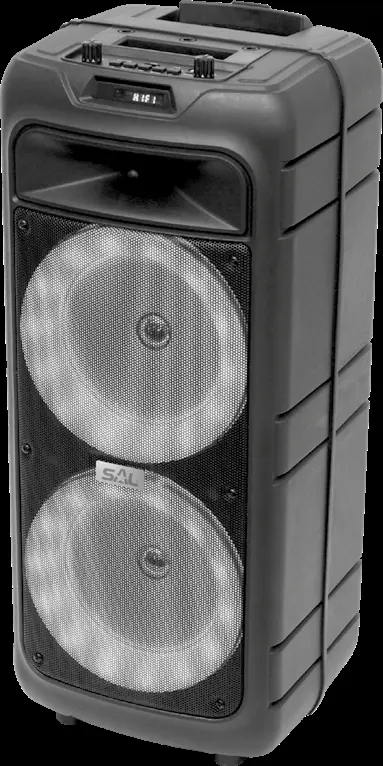
Charging the battery
The battery must be charged before first use. Connect the supplied charging cable to the DC 5V microUSB socket on the sound box and the other end to a USB power supply (mains charger, car charger, or power bank). A charging LED illuminates during charging and turns off when complete. Charging takes approximately 4.5 hours, providing up to 13 hours of operation at medium volume.
Putting into use
Ensure the unit is disconnected from the mains when making connections. Switch off both the sound box and the device to be connected. Turn the unit on using the -OFF ON+ knob. The unit will automatically enter BT mode. If a USB or microSD device is inserted, playback will start automatically.
Volume control and function switching
Volume can be adjusted using the -OFF ON+ knob or the VOL+ / VOL- buttons on the remote controller. To switch between functions (FM RADIO, USB, microSD, BT, AUX), press the MODE button briefly on the unit or hold it for 2 seconds on the remote controller.
Wireless BT connection
To pair with a device: 1. Select BT mode using the MODE button. 2. Enable Bluetooth on your mobile device and search for the sound box. 3. Connect the devices. Once connected, the flashing BT indicator will remain lit.
Stereo wireless BT connection (TWS)
You can pair two identical sound boxes for stereo sound: 1. Turn off BT on your phone. 2. Turn on both sound boxes and ensure they are in BT mode. 3. Wait for the acoustic signal indicating they have connected to each other. 4. Enable BT on your phone and pair with the sound box.
Using the radio
Select FM radio mode with the MODE button. To start automatic tuning and storage, press and hold the PLAY/PAUSE button for 2 seconds. Use the stepping keys to navigate between stored stations.
Karaoke microphone function
Connect the supplied microphone to the MIC socket. Ensure the microphone switch is in the OFF position before connecting. Slowly increase the volume using the MIC VOL control. The microphone sound is echoed.
Cleaning and maintenance
Before cleaning, disconnect the charging cable. Use a soft, dry cloth. Do not use aggressive detergents. Periodically check the charging cable and housing for damage.
Troubleshooting
- Device does not work: Check the ON/OFF switch position or charge the battery.
- No sound: Check volume settings and ensure audio cables are connected correctly.
- MP3 playback issues: Ensure the format is compatible (MP3/WMA/WAV) and the memory device is formatted as FAT32.
- Microphone not audible: Check the MIC VOL setting and ensure the microphone is switched on.
Practical help
Common problems
Device does not turn on or display does not illuminate.
Check the position of the ON/OFF switch or connect the charger to charge the built-in battery.
Device appears to work but makes no sound.
Ensure the volume control is not set to minimum and that audio cables are connected correctly.
MP3 files are not playing.
Ensure the file format is compatible (MP3/WMA/WAV) and the memory device is formatted as FAT32.
Microphone sound is not audible.
Check that the MIC VOL control is not set to minimum and that the microphone is switched on.
Before use
- Charge the battery fully before first use.
- Ensure the unit is switched off when connecting cables.
- Check that the remote control has 2x AAA batteries installed with correct polarity.
- Ensure the memory device (USB/microSD) is formatted as FAT32.
- Keep the microphone cable away from power cords to avoid interference.
Show more Show less
Specs in practice
- Power Output
- 50W total power with 2x 185mm subwoofers.
- Battery Life
- Approximately 13 hours of operation at medium volume.
- Charging Time
- Approximately 4.5 hours for a full charge.
- Bluetooth Range
- Maximum 10 meters.
Images and diagrams
- The control panel includes the ON/OFF volume knob, mode selection, and playback controls.
- The remote control allows for volume adjustment, track stepping, EQ settings, and direct program selection.
- The back panel contains the antenna wire and charging socket.
Model compatibility
- Recommended memory size for USB/microSD is up to 64GB.
- Memory must be formatted as FAT32; NTFS is not supported.
- The unit is designed for home entertainment, not industrial use.

Manual page author
David Miller
Documentation analyst