Electronics / Speakers & Soundbars
User Manual for SAL 200BT Multimedia Speakers
Quick guide for SAL 200BT multimedia speakers. Includes setup, connection, Bluetooth pairing, radio tuning, playback modes, and troubleshooting.
Quick answers from the manual
Quick answer
- The SAL 200BT is a 3-way, bass-reflex multimedia speaker pair with Bluetooth, FM radio, USB/SD playback, and karaoke functionality. p. 20
Key actions
- Pairing Bluetooth p. 21
- Tuning Radio p. 21
First start
- Connect passive speaker to active speaker (RIGHT OUTPUT), plug into mains, turn on rear switch, then use front panel or remote to power on. p. 20
Show 4 more answers Show less
Problems and fixes
No sound
Check volume, input selection, and cable connections.
p. 23Maintenance and reset
- Use RESET button on remote for default volume/tone settings. p. 21
Technical specifications
| Parameter | Value | Meaning | Pages |
|---|---|---|---|
| Power | 2 x 80 / 60 W | Peak / Nominal power | p. 51 |
Where to find it in the PDF
- Safety Instructions p. 2, 3
- Functions & Usage p. 20, 21
- Technical Specifications p. 51
Table of contents
Manual images
Click an image to enlargeQuick guide from the manual
The SAL 200BT is a 3-way, bass-reflex multimedia speaker pair designed for home use. It features Bluetooth connectivity, FM radio, USB/SD playback, and karaoke functionality. This document provides essential instructions for installation, operation, and maintenance.
Description
The system consists of an active speaker (with controls) and a passive speaker. It supports various inputs including USB storage, SD cards, two microphones, and wired audio sources (AUX).
Installation
- Decorative soles: If using the included decorative soles, fix them to the bottom of the speakers with the provided screws. Alternatively, use self-adhesive soles to protect the floor.
- Speaker placement: Lay speakers face down on a carpet to install soles. Two people are recommended for safe handling.
- Connections: Ensure the system is powered off. Connect the passive speaker to the active speaker using the cable provided, inserting it into the RIGHT OUTPUT jack on the back of the active speaker.
Putting into use
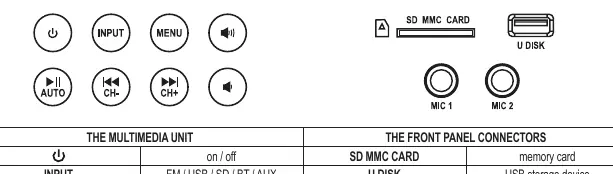
After making connections, turn on the rear tilt switch. Use the ON/OFF button on the front panel or the remote control to switch the unit on. Note that the front panel switch does not fully disconnect the unit from the mains; use the rear switch for long periods of inactivity.
Volume and Function Switching
Use the INPUT button to cycle through modes: FM RADIO, USB/SD playback, Bluetooth (BT), and AUX wired input. Adjust volume using the touch buttons on the front or the VOL+/VOL- buttons on the remote.
Tone Control
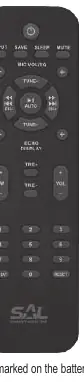
Use the MENU button to select HI (high) or SU (low) tone settings, then adjust using volume control buttons. Alternatively, use the TRE+/TRE- and SW+/SW- buttons on the remote. EQ modes (EQ 0-5) are available for USB/SD/BT playback via the remote.
Wireless BT Connection
Select BT mode using the INPUT button. Pair your mobile device with the speaker in your device's Bluetooth settings. Once paired, the BT indicator will light up continuously.
Using the Radio
Select FM mode with the INPUT button. Press and hold the AUTO button to start automatic tuning and storage. Use CH-/CH+ buttons to navigate stored stations. Manual tuning and storage are also available using the TUNE+/TUNE- and SAVE buttons.
Music Playback from USB/SD
Insert a USB or SD memory device (FAT32 format recommended). The unit will automatically switch to USB/SD mode. Use the REPEAT button on the remote to select playback modes (ONE, RND, ALL).
Wired Audio Inputs
Connect external devices via the AUDIO INPUT (2x RCA) or use the MIC1/MIC2 (6.3mm) jacks for microphones. Adjust microphone volume and echo using the remote control.
Delayed Switch-off
Press the SLEEP button repeatedly to set an automatic switch-off timer (0-120 minutes).
Cleaning and Maintenance
Switch off and unplug the unit before cleaning. Use a soft, dry cloth. Do not use aggressive detergents. Periodically check the mains cable and speaker covering for damage.
Troubleshooting
If the unit malfunctions, turn it off and disconnect from the mains. Check cable connections, volume settings, and input selection. Ensure USB/SD memory is formatted correctly (FAT32) and contains compatible files.
Practical help
Common problems
No sound
Check volume level, ensure correct input is selected, and verify audio cable connections.
MP3 playback not working
Ensure format is compatible (FAT32 recommended), check for foreign objects in USB/SD slot, and ensure correct insertion.
Microphone sound faint
Check MIC VOL setting, ensure microphone is switched on, and verify plug size and connection.
Before use
- Check for shipping damage
- Ensure unit is disconnected from mains before connecting cables
- Place active speaker on the left (L)
- Ensure correct polarity for speaker connections
Show more Show less
Images and diagrams
- Front panel controls: Power, Input, Menu, Volume, Play/Pause, Track selection
- Back panel: Audio Input, Right Output, FM Antenna, Power Switch
Model compatibility
- USB/SD storage: 512MB - 8GB recommended (max 32GB)
- File system: FAT32 only
- Bluetooth range: ~10 meters

Manual page author
Emily Carter
User documentation editor