Electronics / Speakers & Soundbars
SAL PAR 221DJ Portable Party Sound Box User Manual
Quick guide for the SAL PAR 221DJ Portable Party Sound Box. Learn how to operate the DJ sound effects, Bluetooth connection, TWS mode, microphone inputs, and battery charging.
Quick answers from the manual
Quick answer
- The SAL PAR 221DJ is a portable party sound box featuring Bluetooth, FM radio, USB playback, DJ sound effects, and karaoke microphone inputs. p. 18
Key actions
- Pairing TWS mode p. 19
First start
- Charge the battery p. 18
Show 4 more answers Show less
Problems and fixes
Device does not work
Check power switch or charge the battery.
p. 20Maintenance and reset
- Reset to factory settings p. 18
Technical specifications
| Parameter | Value | Meaning | Pages |
|---|---|---|---|
| Battery | 12V / 3000 mAh Li-ion | Built-in rechargeable battery | p. 39 |
| Charging time | ~6 h | Time to fully charge | p. 39 |
Where to find it in the PDF
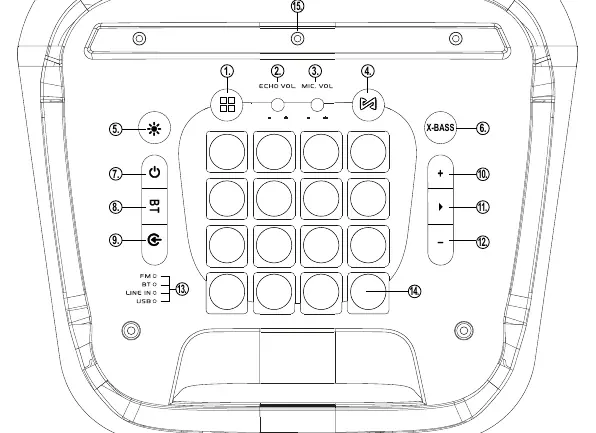
- Control Panel Diagram p. 2
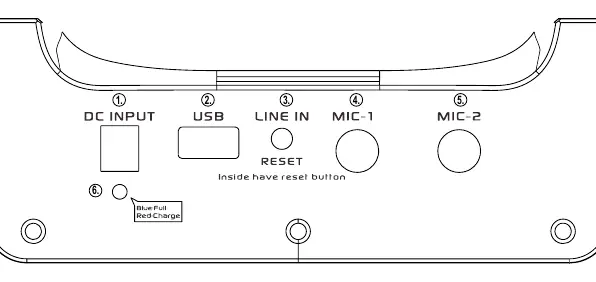
- Rear Panel Diagram p. 3
- Technical Specifications p. 39
Table of contents
Manual images
Click an image to enlargeQuick guide from the manual
The SAL PAR 221DJ is a portable party sound box with a built-in battery, DJ effects, and Bluetooth connectivity. Before first use, charge the battery fully using the included charger. Ensure the device is switched off during charging. The device is designed for hobby and house party use.
Charging the battery
Connect the included charger to the DC INPUT. The CHARGE LED will light up red while charging and turn blue when finished. A full charge takes approximately 6 hours and provides up to 13 hours of operation at medium volume.
Commissioning and operation
Switch the device on by pressing and holding the power button on the control panel. Use the INPUT button to cycle through signal sources: LINE IN, BT, FM RADIO, USB. Volume is controlled by the + / – buttons.
Bluetooth and TWS mode
Select BT mode using the INPUT button. Pair your mobile device via Bluetooth settings. To use TWS mode (pairing two speakers), set both to BT mode, connect one to your phone, then press the TWS button on one of the speakers until a signal is heard.
DJ and Karaoke features
Use the MENU button near the ECHO VOL knob to activate DJ sound effects. Two microphones can be connected to the MIC-1 and MIC-2 jacks on the back for karaoke. Adjust microphone volume and echo using the dedicated controls.
Troubleshooting
If the device does not work, check the power switch and battery charge. If there is no sound, ensure the volume is not set to minimum and cables are connected correctly. For MP3 playback issues, ensure the USB drive is formatted to FAT32 and files are compatible.
Practical help
Common problems
No sound
Check if volume is set to minimum or if audio cables are connected incorrectly.
MP3 playback not working
Ensure USB is formatted to FAT32 and files are compatible. Check for foreign objects in the USB port.
Microphone not audible
Check if MIC VOLUME is set to minimum in the menu and ensure the microphone is switched on.
Before use
- Charge the battery fully before first use.
- Ensure the device is switched off before connecting cables.
- Check that the USB drive is formatted to FAT32.
- Place the device on a stable surface.
Show more Show less
Specs in practice
- Battery life
- Approximately 13 hours at medium volume.
Images and diagrams
- Figure 1: Control panel layout showing DJ effects, volume, and source selection buttons.
- Figure 2: Rear panel layout showing DC input, USB port, and microphone inputs.
Model compatibility
- Recommended microphone types: SAL M 41, M 61, M 71, M 8.
- Do not use NTFS formatted memory units.

Manual page author
David Miller
Documentation analyst