Home Appliances / Parts & Accessories
Samsung 221130-D01 Thermostat Remote Controller User Guide
Quick guide for the Samsung 221130-D01 thermostat remote controller. Learn about button functions, screen navigation, and system status indicators for your heat pump system.
Quick answers from the manual
Quick answer
- The Samsung 221130-D01 is a remote controller for Air to Water Heat Pumps. It allows users to manage temperature, operation modes, and system settings via a multi-screen interface (Home, Zone, DHW, Settings). p. 1, 2
Key actions
- Save settings p. 1
- Access detailed settings p. 1, 2
First start
- Ensure the system is powered. The display will show the Home screen. Use the Option button to access advanced settings. p. 2
Show 2 more answers Show less
Problems and fixes
Settings not saved
Ensure you save before the 180-second timeout expires.
p. 2Where to find it in the PDF
- Remote Controller Overview p. 1
- Home Screen p. 2
- Zone Screen p. 2
- DHW Screen p. 2
- Settings Screen p. 2
Table of contents
Manual images
Click an image to enlargeQuick Guide
The Samsung 221130-D01 is a remote controller designed for Air to Water Heat Pump systems. It provides a centralized interface to monitor system status, adjust temperatures, and configure advanced settings. The interface relies on a navigation pad and specific function buttons to interact with the Home, Zone, DHW (Domestic Hot Water), and Settings screens.
Remote Controller Buttons
The remote controller features the following primary controls:
- Operation On/Off button (LED display): Turns the heat pump power on or off. The LED indicates the status (ON: Operating, Blinking: Error, OFF: Off).
- Up/Down buttons: Move between items vertically or change the set temperature.
- Left/Right buttons: Move between items horizontally or change the item value.
- OK button: Saves your new settings.
- Save & Return button: Saves settings and returns to the previous step.
- Option button: Accesses the detailed setting function.
Screen Navigation
The controller uses several screens to manage the system:
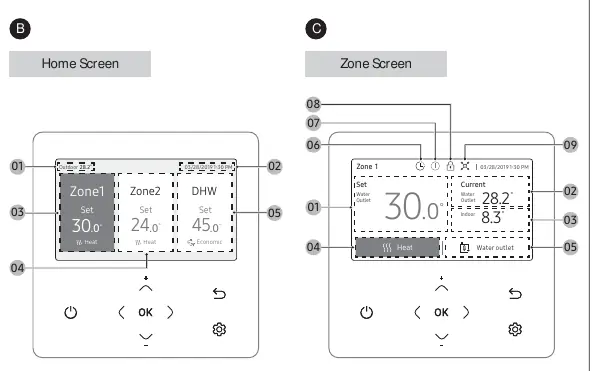
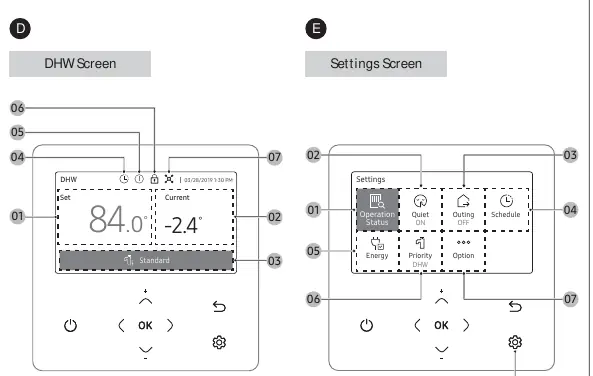
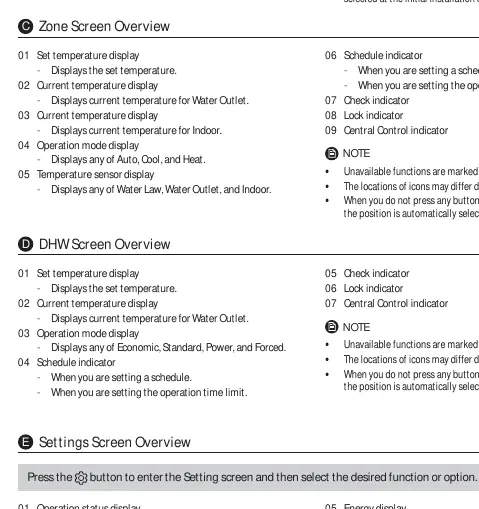
- Home Screen: Displays outdoor temperature, date/time, and status for Zone 1, Zone 2, and DHW.
- Zone Screen: Shows set temperature, current water outlet/indoor temperatures, and operation modes (Auto, Cool, Heat).
- DHW Screen: Displays set temperature, current water outlet temperature, and operation modes (Economic, Standard, Power, Forced).
- Settings Screen: Accessed via the Option button. Allows configuration of Quiet, Outing, Schedule, Energy, and Priority settings.
Operation Tips
- Timeouts: If no button is pressed for 180 seconds while in the Option menu, settings are not saved and the screen reverts to the Home screen.
- Automatic Selection: In certain menus, if no button is pressed for 7 seconds, the highlighted function is automatically selected.
- Inactive Functions: Unavailable functions are marked as inactive and cannot be selected or modified.
- Language Dependency: The operation mode display may change depending on the selected language.
Manufacturer information
Samsung Electronics
Practical help
Common problems
Settings are not being saved.
Ensure you press the OK or Save button before the 180-second timeout expires. If the screen reverts to the Home screen, the changes were not saved.
Cannot select a specific function.
If a function is marked as inactive, it is currently unavailable based on your system's specifications or configuration.
Before use
- Verify the remote controller LED is active.
- Check if the system is powered on.
- Ensure the correct language is selected for the display.
- Confirm if Zone control or DHW support was enabled during initial installation.
Show more Show less
Specs in practice
- LED Blinking
- An error has occurred in the system.
Images and diagrams
- The remote controller features a central navigation pad (Up, Down, Left, Right) surrounded by function buttons (OK, Save & Return, Option).
- The LED display is integrated into the On/Off button.
Model compatibility
- Some functions may not be available depending on specific product specifications.
- The Home screen layout varies based on whether Zone control and DHW support were selected during initial installation.

Manual page author
David Miller
Documentation analyst