Electronics / Televisions
Installation Manual for Samsung Series 8 LED TV
A comprehensive installation and configuration guide for the Samsung Series 8 LED TV, covering setup, hospitality mode settings, channel management, and external device connectivity.
Quick answers from the manual
Quick answer
- This manual provides installation and configuration instructions for Samsung Series 8 LED TVs, specifically for hospitality environments, including hotel mode settings, channel management, and external device connectivity. p. 1, 21
Key actions
- Access Hotel Menu p. 21
- Clone Settings to USB p. 27
First start
- Perform initial setup via Plug & Play menu. p. 29
Show 4 more answers Show less
Problems and fixes
TV in Standalone mode
If SBB/STB is not identified, the TV defaults to Standalone mode.
p. 2Maintenance and reset
- Factory Reset p. 24
Technical specifications
| Parameter | Value | Meaning | Pages |
|---|---|---|---|
| Resolution | 1920 x 1080 | p. 62 |
Where to find it in the PDF
- Installation p. 5, 59, 60
- Connections p. 6, 13, 15, 17
- Hotel Settings p. 21, 22, 23, 24
Table of contents
Manual images
Click an image to enlargeKey Information from the Manual
This document provides installation and configuration instructions for the Samsung Series 8 LED TV, specifically designed for hospitality environments. It covers physical installation, connection of external devices, and advanced hotel-specific settings.
Installation
Stand Installation: Ensure the TV is placed on a soft surface with the screen facing down. Use the provided components (stand, guides, screws) to assemble the stand as shown in the manual. Always have at least two people lift and move the TV.
Wall Mounting: Use a VESA-compliant wall mount. Ensure the wall is vertical and sturdy. Do not exceed a 15-degree tilt. Always disconnect power before installing the wall mount.
Connections
The TV features various ports for external devices:
- AV IN: For A/V devices using RCA cables.
- USB: For software upgrades, content, and cloning settings.
- HDMI IN: For high-definition devices. HDMI 2 (DVI) supports DVI connections.
- ANT IN: For antenna or cable TV signals.
- RJP (Remote Jack Pack): For connecting external A/V modules.
- Variable Audio Out: For connecting bathroom speakers (Mono only).
Hospitality Mode Settings
The TV includes a specialized hotel menu for configuration. Access this menu by pressing MUTE -> 1 -> 1 -> 9 -> ENTER on the remote control.
- Hospitality Mode: Choose between Interactive (with SBB/STB) or Standalone mode.
- Cloning: Allows copying settings from one TV to a USB drive and then to other TVs.
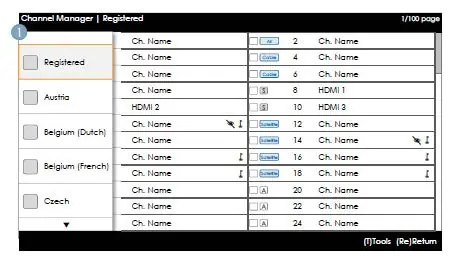
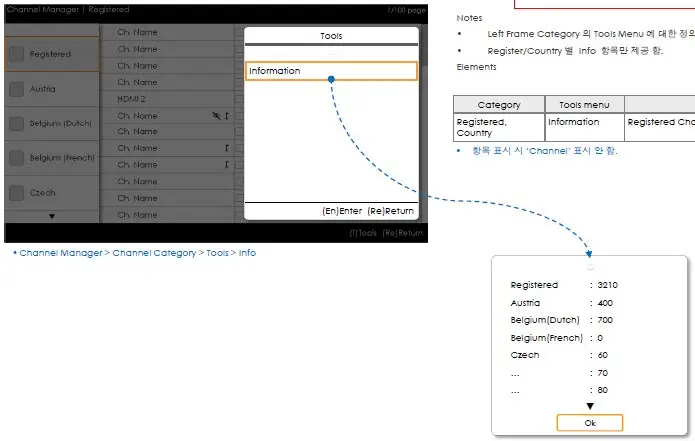
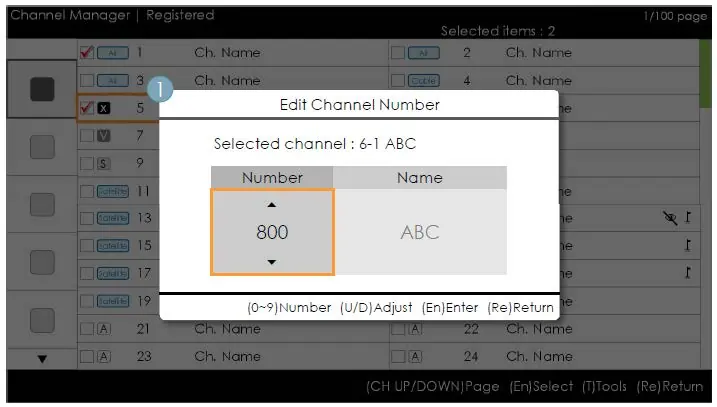
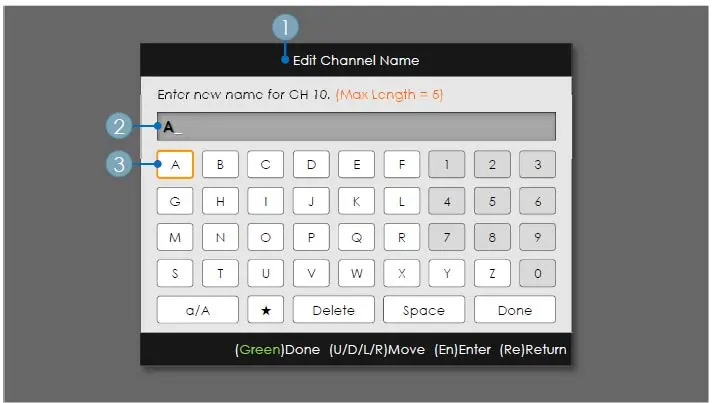
- Channel Editor: Used to edit channel numbers, names, and sort channels.
- Welcome Message: Configure a custom message displayed when the TV is turned on.
- Hotel Logo: Upload a custom logo (BMP/AVI) to be displayed at startup.
Troubleshooting and Diagnostics
The TV includes a self-diagnosis menu for checking picture and sound quality. If the TV fails to detect an SBB/STB, it will default to Standalone mode. Ensure all cables are securely connected and that the correct source is selected.
Safety
Maintain at least 10cm of clearance around the TV for proper ventilation. Do not use non-Samsung parts for mounting. Ensure the TV is stable to prevent tipping, especially in environments with children.
Manufacturer information
Samsung Electronics
Practical help
Common problems
TV does not detect SBB/STB
Ensure the data cable is connected to the DATA port on the TV and the ETH MODEM port on the STB.
Samsung Smart Control not working
Check batteries. Pair via Bluetooth by holding RETURN and GUIDE for 3 seconds within 30-40cm of the TV.
No signal or distorted signal
Check antenna/cable connection and ensure the correct source is selected.
Before use
- Ensure at least 10cm clearance around the TV for ventilation.
- Use only provided stand or wall mount parts.
- Check that all external devices are powered off before connecting.
- Ensure the correct data cable is used for your provider.
Show more Show less
Specs in practice
- Optimal Resolution
- 1920 x 1080 @ 60 Hz for best picture quality.
- Variable Audio Out
- Output for bathroom speakers (Mono only).
Images and diagrams
- Stand installation involves attaching the stand guide to the TV underside and securing it with screws.
- The connection panel includes HDMI, USB, AV, and Data ports.
- Hotel mode settings are accessed via a specific remote control sequence.
Model compatibility
- Compatible with TeleAdapt TA-7610, TA-7650 (HD), and TA-7660 (HD Plus) RJP modules.
- Sound Bar ARC function supported on models HW-F350/F450/F550.

Manual page author
David Miller
Documentation analyst