Electronics / Televisions
Samsung QLED 4K Smart TV User Manual
Quick guide for your Samsung QLED 4K Smart TV. Includes safety instructions, wall mounting, initial setup, troubleshooting, and technical specifications.
Quick answers from the manual
Quick answer
- This manual covers safety, installation, initial setup, and troubleshooting for Samsung QLED 4K Smart TVs. p. 2, 3, 5
Key actions
- Wall mounting p. 3, 4
- Initial Setup p. 5
First start
- Turn on the TV to begin the Initial Setup process automatically. p. 5
Show 4 more answers Show less
Problems and fixes
TV won't turn on
Check power cable, wall outlet, and remote sensor light.
p. 5
Remote control does not work
Replace batteries, check polarity, or re-pair Bluetooth remote.
p. 5Maintenance and reset
- Change PIN code via Settings > General > System Manager > Change PIN. p. 6
Technical specifications
| Parameter | Value | Meaning | Pages |
|---|---|---|---|
| Display Resolution | 3840 x 2160 | 4K resolution | p. 6 |
Where to find it in the PDF
- Safety Instructions p. 2, 3
- Installation p. 3, 4
- Troubleshooting p. 5
Table of contents
Manual images
Click an image to enlargeQuick guide from the manual
This manual provides essential safety, installation, and operation instructions for your Samsung QLED 4K Smart TV. Key procedures include wall mounting, initial setup, and troubleshooting common power or remote control issues.
Safety Instructions
- Power: Do not overload wall outlets. Ensure the power cord is firmly seated. Unplug during lightning storms or long periods of disuse.
- Installation: Maintain at least 10 cm of clearance around the TV for proper ventilation. Do not place the TV on unstable surfaces.
- Wall Mounting: Use only VESA-compliant wall mounts. Always have at least two people mount the TV (four people for 82-inch or larger models). Do not install while the TV is powered on.
Initial Setup
Upon first power-on, the TV automatically initiates the Initial Setup. Follow the on-screen instructions to configure basic settings. Ensure the protective film is removed from the Samsung logo and the bottom of the TV to prevent screen dimming.
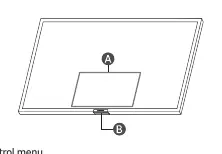
Using the TV Controller
You can turn on the TV using the TV Controller button located at the bottom of the unit. Pressing this button while the TV is on opens the Control menu.
Troubleshooting
- TV won't turn on: Verify the power cable is securely connected to both the TV and the wall outlet. Check that the remote sensor at the bottom of the TV is lit solid red.
- Remote control not working: Check if the power indicator blinks when pressing the power button. If not, replace batteries. Ensure batteries are inserted with correct polarity. If using a Samsung Smart Remote (Bluetooth), ensure it is paired with the TV.
Settings and Features
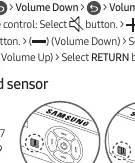
- Eco Sensor: Automatically adjusts screen brightness based on room lighting. Located at the bottom of the TV; do not block it.
- PIN Change: Navigate to Settings > General > System Manager > Change PIN. Default is 0000.
- Sound Sensor: Available on Q7, Q8, and Q9 series. Toggle using the button at the bottom of the TV.
Specifications
- Display Resolution: 3840 x 2160
- Operating Temperature: 10 °C to 40 °C
- Operating Humidity: 10 % to 80 %, non-condensing
Manufacturer information
Samsung Electronics
Practical help
Common problems
TV will not turn on
Check power cable connection, ensure wall outlet is working, and verify the remote sensor light is solid red.
Remote control not working
Replace batteries, ensure correct polarity, point directly at the TV (1.5-1.8m), or re-pair if it is a Bluetooth Smart Remote.
Before use
- Remove protective film from the Samsung logo and bottom of the TV.
- Ensure at least 10 cm of space around the TV for ventilation.
- Use only Samsung-recommended wall mount parts.
- Check that all items are included in the box.
Show more Show less
Specs in practice
- Display Resolution
- 3840 x 2160 (4K UHD)
- Operating Temperature
- 10 °C to 40 °C (50 °F to 104 °F)
Images and diagrams
- Wall mounting bracket installation steps.
- TV controller button and remote sensor location.
- Sound sensor button operation.
Model compatibility
- Sound sensor function is only supported on Q7, Q8, and Q9 series models.
- Wall mount screw specifications are found in the Quick Setup Guide.

Manual page author
Emily Carter
User documentation editor