Electronics / USB Hubs & Docking
Sandberg USB-C 13in1 Docking Station Pro
Quick guide for the Sandberg USB-C 13in1 Docking Station Pro. Learn about port connectivity, power delivery, display output, and system compatibility requirements.
Table of contents
Quick guide from the manual
The Sandberg USB-C 13in1 Docking Station Pro is a plug-and-play device designed to expand your laptop's connectivity. It requires no drivers for installation. To use the docking station, connect it to your laptop using the provided USB-C to USB-C cable. For power delivery, you can connect your laptop's charger directly to the docking station's power-through port.
Important: Connection of display devices requires the USB-C port on your laptop to support Alt Mode. Without this feature, video output will not function.
Device Overview
The docking station provides 13 ports, including:
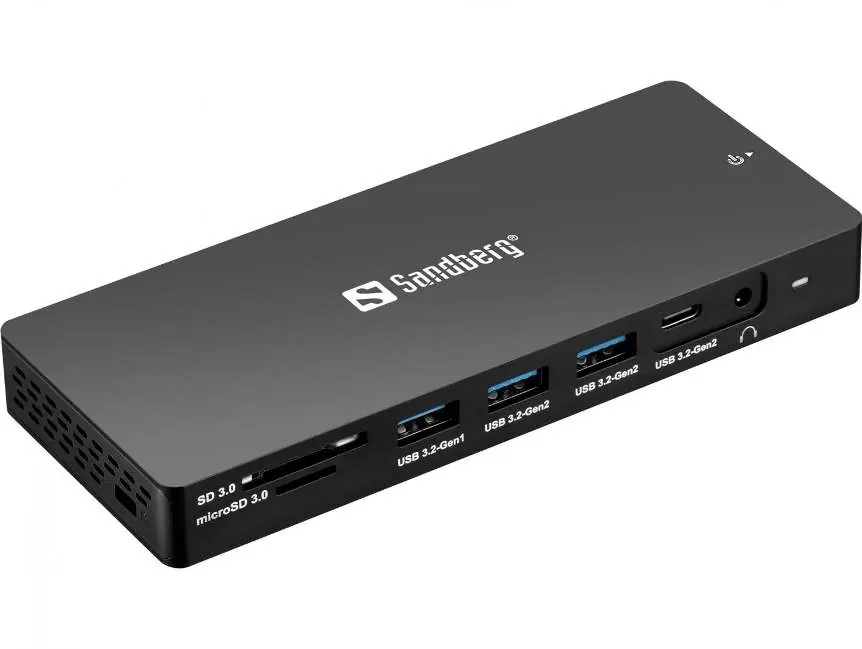
- 3 x USB 3.0 A ports
- 1 x USB-C 3.1 port
- 2 x HDMI ports
- 1 x DisplayPort (DP)
- 1 x RJ45 (1000 Mbps)
- SD and MicroSD card reader slots
- Minijack headset port
- USB-C female port for power delivery (up to 100W)
Specifications
The device supports high-resolution video output and fast data transfer:
- Video Output: HDMI 2.0 and DP 1.4 support resolutions up to 4K at 60Hz.
- Power Delivery: Supports up to 100W power-through charging.
- Data Transfer: USB ports support speeds up to 10 Gbps.
- Network: RJ45 connector supports 10/100/1000 Mbps operation.
Compatibility and Modes
The docking station is compatible with Windows 10, Windows 11, and MacOS. Note the following limitations:
- Windows: Supports MST (Multi-Stream Transport) for extended desktop mode and mirror mode.
- MacOS: Supports mirror mode only. Extended desktop mode is not possible with MacOS.
- Multi-Monitor Setup: Supports simultaneous output at 2x HDMI and 1x DP. If used on a laptop, the laptop screen can also be active, allowing for up to 4 monitors in total.
Package Contents
- 1 x Sandberg USB-C 13in1 Docking Station Pro
- 1 x USB-C to USB-C cable (100W PD, 70 cm)
- 1 x Quick guide
Manufacturer information
Sandberg A/S
Practical help
Common problems
Extended desktop mode not working on MacOS
Extended desktop mode is not supported on MacOS; only mirror mode is available.
Display devices not connecting
Ensure your laptop's USB-C port supports Alt Mode. This is a hardware requirement for video output.
Before use
- Verify your laptop has a USB-C port with Alt Mode support.
- Connect the provided USB-C to USB-C cable to the docking station and your laptop.
- Connect your power charger to the docking station if you require Power Delivery (up to 100W).
- Ensure all peripheral devices (keyboard, mouse, monitors) are connected to the appropriate ports.
Model compatibility
- Windows 10/11: Supports MST extended and mirror mode.
- MacOS: Supports mirror mode only (including M1 chips).

Manual page author
Emily Carter
User documentation editor
Prepares concise manual descriptions and highlights the most useful setup, operation, and maintenance information for readers.