Lighting / Work Lights
User Manual for Scangrip Nova 4 Connect LED Floodlight
Quick guide for the Scangrip Nova 4 Connect LED floodlight. Learn how to operate the light, connect batteries, use Bluetooth controls, and understand IP ratings and safety precautions.
Table of contents
Manual images
Click an image to enlargeQuick guide from the manual
The Scangrip Nova 4 Connect is a high-efficiency COB LED work light designed for professional use. It features Bluetooth light control, a built-in power bank, and flexible power options including battery or mains power. The light is compatible with the Metabo CAS battery system and various 18V battery packs from other brands using the Scangrip Connect system.
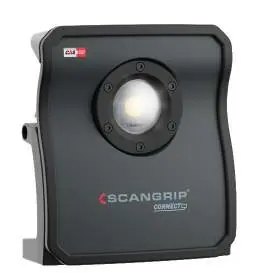
Operation
The lamp is controlled via the buttons located on the back panel:
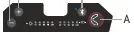
- Button A: Turns the lamp on or off.
- Button B: Increases the brightness level.
- Button C: Decreases the brightness level.
- Button D: Enables or disables the Bluetooth function.
When the brightness level is changed, the new value is saved, and the lamp will start at that level the next time it is turned on.
Bluetooth Light Control
The lamp can be controlled via a smartphone app (iOS 10.3+ or Android 5.0+). Features include:
- Turning the lamp on/off and adjusting output.
- Connecting up to 4 lamps together.
- Assigning a PIN code to prevent unauthorized control.
To delete the PIN code: Turn on the Bluetooth function, then press and hold the Bluetooth button for 10 seconds.
Battery and Power
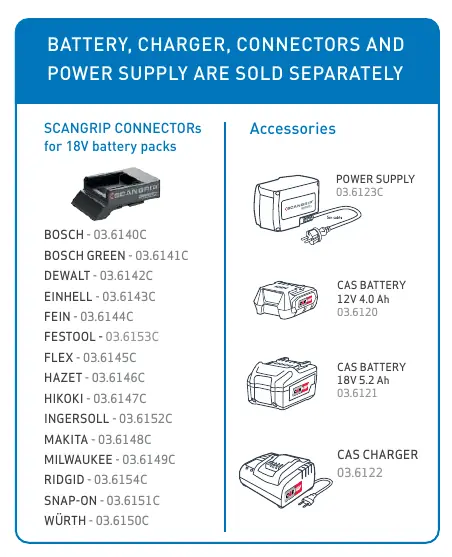
The work light is designed to be used with Metabo CAS batteries (12V and 18V). It is also compatible with 18V batteries from other brands (such as Bosch, Dewalt, Makita, Milwaukee, etc.) by using the Scangrip Connect system. A Scangrip power supply can be used instead of a battery; note that the battery cover must be removed when using the power supply.
The lamp includes a built-in USB power outlet (5V, 1A) to charge mobile devices. Note that the USB outlet is disabled when the lamp is in backup mode.
IP Ratings
The lamp has three different IP ratings depending on the configuration:
- IP65: When used with a Scangrip power supply.
- IP54: When the battery cover is mounted and closed.
- IP30: When the battery cover is removed and an external battery is used.
Safety and Maintenance
- Always respect applicable legislation for working with electrical equipment.
- Avoid looking directly into the beam of light to prevent dazzling.
- Do not use the lamp near a naked flame.
- Protect the mains cable from oil, heat, and sharp edges.
- The light source is not replaceable; when it reaches the end of its life, the whole luminaire must be replaced.
- If the lamp is disconnected from the mains and the battery is discharged, push the power button to enable the internal backup battery. The 10% LED will blink to indicate backup mode.
- Internal backup battery must be replaced with an original Scangrip battery.
Manufacturer information
SCANGRIP A/S
Practical help
Common problems
Lamp does not turn on
Check if the battery is charged or if the power supply is correctly connected. If using a battery, ensure it is properly seated.
Bluetooth control not working
Ensure Bluetooth is enabled on the lamp (Button D). If you need to reset the PIN, hold the Bluetooth button for 10 seconds.
USB power bank not charging devices
The USB outlet is disabled when the lamp is in backup mode. Ensure the lamp is connected to a main power source or a primary battery.
Before use
- Verify the battery pack is compatible (Metabo CAS or 18V with Scangrip Connector).
- Ensure the battery cover is closed for IP54 protection.
- Check that the power supply or battery is securely connected.
- Ensure the lamp is placed on a non-combustible surface.
- Check that the mains cable is free from damage if using a power supply.
Images and diagrams
- Button A: Power On/Off.
- Button B: Increase brightness.
- Button C: Decrease brightness.
- Button D: Bluetooth enable/disable.
Model compatibility
- Compatible with Metabo CAS battery system (12V 4.0Ah - 18V 5.2Ah).
- Compatible with 18V batteries from Bosch, Dewalt, Einhell, Fein, Festool, Flex, Hazet, Hikoki, Ingersoll, Makita, Milwaukee, Ridgid, Snap-on, Würth using Scangrip Connectors.

Manual page author
Michael Turner
Technical manual editor
Reviews PDF manuals for structure, safety notes, and practical product details so readers can find the right information quickly.