Power / Wireless Chargers
User Manual for Scanstrut ROKK Wireless Nano 10W Charger
Quick guide for the Scanstrut ROKK Wireless Nano 10W charger. Includes installation steps, wiring diagrams, safety warnings, and usage requirements for Qi-compatible devices.
Table of contents
Manual images
Click an image to enlargeImportant Information
The Scanstrut ROKK Wireless Nano 10W is a wireless charger designed for marine and outdoor environments. It is compatible with Qi-enabled devices and can charge through non-metallic phone cases up to 3mm thick.
- Power Input: 12V DC or 24V DC only.
- Safety: A fuse or circuit breaker must be installed between the power source and the charger.
- Environment: Not for use in hazardous or flammable areas (e.g., engine rooms).
- Waterproofing: The IPX6 rating is only valid if installed correctly on a flat, non-porous, and smooth surface.
Installation
Before drilling, ensure the area behind the mounting surface is clear of cables, fuel, or other hazardous objects. Ensure the mounting surface is flat to maintain the IPX6 seal.
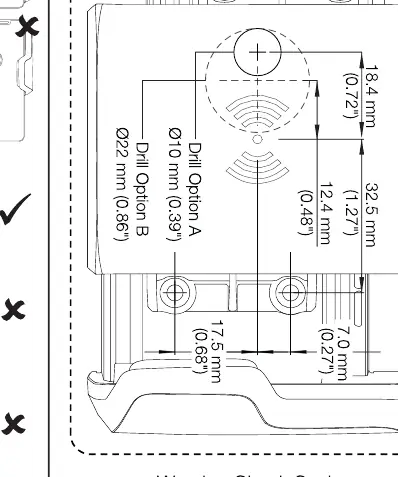
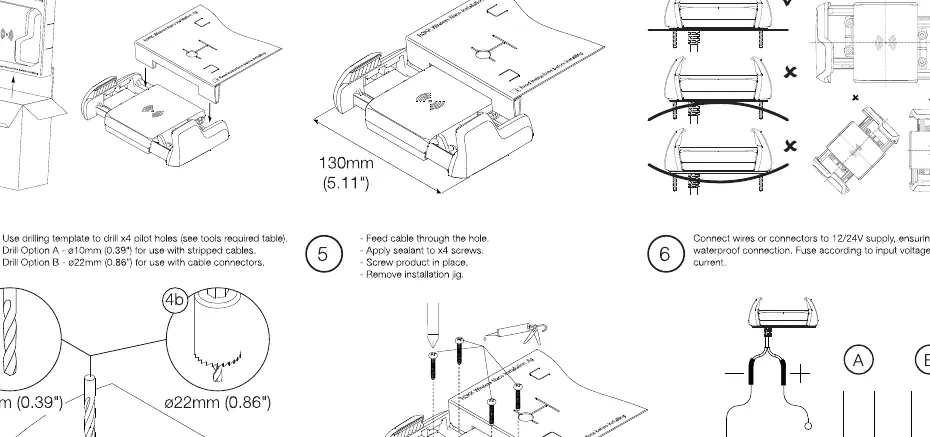
- Use the provided drilling template to mark the location.
- Drill the hole: 10mm for stripped cables or 22mm for cables with connectors.
- Insert the Nano unit into the hole.
- Secure the unit using the provided screws.
Wiring
When extending the cable, ensure a minimum of 10V is supplied to the product continuously. It is recommended to use 18 AWG (0.82 mm2) wire for any extension length.
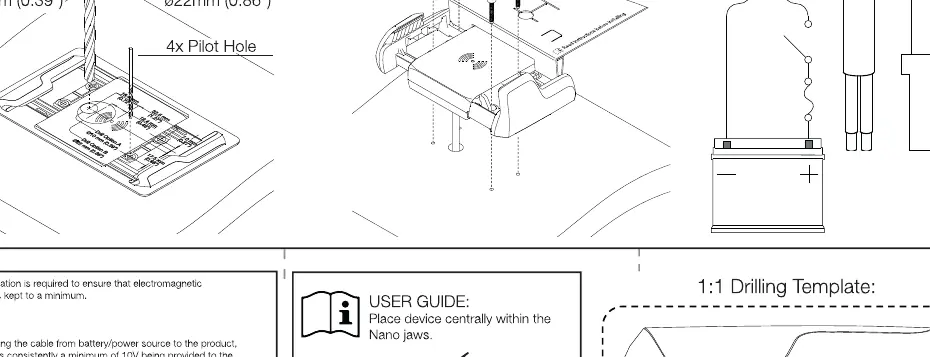
- Connect the positive and negative wires to the 12V or 24V power source.
- Verify correct polarity before switching on the power.
- Ensure the cable is secured and does not interfere with mechanical systems.
Usage and Maintenance
Place the device in the center of the Nano jaws. If the device is used in high temperatures or direct sunlight, it may temporarily shut down as a safety feature. Clean the unit carefully with fresh water.
Practical help
Common problems
Device stops charging
The device may have entered thermal safety shutdown due to high ambient temperature or direct sunlight. Allow it to cool.
Slow or no charging
Ensure the phone case is non-metallic and no thicker than 3mm. Metallic cases will interfere with charging.
Electromagnetic interference
Ensure the product is installed correctly according to EMC guidelines to minimize interference with other equipment.
Before use
- Verify power source is 12V or 24V DC.
- Ensure a fuse or circuit breaker is installed between the power source and the charger.
- Check that the mounting surface is flat, non-porous, and smooth.
- Confirm the phone case is non-metallic and <= 3mm thick.
- Verify no fuel, cables, or hazardous objects are behind the mounting area.
Specs in practice
- Input Voltage
- 12V DC or 24V DC only.
- Output Power
- 10W (at 9V, 1.1A).
Images and diagrams
- The drilling template shows two hole sizes: 10mm for stripped cables and 22mm for cables with connectors.
- The wiring diagram illustrates the connection to a 12V/24V battery/power source with a fuse.
Model compatibility
- Compatible with Qi-enabled devices.
- Works through non-metallic phone cases up to 3mm thick.

Manual page author
Emily Carter
User documentation editor
Prepares concise manual descriptions and highlights the most useful setup, operation, and maintenance information for readers.