Electronics / Camera Lenses
User Manual for Aukey Graphite 10W Wireless Fast Charger LC-Q6
Quick guide for the Aukey Graphite 10W Wireless Fast Charger (LC-Q6). Learn how to set up, understand LED indicators, and troubleshoot charging issues.
Table of contents
Manual images
Click an image to enlargeQuick guide from the manual
The Aukey Graphite 10W Wireless Fast Charger (LC-Q6) is designed to provide efficient wireless charging for Qi-compatible devices. To achieve fast charging speeds, ensure you use a Quick Charge 2.0 or 3.0 compatible power adapter. The device features an LED indicator to show charging status and includes safety features like metal object detection.
Product Diagram
The charger features a simple design with three main components:
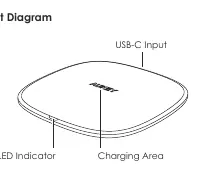
- USB-C Input: Located at the back of the device for connecting the power cable.
- Charging Area: The center surface where the phone should be placed.
- LED Indicator: Located at the front to display the current charging status.
Getting Started
Follow these steps to begin charging:
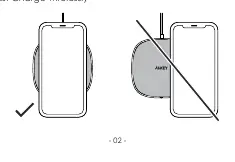
- Connect the LC-Q6 to a wall outlet using a Wireless Fast Charging-compatible power adapter (Quick Charge 2.0 or 3.0 recommended).
- Place your wireless charging-compatible phone on the center of the charging area.
- The LED indicator will turn green, confirming that your phone is charging.
LED Indicators
The LED light provides real-time feedback on the charger's status:
- Red: Standby mode.
- Green: Charging or fully charged.
- Flashing Red: Charging error (check for metal objects or power issues).
Product Care & Safety
- Keep the device away from liquids, extreme heat, and strong magnetic fields.
- The charger automatically detects metal objects in the charging area. If interference is detected, charging will pause and resume automatically once the obstruction is removed.
- For non-wireless-charging phones, a separate wireless charging receiver (not included) is required.
Warranty & Customer Support
If you encounter issues, please contact the support team for your region. Include your Amazon order number and the product model number (LC-Q6) in your correspondence. Support emails are available for US, EU, CA, and JP regions.
Manufacturer information
AUKEY
Practical help
Common problems
LED indicator is flashing red
This indicates a charging error. Ensure there are no metal objects in the charging area and that the power input is sufficient.
Charging is slow
Ensure you are using a Quick Charge 2.0 or 3.0 compatible power adapter. Standard adapters may not support fast charging speeds.
Before use
- Verify your phone is compatible with Qi wireless charging.
- Ensure you have a Quick Charge 2.0/3.0 wall adapter for fast charging.
- Check that the charging area is free of metal objects.
- Connect the provided USB-A to C cable to the charger and power adapter.
Images and diagrams
- USB-C Input: Port for connecting the power cable.
- Charging Area: The surface where the phone must be placed for charging.
- LED Indicator: Front-facing light indicating status.
Model compatibility
- Requires a wireless charging receiver (not included) for phones without built-in wireless charging.
- Fast charging is compatible with specific Samsung phones and iPhones when using a Quick Charge 2.0/3.0 adapter.

Manual page author
Michael Turner
Technical manual editor
Reviews PDF manuals for structure, safety notes, and practical product details so readers can find the right information quickly.