Electronics / Networking
User Manual for Secomp Wireless Charger 19.11.1011
Quick guide for the Secomp 19.11.1011 wireless charger. Learn how to set up, charge your device, troubleshoot common issues, and follow safety guidelines.
Table of contents
Manual images
Click an image to enlargeQuick guide from the manual
This wireless charger is designed for Qi-compatible devices. To ensure proper operation, use a power adapter with at least DC 5V/2A. For fast charging, a Quick Charge 2.0/3.0 compatible adapter is required. Ensure your device is placed correctly on the center of the charging pad and that there are no metal objects or thick cases (over 6mm) between the phone and the charger.
Product Overview
The device consists of the following components:
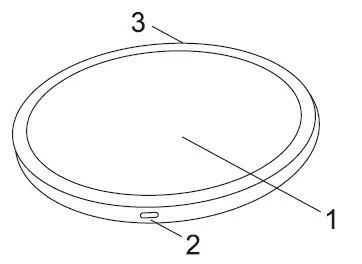
- Wireless charging area (top surface)
- Type C connector (for power input)
- LED indicator light
Using the Wireless Charger
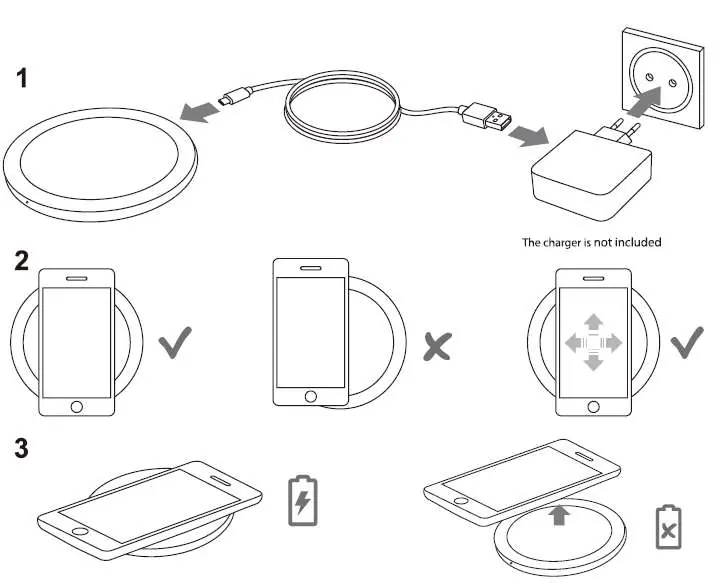
- Connect the wireless charger to a wall charger using the included or a high-performance Type C cable.
- Plug the wall charger into an electric socket.
- Place your Qi-compatible smartphone or device on the center of the wireless charger.
- Adjust the position if necessary until charging begins.
- The white LED light will glow continuously during the charging process.
- If the LED indicator starts to blink, the device is placed incorrectly, is incompatible, or is not accepting the charge. Reconnect the USB cable if issues persist.
- Remove the device once fully charged and unplug the charger when not in use to save energy.
Usage Tips
- Do not place metal objects between the smartphone and the charger, as this may interfere with charging.
- Remove protective cases if they are thicker than 6mm or contain metal.
- Charging time varies based on battery capacity, phone energy consumption, and placement.
Troubleshooting
- Device not charging: Ensure the device is Qi-compatible and placed correctly on the center of the pad.
- LED blinking: Check for incompatible devices or incorrect placement.
- Charging blocked: Remove thick or metal protective cases.
- Power issues: Ensure the USB charger is not too weak (minimum DC 5V/2A required) and that the cable is not damaged or too long.
Safety Information
- Do not use damaged power cords, plugs, or loose electrical sockets.
- Do not drop or subject the device to impact.
- Do not disassemble, modify, or repair the device yourself.
- Keep the device away from humidity, heat, and children.
Technical Specifications
- Type: Wireless Charger
- Frequency Range: 110-205 kHz
- Input: DC 5V, 2A / DC 9V, 1.67A
- Output: DC 5V, 1A / DC 9V, 1.1A
- Charging Distance: ≤ 6 mm
- Size: 100 x 12 mm
- Weight: 95 g
Practical help
Common problems
LED indicator is blinking
The device is placed incorrectly, is incompatible, or is not accepting the charge. Reposition the device or reconnect the USB cable.
Device is not charging
Ensure the device is Qi-compatible, remove any metal objects or thick cases (>6mm) from the back of the phone, and ensure the power adapter meets the minimum 5V/2A requirement.
Before use
- Verify your device supports the Qi wireless charging standard.
- Use a power adapter with at least DC 5V/2A output.
- Use the included or a high-performance Type C cable.
- Ensure the charging surface is free of metal objects.
- Remove protective cases thicker than 6mm.
Specs in practice
- Charging Distance
- The maximum thickness of a phone case or gap allowed for charging is 6mm.
- Frequency Range
- The operating frequency of the wireless charging field is 110-205 kHz.
Images and diagrams
- 1: Wireless charging area where the device should be placed.
- 2: Type C connector for power input.
- 3: LED indicator light showing charging status.
Model compatibility
- Compatible with all Qi-standard wireless charging devices.
- Fast charging mode requires a Quick Charge 2.0/3.0 compatible charger.

Manual page author
David Miller
Documentation analyst
Organizes user manual content into clear summaries, with attention to model details, product context, and everyday usability.