Sports / Fitness
User Manual for Scosche 142PI100CL 100W Portable Power Inverter
Quick guide for the Scosche 142PI100CL 100W Portable Power Inverter. Learn how to connect, understand LED indicators, safety precautions, and troubleshooting.
Table of contents
Quick Start Guide
To use the Scosche 100W Mobile Power Inverter, ensure your vehicle's 12V power outlet is in working condition. Plug the 12V power plug directly into the 12V socket. The LED indicator will illuminate green to confirm the unit is powered on. Note: This device is designed for 12-volt power outlets only and is not intended for use with cigarette lighter sockets.
Product Overview
The device features the following components:
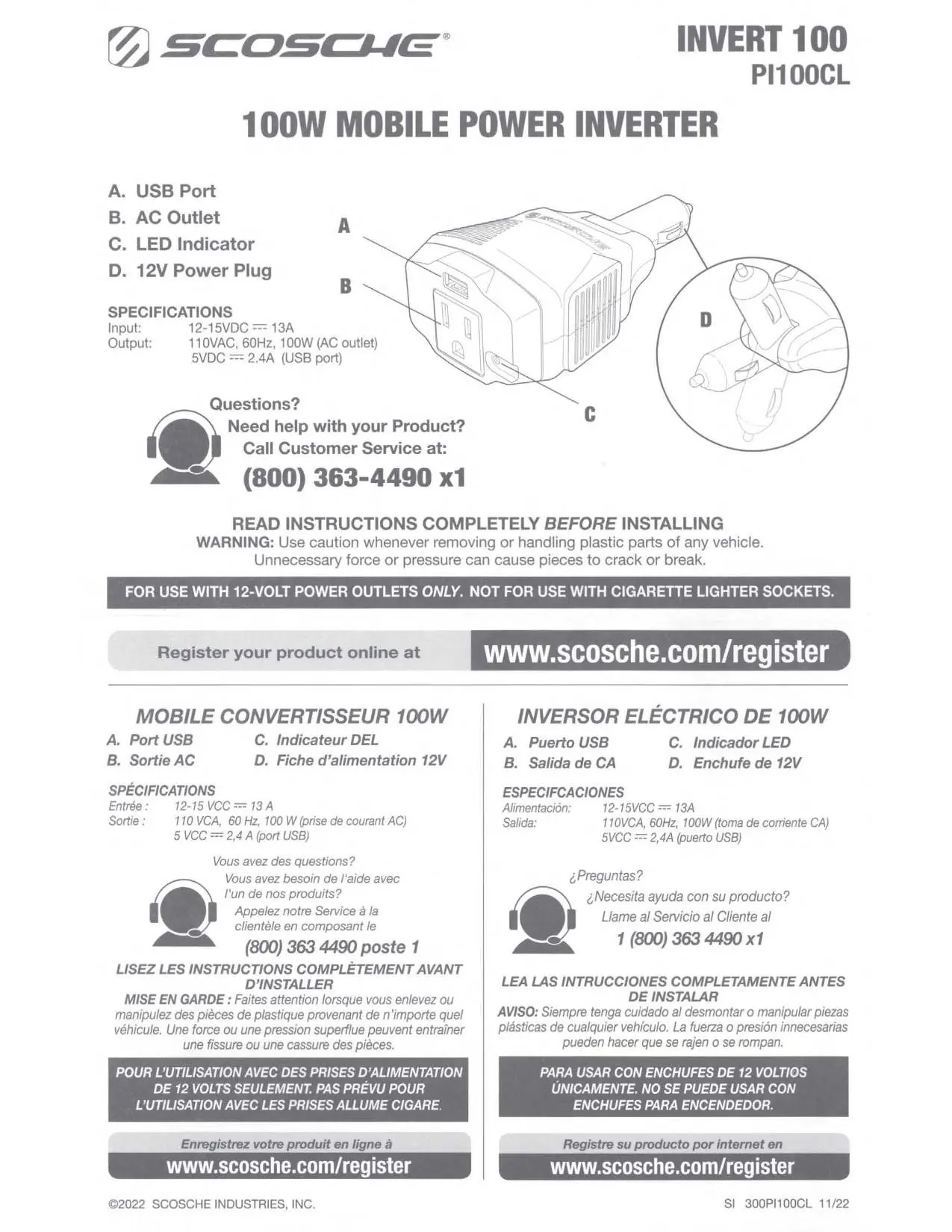
- A. USB Port: For charging USB-powered devices.
- B. AC Outlet: Standard outlet for powering AC devices.
- C. LED Indicator: Displays the operational status of the inverter.
- D. 12V Power Plug: Connects the inverter to the vehicle's power source.
LED Indicator Status
The LED indicator provides information about the unit's status:
- Green LED: Power On.
- Red LED: Power Protection Mode.
The unit will enter protection mode under the following conditions:
- Low Input Voltage: Input voltage drops below 10.65V.
- High Input Voltage: Input voltage exceeds 15-16V.
- Thermal Protection: Internal temperature exceeds 212°F (100°C).
- Overload Protection: Consistent load exceeds 150W or USB output current exceeds 4.0A.
Safety Precautions
To ensure safe operation and prevent personal injury or damage to the device, follow these guidelines:
- Do not insert foreign objects into the AC outlet or ventilation openings.
- Keep the inverter away from flammable materials, fumes, or gases.
- Do not open the inverter; there are no user-serviceable parts inside.
- Do not expose the device to moisture.
- Keep the device away from children; it is not a toy.
- Do not leave the inverter unattended while in use.
- Always disconnect the inverter when not in use.
- Do not block ventilation openings.
- Avoid placing the device in small, enclosed spaces like glove boxes or consoles with poor air circulation.
- Do not place the inverter near heating vents or heat-generating equipment.
- Avoid direct sunlight and do not use the inverter outdoors.
Technical Specifications
- Input: 12-15VDC, 13A
- Output (AC): 110VAC, 60Hz, 100W
- Output (USB): 5VDC, 2.4A
Support and Warranty
For technical support or questions, contact Scosche at 1-800-363-4490 ext. 1. The product includes a 1-year warranty from the date of purchase. For complete warranty details, visit www.scosche.com.
Official resources from the manual
Manufacturer information
Scosche Industries, Inc.
Practical help
Common problems
LED is red (Protection Mode)
Check if input voltage is within 12-15VDC, ensure the unit is not overheating (above 100°C), or verify that the load does not exceed 150W/4.0A.
Inverter does not turn on
Ensure the 12V socket is functioning and the plug is securely inserted.
Before use
- Ensure the 12V socket is in working condition.
- Verify the device is not being used with a cigarette lighter socket.
- Check that all ventilation openings are clear and unobstructed.
- Ensure the device is kept away from moisture and heat sources.
- Confirm the device is not left unattended while in use.
Specs in practice
- Input: 12-15VDC 13A
- Requires a 12V power outlet; do not use cigarette lighter sockets.
- Output: 110VAC 60Hz 100W
- Provides standard AC power for small electronics.
- USB Output: 5VDC 2.4A
- Standard charging port for USB devices.
Images and diagrams
- A: USB Port for charging devices.
- B: AC Outlet for plugging in AC devices.
- C: LED Indicator showing power and protection status.
- D: 12V Power Plug for connecting to the vehicle's power outlet.
Model compatibility
- For use with 12-volt power outlets only.
- Not for use with cigarette lighter sockets.

Manual page author
David Miller
Documentation analyst
Organizes user manual content into clear summaries, with attention to model details, product context, and everyday usability.