Tools / Power Tools
User Manual for Senix 1000W Inverter Generator GN4QL-L1
Quick guide for the Senix 1000W Inverter Generator (GN4QL-L1). Includes setup, operation, maintenance, troubleshooting, and safety instructions.
Table of contents
Manual images
Click an image to enlargeQuick Guide
This guide provides essential information for operating and maintaining your Senix 1000W Inverter Generator. Always read the full manual before use. Ensure the generator is placed on a flat, stable surface and properly grounded before operation. Never operate in enclosed spaces due to carbon monoxide risks.
Safety Instructions
- Work Area: Keep the area clean, well-lit, and free of flammable materials.
- Electrical Safety: Use only compatible plugs and extension cords suitable for outdoor use.
- Personal Safety: Wear appropriate protective equipment (eye, hearing, respiratory).
- Fuel Safety: Always switch off and cool down the generator before refueling. Never smoke or use near open flames.
- Residual Risks: Be aware of fuel leakage, exhaust fumes, and hot surfaces.
Know Your Unit
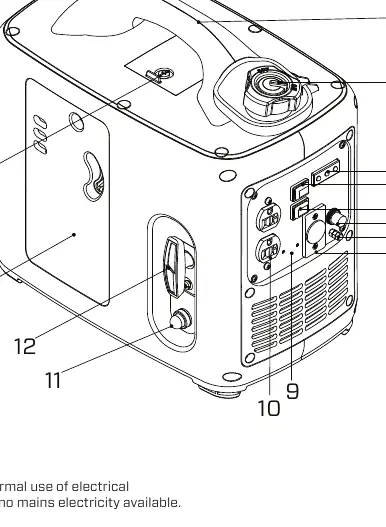
Key components include the handle, fuel cap with air relief valve, LED indicators, economy switch, engine switch, DC breaker reset button, ground terminal, 12V DC receptacle, CO detector, 120V AC receptacle, primer bulb, starter rope handle, air filter access door, and spark plug access cover.
Assembly
Unpack all parts and ensure the generator is on a flat surface. This product is not delivered with fuel or oil. You must fill the oil tank and fuel tank before the first use.
Operation
Switching On
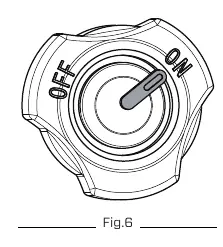
- Set the air relief valve to the ON position.
- Turn on the engine switch.
- Press the primer bulb 3 to 5 times until filled with fuel.
- Move the choke switch down to close the choke.
- Pull the starter rope handle until the engine starts.
- Once started, push the choke switch upward to open the choke.
- Let the generator run idle for 10 seconds before connecting devices.
Switching Off
- Switch off and disconnect the end device.
- Let the generator run idle for three minutes.
- Switch off the engine switch and let it cool down.
- Turn the choke switch and air relief valve to the OFF position.
Maintenance
- Change Oil: Drain waste oil into a container, tilt the engine, and refill with approved oil (SAE 10W-30/5W-30/30).
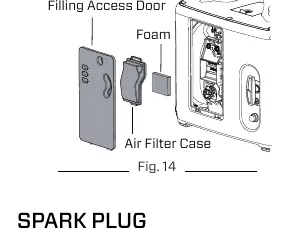
- Air Filter: Regularly clean the foam filter in the air filter case.
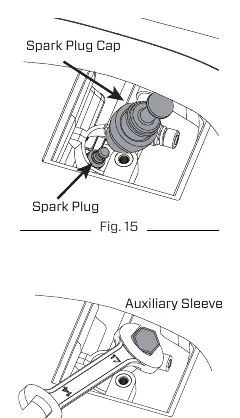
- Spark Plug: Check for damage, clean debris, and adjust the gap to 0.6 – 0.7 mm.
Troubleshooting
If the engine does not start, check fuel levels, oil levels, the engine switch position, the air filter, the primer bulb, and the spark plug connection. If the engine stops, check for fuel, oil, or overload conditions.
Practical help
Common problems
Engine does not start
Check fuel level, oil level, engine switch (must be 'I'), air filter, primer bulb, and spark plug connection/gap.
Engine stops during operation
Check for empty fuel/oil tanks or overload condition.
Engine idles poorly
Clean the air filter and remove debris from air vents.
Engine runs hot or smokes
Check for wrong fuel type and replace if necessary.
Before use
- Check oil level
- Check fuel level
- Ensure air relief valve is in OFF position before filling
- Ensure proper grounding
- Check for any fuel or oil leaks
- Ensure air filter is clean and installed
Specs in practice
- Starting Watts
- 1000W - Maximum power for starting appliances.
- Running Watts
- 900W - Continuous power output.
Images and diagrams
- Control panel: Shows receptacles, switches, and indicators.
- Oil filling: Shows access door and dipstick location.
- Spark plug: Shows removal and gap adjustment.
- Air filter: Shows access door and foam filter.
Model compatibility
- Not for long-term power supply.
- Not for medical devices.
- Private use only.
- Do not use in enclosed spaces.

Manual page author
Emily Carter
User documentation editor
Prepares concise manual descriptions and highlights the most useful setup, operation, and maintenance information for readers.