Home / Security
Installation Guide for SCS Sentinel PushBell 230V Wired Doorbell Button
Quick installation guide for the SCS Sentinel PushBell 230V wired doorbell button. Includes wiring instructions, compatibility details, and safety information.
PDF source: Français · summary: English
Quick answers from the manual
Quick answer
- The PushBell 230V is a wired doorbell button for 230V circuits. It requires a minimum wire section of 1.5mm² and must be installed on a circuit protected by a fuse or circuit breaker. p. 1
Key actions
- Wiring the doorbell button p. 1
Maintenance and reset
- Clean the device using a soft cloth. Do not use abrasive or corrosive substances. p. 2
Show 2 more answers Show less
Technical specifications
| Parameter | Value | Meaning | Pages |
|---|---|---|---|
| Wire Section | 1.5mm² | Minimum wire gauge required for installation. | p. 1 |
| Ingress Protection | IP55 | Protected against dust and water jets. | p. 1 |
Where to find it in the PDF
- Wiring and Installation p. 1
- Compatibility and Warranty p. 2
Table of contents
Quick Guide for Installation
The SCS Sentinel PushBell 230V is a wired doorbell button designed for 230V electrical systems. Installation must be performed by a qualified person. Ensure the power supply is disconnected before beginning any work.
Wiring Instructions
Follow these steps to install the unit:
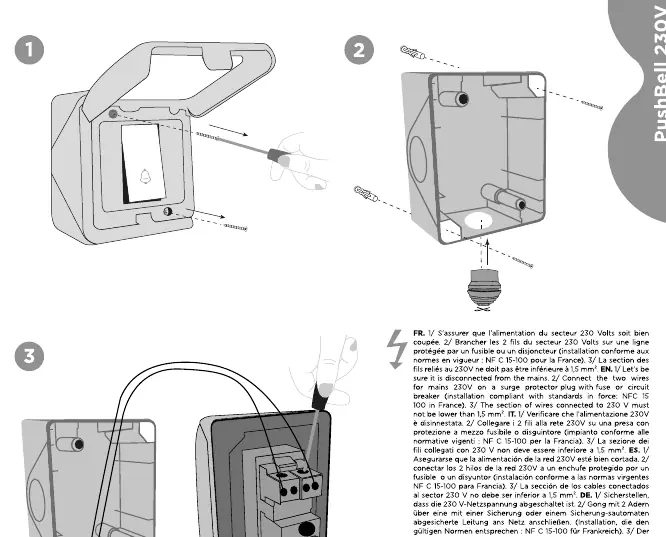
- Power Off: Ensure the 230V power supply is switched off at the circuit breaker before starting.
- Wiring: Connect the two wires to the 230V power supply. The wire section must be at least 1.5mm².
- Protection: Ensure the circuit is protected by a fuse or circuit breaker compliant with local standards (e.g., NF C 15-100 for France).
Compatibility
This device is compatible with the SCS Sentinel CFI0005 MecaBell 3238 230V wired chime.
Safety and Maintenance
The unit is rated IP55, meaning it is protected against harmful dust deposits and water jets from all directions. Do not clean with abrasive or corrosive substances; use a soft cloth. Keep the device out of reach of children.
Warranty and Support
The product includes a 2-year warranty. Proof of purchase is required for the duration of the warranty period. For technical support, contact the manufacturer via their website at www.scs-sentinel.com.
Official resources from the manual
Manufacturer information
SCS Sentinel
Practical help
Common problems
Doorbell not functioning after installation
Verify that the 230V power supply is active and that the circuit is properly protected by a fuse or circuit breaker.
Before use
- Ensure the 230V power supply is switched off at the circuit breaker.
- Verify that the wire section is at least 1.5mm².
- Ensure the circuit is protected by a fuse or circuit breaker.
- Check that the installation location is suitable for an IP55 rated device.
Show more Show less
Specs in practice
- Wire Section
- Minimum gauge of 1.5mm² required for safe operation.
Images and diagrams
- The wiring diagram illustrates the connection of the two wires to the doorbell button mechanism.
- The diagram shows the mounting process using screws and wall plugs.
Model compatibility
- Compatible with SCS Sentinel CFI0005 MecaBell 3238 230V wired chime.

Manual page author
David Miller
Documentation analyst