Home / Security
IQ Pro Security System User Manual
Quick guide for the IQ Pro security system. Learn how to manage alarms, reset smoke detectors, handle trouble conditions, manage user codes, and configure partitions.
Table of contents
Quick guide from the manual
The IQ Pro is a professional security system. This guide covers essential operations including alarm management, user code functions, and system maintenance. Always refer to your installer for system configuration and specific zone setups.
Alarm management
The system generates specific sounds for different alarm types:
- Fire: Temporal 3 (3 short beeps, 1.5s pause, repeat).
- Carbon Monoxide: Temporal 4 (4 short beeps, 5s pause, repeat).
- Intrusion (Burglary): Continuous siren.
- Flood: 1s on, 3s off, repeating.
Silencing alarms: If an alarm is accidental, enter your valid access code on the keypad to silence it. For fire alarms, ensure you contact your central station to avoid unnecessary dispatch.
Resetting smoke detectors
After a fire alarm condition, you must reset the sensors:
- Enter your user code to silence the alarm.
- Enter the user code again to send a sensor reset command to the smoke detectors.
- If the detector does not reset, it may still be detecting an alarm condition. Contact your alarm system provider if unsuccessful.
Trouble conditions
If the system detects a trouble condition, the Trouble indicator turns on and the keypad beeps twice every 10 seconds.
- Silence beeps: Press the [*] key.
- Examine troubles: Press [*][2].
- Override: Enter [*][2], scroll to 'Acknowledge All Troubles', and press [*] or enter 99.
Managing users and partitions
The IQ Pro supports up to 242 users. Access codes can be 4 or 6 digits, configured by your installer. User types include Master (full access), User (no system settings), and Guest (temporary access).
Partitions: The system can be divided into independent areas (partitions). A master code can access the entire system, while user codes are limited to assigned partitions.
Additional features
- Chime: Press and hold the Chime key to toggle entry/exit sensor notifications.
- Command outputs: Used for items like garage doors. Press [*][7] and follow the keypad prompts to activate.
Safety and maintenance
Keep the system in optimal condition:
- Cleaning: Wipe with a damp cloth only. Do not use abrasives, solvents, or alcohol.
- Testing: Test all keypad LEDs, sounders, and sirens regularly. Smoke detectors must be tested annually by your installer.
- Safety: Do not attempt to service the unit yourself. Ensure cables are not under mechanical strain.
Practical help
Common problems
Fire alarm sounds accidentally
Enter your access code to silence the alarm and call your central station to avoid dispatch.
Trouble indicator is on
Press [*][2] on the keypad to examine the specific trouble condition.
Smoke detector will not reset
If the alarm reactivates after a reset attempt, contact your alarm system provider.
Before use
- Verify with your alarm company that your system is equipped with fire detection.
- Fill out the 'Reference sheets' in the manual with your specific system information.
- Ensure all smoke detectors are tested annually by a professional.
- Test system keypad LEDs, sounders, bells, and sirens.
- Ensure the system is installed by qualified Service Persons only.
Show more Show less
Images and diagrams
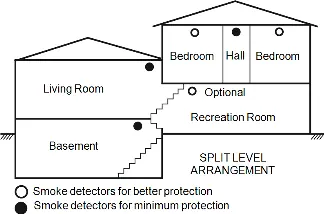
- Smoke detector placement diagrams show optimal locations for better protection (e.g., bedrooms, hallways) versus minimum protection.
- Ceiling/wall diagram indicates the 'Never Here' zone for smoke detectors (corners) and acceptable mounting distances (4 inches from ceiling/wall).
Model compatibility
- Command outputs are a supplementary feature not investigated by UL/ULC.
- System must be installed in non-hazardous, indoor locations only.

Manual page author
Emily Carter
User documentation editor