Tools / Power Tools
Sealey CP1210 12V Angle Grinder User Manual
Quick guide for the Sealey CP1210 12V Angle Grinder, covering safety, assembly, disc installation, operation, and maintenance procedures.
Table of contents
Quick guide from the manual
This document provides essential safety, assembly, and operational instructions for the Sealey CP1210 12V Angle Grinder. Always ensure the battery is removed before performing any maintenance or changing accessories. The tool is designed for grinding and cutting tasks; ensure you use only approved discs and wear appropriate personal protective equipment.
Assembly
To attach a grinding or cutting disc:
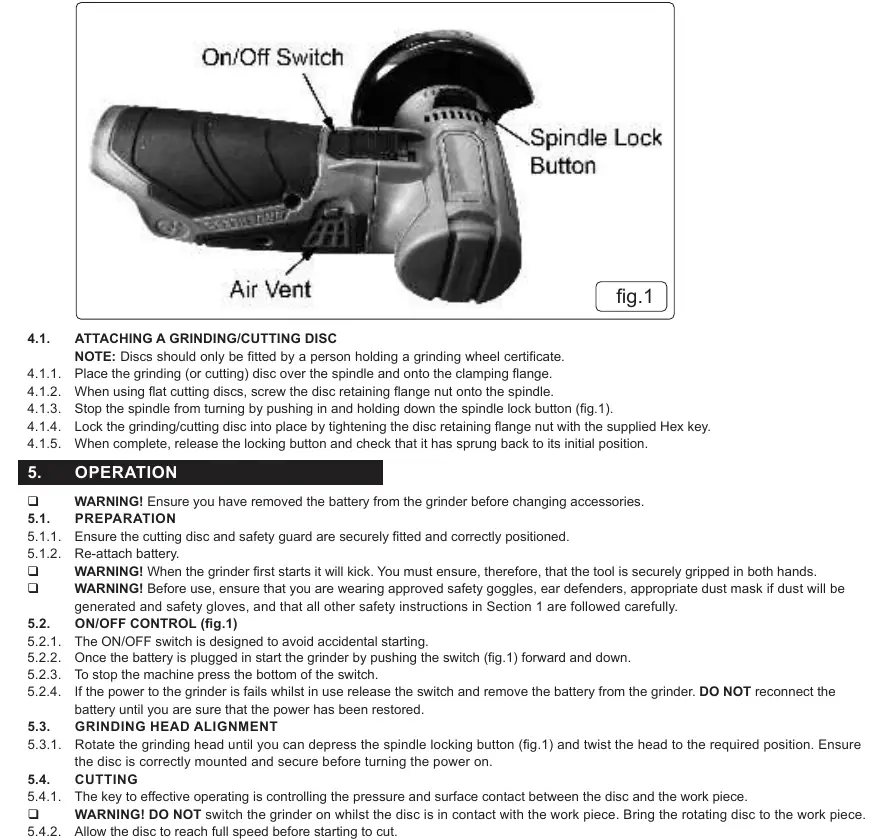
- Place the disc over the spindle and onto the clamping flange.
- If using a flat cutting disc, screw the disc retaining flange nut onto the spindle.
- Push and hold the spindle lock button to stop the spindle from rotating.
- Tighten the disc retaining flange nut using the supplied Hex key.
- Release the spindle lock button and verify it has returned to its initial position.
Operation
Before starting, ensure the safety guard is correctly positioned and the battery is attached. When starting, the tool may kick; hold it securely with both hands. To operate, push the ON/OFF switch forward and down. To stop, press the bottom of the switch. If power fails during use, release the switch and remove the battery immediately.
Maintenance
Regular maintenance is crucial for tool longevity and safety:
- Disconnect the battery before any inspection or cleaning.
- Regularly check that all fixing screws are tight.
- Clean the tool body with a soft brush or dry cloth; do not use caustic agents.
- Keep ventilation holes clear of dust and debris.
- Lightly lubricate moving parts at regular intervals.
Safety
Always wear approved safety goggles, ear defenders, gloves, and a dust mask if necessary. Do not operate the grinder if parts are missing or damaged. Never use the grinder near flammable materials or in damp locations. Do not touch the workpiece immediately after grinding as it will be very hot. Ensure the grinding disc is inspected for cracks or fissures before use.
Technical Specifications
- Model: CP1210
- Battery: 12V 2.0/4.0Ah Li-ion (not included)
- Disc Size: 75mm
- Free Speed: 19500rpm
- Motor Power: 200W
- Spindle Size: M5
For technical support, contact [email protected] or call 01284 757505.
Manufacturer information
Sealey Group
Practical help
Common problems
Grinder overheating
Ensure air vents are not covered during operation.
Disc damage
Inspect for fissures or cracks before use. If in doubt, do not use the disc.
Tool kicks on startup
Ensure the tool is securely gripped in both hands before switching on.
Before use
- Ensure the battery is removed before changing accessories.
- Check that the safety guard is securely fitted and correctly positioned.
- Inspect the grinding disc for any cracks or damage.
- Ensure you are wearing approved safety goggles, ear defenders, gloves, and a dust mask.
- Verify that the workpiece is securely clamped.
- Ensure the work area is clean and free of flammable materials.
Specs in practice
- Free Speed: 19500rpm
- The maximum rotational speed of the spindle without load.
- Spindle Size: M5
- The thread size required for compatible accessories.
- Noise Power: 80/69dB(A)
- Sound levels produced during operation; ear protection is required.
Images and diagrams
- The diagram shows the location of the On/Off switch, the Spindle Lock Button, and the Air Vents.
- The spindle lock button must be pressed to hold the spindle stationary while tightening or loosening the disc flange nut.
Model compatibility
- Requires Sealey CP1200BP (2.0Ah) or CP1200BP4 (4.0Ah) 12V battery.
- Requires Sealey CP1200MC battery charger.
- Only use approved grinding discs with a speed rating equal to or higher than the grinder.

Manual page author
David Miller
Documentation analyst
Organizes user manual content into clear summaries, with attention to model details, product context, and everyday usability.