Tools / Automotive Tools
Sealey VS5285 Diesel Engine Timing Tool Kit User Guide
Quick guide for the Sealey VS5285 Diesel Engine Timing Tool Kit. Includes safety instructions, application list for Ford 2.0TDCI EcoBlue engines, and step-by-step procedures for checking and installing timing belts.
Table of contents
Manual images
Click an image to enlargeQuick guide from the manual
The Sealey VS5285 is a specialized timing tool kit designed for Ford 2.0TDCI EcoBlue 'Panther' diesel engines. This guide covers the essential steps for checking and installing the timing belt. Important: Always refer to the vehicle manufacturer's service instructions for specific data and procedures. Incorrect timing can cause severe engine damage.
Safety Information
- Always wear approved eye protection and appropriate Personal Protective Equipment (PPE).
- Ensure the vehicle is properly supported by axle stands when raised.
- Do not start or move the vehicle while the engine is in gear or while timing devices are fitted.
- Keep children and unauthorized persons away from the work area.
- Store tools in a safe, dry, childproof location when not in use.
Product Contents
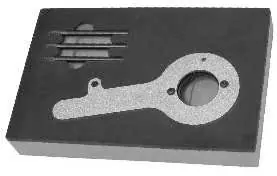
- VS5285.01: Crankshaft Setting Tool (OE Ref: 303-1637)
- VS5285.02: Camshaft Setting Pins / Tensioner locking pin (6mm Pin x3)
Applications
This kit is compatible with Ford 2.0TDCI EcoBlue engines found in the following models:
- Models: Edge (18-21), Focus (19-23), Focus Active (19-23), Galaxy (18-21), Mondeo (19-21), Ranger (19-22), S-MAX (18-21), Tourneo Custom (16-23), Tourneo Custom Active (20-23), Transit (16-23), Transit Custom (16-23), Transit Custom Active (20-23).
Operation
Checking the Belt Timing
- Remove the auxiliary drive belt, crankshaft pulley, and timing belt cover. Note: Some variants require cutting the drive belt; all auxiliary belts must be replaced.
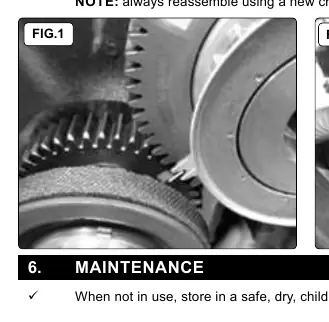
- Rotate the crankshaft in the normal direction until the mark on the Crankshaft Gear and the two marks on the Intermediate Gear are aligned. Note: Marks align every 14th full revolution.
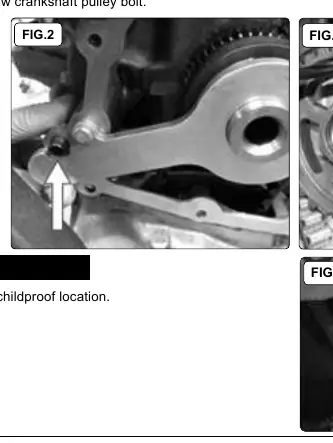
- Locate the VS5285.01 Crankshaft Setting Tool into the recessed profile of the Crankshaft Sprocket. Ensure the 3 teeth are fully located and the flat area is against the guide sleeve.
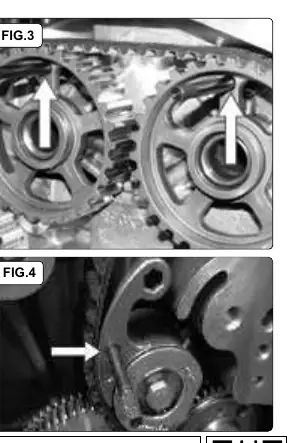
- Insert the two VS5285.02 Camshaft Setting Pins through the holes at the 12 o'clock position in the Camshaft Sprockets and into the cylinder head apertures.
Installation
- Ensure the engine is in the timed position using the setting pins and alignment tool.
- Fit a new timing belt tensioner and tighten the securing bolt to 25 Nm.
- Fit the new timing belt in a clockwise direction, starting at the intermediate sprocket.
- Remove all tooling and reassemble in the reverse order of dismantling. Always use a new crankshaft pulley bolt.
Manufacturer information
Sealey Group
Practical help
Common problems
Timing marks do not align
Continue rotating the crankshaft; the marks only align every 14th full revolution.
Camshaft setting pins cannot be fully installed
The engine timing position may need to be adjusted.
Before use
- Wear approved eye protection
- Ensure vehicle is supported by axle stands
- Do not start engine with timing tools fitted
- Verify engine code matches application list
- Ensure you have a new crankshaft pulley bolt for reassembly
Specs in practice
- Tensioner bolt torque
- 25 Nm
Images and diagrams
- Fig 1: Crankshaft gear and intermediate gear alignment marks
- Fig 2: Correct placement of VS5285.01 Crankshaft Setting Tool
- Fig 3: Insertion of Camshaft Setting Pins into sprockets
- Fig 4: Using the Tensioner Retaining Pin
Model compatibility
- Compatible with Ford 2.0TDCI EcoBlue 'Panther' engines
- Covers various Ford models from 2016-2023

Manual page author
David Miller
Documentation analyst
Organizes user manual content into clear summaries, with attention to model details, product context, and everyday usability.