Home / Security
Quick Start Guide for Security Brands Ascent M7 Access Control Unit
Quick start guide for the Security Brands Ascent M7 cellular access control unit. Includes installation, wiring diagrams for power, relays, Wiegand devices, and status inputs, plus safety warnings and technical specifications.
Table of contents
Manual images
Click an image to enlargeQuick Start Guide Overview
This guide provides essential instructions for installing and setting up the Security Brands Ascent M7 cellular access control unit. Important: This unit is a cellular accessory for a gate or door. An uninterrupted cellular connection cannot be guaranteed, so an emergency egress or primary entry mechanism (such as a transmitter, fire box, or mechanical release) should always be used.
Unpacking and Mounting
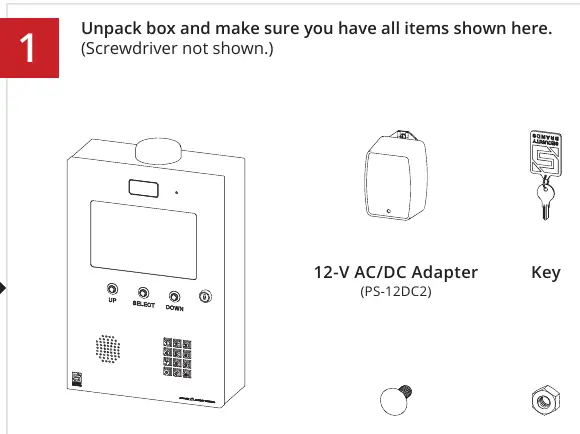
Ensure you have all items shown in the box: the Ascent Unit, 12-V AC/DC Adapter (PS-12DC2), Key, 4 Carriage Bolts, and 4 Hex Nuts. A screwdriver is required but not included.
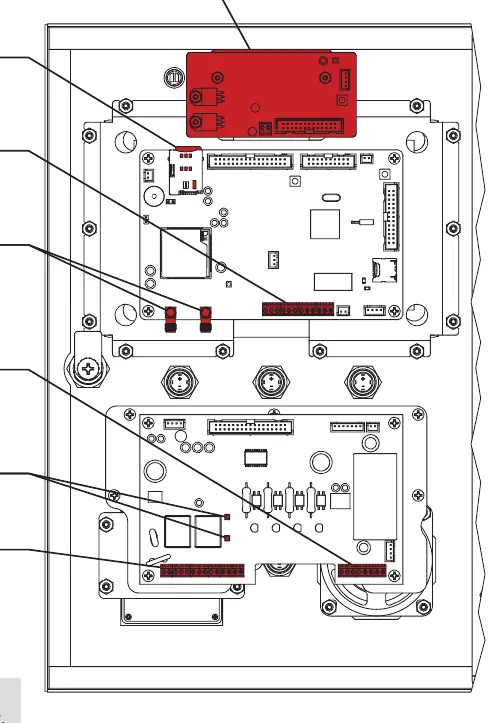
- Unlock and open the front door of the unit to access mounting, wiring, and setup terminals.
- Mount the unit on a gooseneck pedestal using the included hardware.
- Use all four carriage bolts when mounting.
- If using alternate mounting, the 4G LTE Antenna Extension Kit (Model 16-ANTX-1) must be purchased and installed to avoid signal loss.
- Seal all openings created in the enclosure to prevent damage.
Wiring Connections
Feed wires through the back of the unit and connect them using the included screwdriver. Do not use excessive force.
Power and Relay Terminals
The unit accepts 12-24 VAC/DC. If using a third-party power source, ensure it does not exceed 24 VAC/DC. Connect the positive and negative wires to the Power terminals (J3). Relay A and Relay B terminals are available for gate operator or door opener connections.
Status and Event Terminals
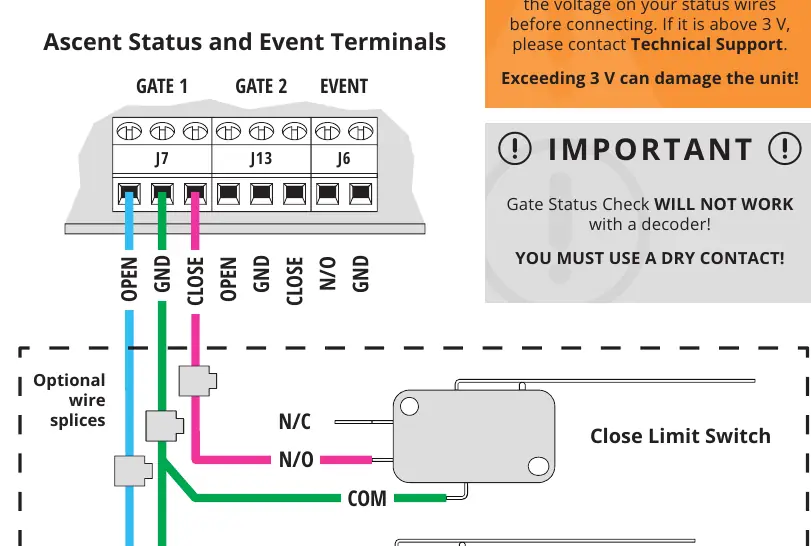
These terminals are designed for low voltage (3V or less). Exceeding 3V can damage the unit. The Gate Status Check will not work with a decoder; you must use a dry contact.
Wiegand Device Terminals
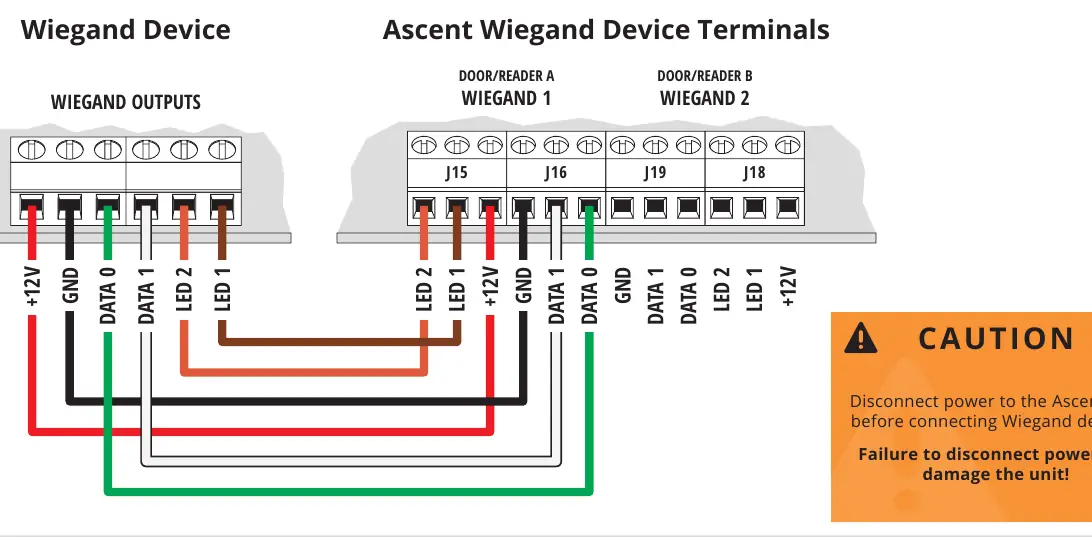
For connecting Wiegand devices such as card readers, use the Wiegand 1 or Wiegand 2 terminals. Caution: Disconnect power to the Ascent unit before connecting Wiegand devices.
Activation and Setup
The Ascent unit will not work until the activation process is complete. Follow the included Activation Guide to create an account. Adding and deleting codes is done through Summit Control, not from the keypad on the unit. For help, contact Summit Control at 972-474-6422.
Technical Specifications
- Input Power: 12-24 VAC/DC (no more than 10% beyond this range).
- Current Draw: Less than 690 mA @ 12 VDC; less than 420 mA @ 24 VDC.
- Status Terminals: 3V or less.
- Compatibility: Not intended for solar applications.
Manufacturer information
Security Brands, Inc.
Practical help
Common problems
Unit will not work
The activation process must be complete. Follow the included Activation Guide.
No signal
If not using a standard gooseneck pedestal mount, you must purchase and install the 4G LTE Antenna Extension Kit (Model 16-ANTX-1).
Status terminals damaged
Ensure the voltage on status wires is 3V or less before connecting. Do not use a decoder; use a dry contact.
Power source damage
Do not exceed 24 VAC/DC. Ensure positive is connected to positive and negative to negative.
Before use
- Verify power source is 12-24 VAC/DC.
- Ensure the gate path is clear before operating.
- Have a screwdriver ready for wiring.
- Check if using a third-party power source (requires specific wiring procedure).
- Ensure the 'hockey puck' antenna remains in place even if using an extension.
Specs in practice
- Status Terminals
- Low voltage (3V or less). Exceeding this will damage the unit.
- Current Draw
- Less than 690 mA @ 12 VDC or 420 mA @ 24 VDC.
Images and diagrams
- Power and Relay Terminals: Shows connection for power and gate operator/door opener.
- Status and Event Terminals: Shows wiring for gate status and request-to-exit devices.
- Wiegand Terminals: Shows wiring for card readers.
Model compatibility
- Not intended for solar applications.
- Gate Status Check will not work with a decoder; must use a dry contact.
- Terminals vary widely across gate/door opener manufacturers.

Manual page author
Emily Carter
User documentation editor
Prepares concise manual descriptions and highlights the most useful setup, operation, and maintenance information for readers.