Home / Security
User Manual for Security Brands Remote 300 14-R300
Quick guide for the Security Brands Remote 300 (14-R300). Learn how to set up DIP switches, pair buttons, and operate your gate or door opener safely.
Table of contents
Manual images
Click an image to enlargeQuick Guide
The Remote 300 is a 300-MHz remote control with two programmable buttons. The most critical step for operation is matching the DIP switch settings on the remote to the settings on your receiver. The CR2032 battery comes pre-installed.
What's in the Box
- Remote 300 unit
- Visor clip
Setup
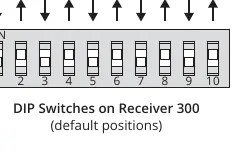
- Configure Receiver: Set the DIP switches on your 300-MHz receiver to your desired positions. For best results, use the Security Brands Receiver 300 (14-REC300).
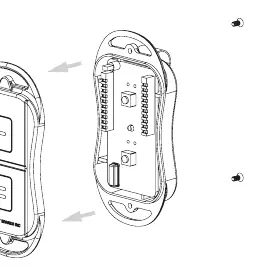
- Open Remote: Remove the two screws on the bottom of the Remote 300 and pull the case apart. You may remove the visor clip for easier access. Ensure the circuit board remains attached to the base.
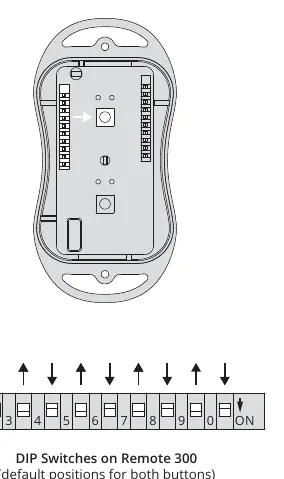
- Locate DIP Switches: Find the DIP switches on the Remote 300 circuit board that correspond to the button you wish to program.
- Match Settings: Set the DIP switches on the remote to match the positions set on your receiver.
- Close Unit: Once configured, close the unit and secure it with the screws. Repeat the process for the second button if you wish to pair it with a different receiver or the same one.
How to Use
- Ensure you are within range of the 300-MHz receiver.
- Press the remote button linked to the desired receiver. The status LED should light up.
- The receiver will respond and operate the gate or door.
Troubleshooting
If the receiver does not respond:
- Ensure the receiver has power.
- Check that the remote LED lights up when a button is pressed; if not, check the battery.
- Ensure the receiver antenna is not inside a metal box.
- Verify that the DIP switch positions match exactly on both the remote and the receiver.
- If using a third-party receiver, ensure the frequency jumper is set to the 300-MHz position.
Safety Warning
WARNING! Automatic gates can cause serious injury or death. Always check that the gate path is clear before operating. Reversing or other safety devices should always be used.
Contact Support
For assistance, call (972) 474-6390 or email [email protected].
Manufacturer information
Security Brands, Inc.
Practical help
Common problems
Receiver does not respond
Check battery, ensure antenna is not in a metal box, verify DIP switch positions match, and ensure frequency jumper is set to 300-MHz (if using a third-party receiver).
Before use
- Ensure you have a 300-MHz receiver.
- Verify the CR2032 battery is installed (pre-installed).
- Identify the DIP switch settings on your receiver.
- Have a screwdriver ready to open the remote case.
Specs in practice
- DIP Switches
- Physical switches used to set the unique security code for the remote and receiver.
Images and diagrams
- DIP Switch Settings: Shows the ON/OFF positions for the switches on both the receiver and the remote.
- Opening the Remote: Illustrates removing the two screws on the bottom to access the internal circuit board.
Model compatibility
- Requires a 300-MHz receiver.
- Compatible with Security Brands Receiver 300 (14-REC300).

Manual page author
Emily Carter
User documentation editor
Prepares concise manual descriptions and highlights the most useful setup, operation, and maintenance information for readers.