Home / Security
Security Brands 14-RK10 Ridge Reskey User Guide
Quick start guide for the Ridge Reskey 14-RK10 keypad, covering installation, battery replacement, and programming procedures for 433-MHz and 300-MHz receivers.
Table of contents
Quick guide from the manual
This document provides essential instructions for the installation and programming of the Ridge Reskey 14-RK10 keypad. It covers physical mounting, battery installation, and specific programming sequences for both 433-MHz (Ridge 2.0) and 300-MHz receiver systems.
Installation and Setup
Before installation, ensure you have the Ridge Reskey unit and two AAA batteries. The unit is IP44-rated, providing some protection from the elements, but it must be mounted in a covered location. Avoid mounting near metal objects or sources of interference that could block RF transmission.
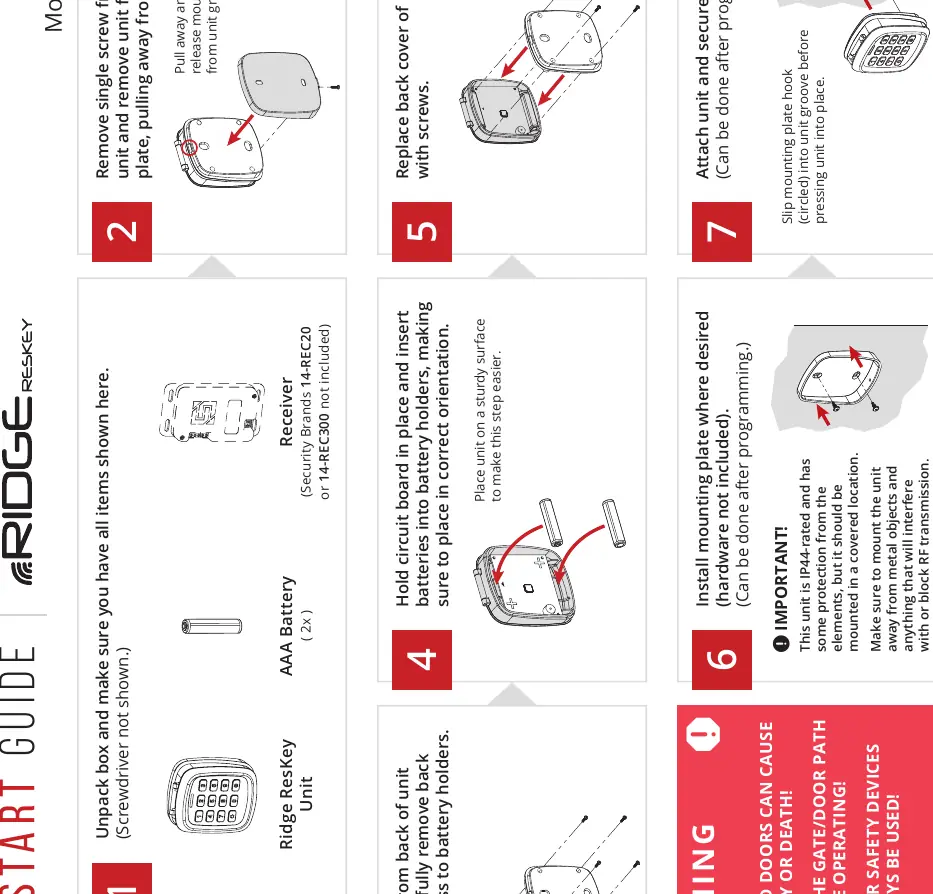
- Remove the single screw from the bottom of the unit and pull the unit away from the mounting plate.
- Remove the screws from the back of the housing to access the battery holders.
- Insert two AAA batteries, ensuring correct orientation.
- Install the mounting plate on your desired surface (hardware not included).
- Slip the mounting plate hook into the unit groove and secure the unit with the bottom screw.
433-MHz Programming
For use with the Ridge 2.0 Transceiver (14-REC20):
- Pairing: Press and hold the programming button on the receiver for two seconds until the LED lights up. Perform the desired programming sequence on the keypad. The LED will turn off if pairing is successful.
- Default Master Code: 1251.
- Functions: You can add/delete access codes, change the master code, add limited-use codes (Channel A only), or delete all codes using the keypad sequences provided in the manual.
300-MHz Programming
For use with 300-MHz receivers (e.g., 14-REC300):
- DIP Switches: Ensure the receiver DIP switch positions match your configuration (default is 0101010101).
- Default Master Code: 9999.
- Functions: Use the keypad to add/delete access codes, change the master code, or delete all codes.
Safety and Support
Automatic gates and doors can cause serious injury or death. Always ensure the path is clear before operating. Reversing or other safety devices should always be used. For technical support, contact Security Brands Inc. at 972-474-6390 or email [email protected]. Support is available Monday–Friday, 8am–5pm Central.
Manufacturer information
Security Brands, Inc.
Practical help
Common problems
Unit not responding or pairing fails
Ensure batteries are fresh and correctly oriented. Check for metal obstructions near the unit that may block RF signals.
Programming sequence not accepted
Verify you are using the correct Master Code (1251 for 433-MHz, 9999 for 300-MHz) and that you are in the correct sub-mode.
Before use
- Verify you have the Ridge Reskey unit and 2x AAA batteries.
- Ensure you have a screwdriver (not included).
- Confirm your receiver type (433-MHz or 300-MHz) to follow the correct programming section.
- Choose a covered mounting location away from metal objects.
- Check that the gate/door path is clear of obstructions.
Images and diagrams
- Steps 1-7 illustrate the physical assembly, battery insertion, and mounting process.
- Programming sections use flow-chart style sequences (e.g., Master Code -> Sub Mode -> Action) to guide input.
Model compatibility
- 433-MHz programming is for Ridge 2.0 Transceiver (14-REC20) only.
- 300-MHz programming is for 300-MHz receivers (e.g., 14-REC300).

Manual page author
David Miller
Documentation analyst
Organizes user manual content into clear summaries, with attention to model details, product context, and everyday usability.