Home / Security
Wiring Guide for Security Brands 19-100I Advantage DKLP to Aiphone LEM-1DL
A comprehensive wiring guide for connecting the Security Brands 19-100I Advantage DKLP intercom system to the Aiphone LEM-1DL, including power supply connections and gate operator integration.
Table of contents
Quick guide from the manual
This document provides the specific wiring configuration required to connect the Security Brands 19-100I Advantage DKLP intercom to an Aiphone LEM-1DL master station. It includes instructions for integrating the included 12V power adapter and connecting the system to a gate operator open input.
Wiring and Connections
The system requires careful connection of the wire harness from the 19-100I unit to the Aiphone LEM-1DL terminals and the power supply. Key connection points include:
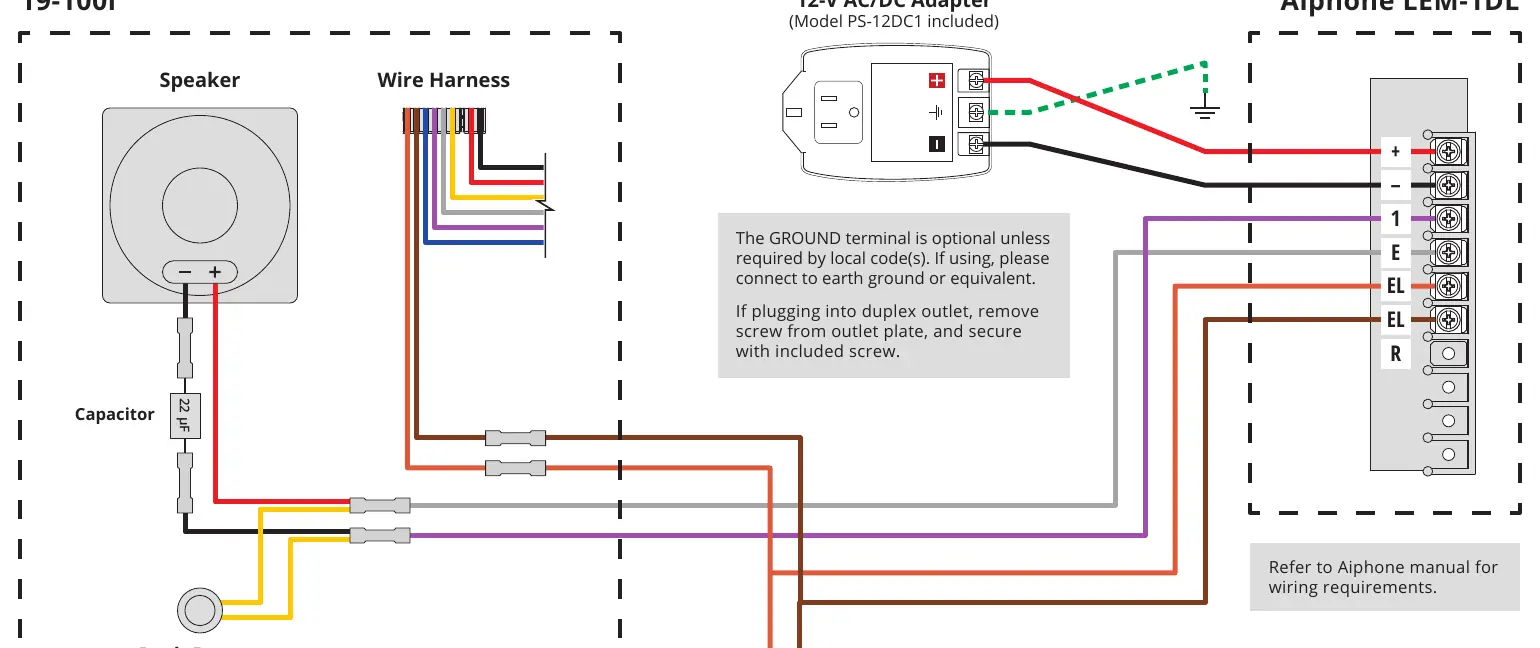
- Power Adapter: Connect the included PS-12DC1 12V AC/DC adapter. The positive (+) terminal connects to the Aiphone (+) terminal, and the negative (-) terminal connects to the Aiphone (-) terminal.
- Grounding: The ground terminal on the power adapter is optional unless required by local electrical codes. If used, connect it to an earth ground.
- Gate Operator: The system includes wiring paths to connect to a gate operator open input.
- Aiphone Terminals: Ensure wires are correctly mapped to the Aiphone LEM-1DL terminals labeled +, -, 1, E, EL, EL, and R as per the provided wiring diagram.
Important Installation Notes
- Always refer to the official Aiphone manual for specific wiring requirements of the LEM-1DL unit.
- If plugging the power adapter into a duplex outlet, remove the existing screw from the outlet plate and secure the adapter using the included screw.
- The 19-100I unit includes a 22 µF capacitor connected to the speaker and push button assembly; ensure these factory connections remain intact during installation.
Technical Support
If you require assistance, contact Security Brands Inc. support:
Phone: 844-259-8265Email: [email protected]: Monday–Friday, 8am–5pm Central Time
Manufacturer information
Security Brands, Inc.
Practical help
Common problems
Power adapter does not fit securely in the outlet.
If using a duplex outlet, remove the center screw from the outlet plate and secure the adapter using the screw provided with the unit.
Uncertainty regarding ground connection.
The ground terminal is optional. Only connect it to earth ground if required by your local electrical codes.
Before use
- Verify you have the 19-100I intercom unit.
- Ensure you have the Aiphone LEM-1DL master station.
- Confirm the included PS-12DC1 12V AC/DC adapter is available.
- Review the Aiphone manual for specific terminal requirements.
- Check local codes regarding earth grounding requirements.
Specs in practice
- 22 µF Capacitor
- A component pre-installed in the 19-100I unit; do not disconnect or alter this component.
Images and diagrams
- The diagram illustrates the wire harness connections from the 19-100I to the Aiphone LEM-1DL.
- Red and black lines indicate the power supply path from the adapter to the Aiphone unit.
- The diagram shows the integration point for the Gate Operator Open Input.
Model compatibility
- Designed specifically for connecting the Advantage DKLP (19-100i) to the Aiphone LEM-1DL.
- Requires adherence to Aiphone-specific wiring standards.

Manual page author
David Miller
Documentation analyst
Organizes user manual content into clear summaries, with attention to model details, product context, and everyday usability.