Automotive / Motorcycle Communication
Sena 10C Bluetooth Motorcycle Headset with Camera User Guide
Quick start guide for the Sena 10C Bluetooth motorcycle headset with integrated camera. Learn how to install, pair, operate the intercom, record video, and troubleshoot your device.
Table of contents
Manual images
Click an image to enlargeQuick Guide
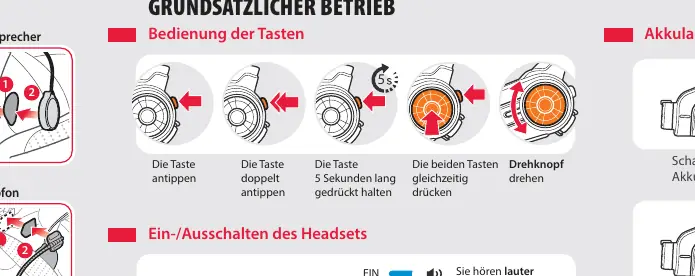
The Sena 10C is a combined Bluetooth communication system and camera for motorcycles. To power the device on or off, hold the Jog Dial and the Phone Button simultaneously for 1 second. To pair with a mobile phone, hold the Phone Button for 5 seconds until the LED flashes and you hear the voice prompt. Use the Jog Dial to adjust volume, navigate the radio, and control camera/intercom functions.
Device Layout and Installation
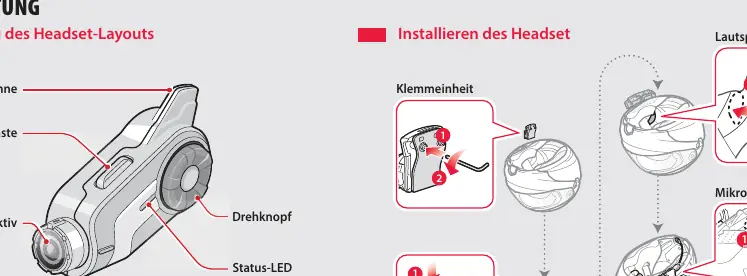
The headset features an antenna, camera lens, Jog Dial, Phone Button, and status LED. Ports include a Micro-HDMI cable connection, microSD card slot, and a charging/firmware update port. Installation involves attaching the clamp unit to the helmet, securing the speakers inside the helmet lining, and positioning the microphone.
Basic Operation
- Power On/Off: Press and hold the Jog Dial and Phone Button for 1 second.
- Volume: Rotate the Jog Dial.
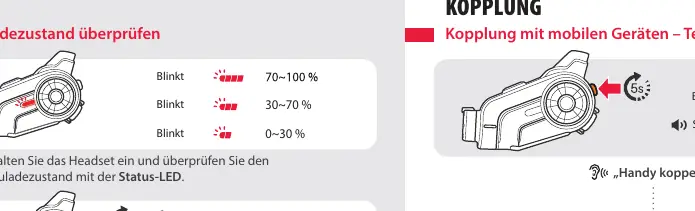
- Battery Status: Turn the headset on and check the status LED. A flashing LED indicates the charge level (High, Medium, Low).
- Charging: Connect via the charging port using an AC adapter or USB cable.
Pairing and Phone Features
To pair with a phone, ensure the headset is in pairing mode (hold Phone Button for 5 seconds). Once paired, you can use the Phone Button to answer, end, or reject calls. You can also use voice dialing or speed dial features if configured.
Intercom and Camera
Intercom: Pair with other headsets by following the specific intercom pairing sequence. Once paired, you can initiate a 2-way intercom conversation.
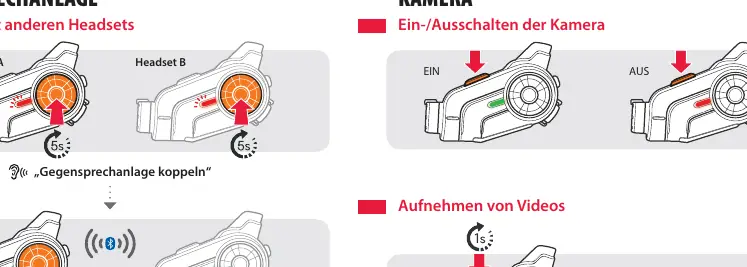
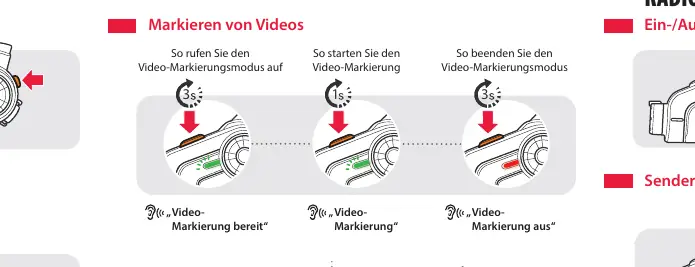
Camera: Use the camera button to start/stop recording or take photos. You can also tag videos during recording to mark important moments.
Settings and Troubleshooting
You can configure settings via the headset itself, the Sena Device Manager (via USB on a computer), or the Sena Smartphone App. If the device malfunctions, use a small pin to press the Reset button located in the pinhole on the back of the headset. To perform a full factory reset, hold the Phone Button for 12 seconds, then tap the Jog Dial.

Manufacturer information
SENA
Practical help
Common problems
Device not functioning correctly
Press the Reset button located in the pinhole on the back of the headset using a pointed object.
Restore factory settings
Hold the Phone Button for 12 seconds, then tap the Jog Dial. The headset will reset and turn off.
Before use
- Charge the battery fully before first use.
- Install the clamp unit securely to the helmet.
- Insert a microSD card into the slot for camera recording.
- Pair your mobile phone via Bluetooth settings.
- Download the Sena Smartphone App for easier configuration.
Specs in practice
- Phone Button
- Used for power, answering/ending calls, and entering pairing modes.
Images and diagrams
- The layout diagram identifies the antenna, camera lens, Jog Dial, Phone Button, and various ports.
- Installation diagrams show the correct placement of the clamp unit, speakers, and microphone inside the helmet.
Model compatibility
- Compatible with the Sena Smartphone App (Android and iPhone).
- Requires Sena Device Manager software on a computer for firmware updates.

Manual page author
David Miller
Documentation analyst
Organizes user manual content into clear summaries, with attention to model details, product context, and everyday usability.