Automotive / Motorcycle Communication
User Guide for SENA Summit X Snow Sports Communication System
Quick start guide and user manual for the SENA Summit X. Learn how to install the device, pair with smartphones, use Mesh and Wave Intercom, and troubleshoot common issues.
Table of contents
Manual images
Click an image to enlargeQuick Guide from the Manual
The SENA Summit X is a communication system designed for snow sports. To get started, download the Sena Outdoor app and the WAVE Intercom app from the Google Play Store or App Store. Ensure the device is fully charged before first use.
About the Summit X
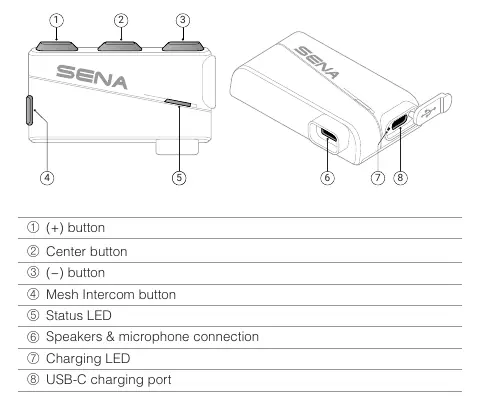
The device features Mesh Intercom 3.0, Wave Intercom compatibility, and Bluetooth 5.2. It includes a status LED, charging LED, and a USB-C charging port. Controls consist of a (+) button, (-) button, Mesh Intercom button, and a Center button.
Installation
Select the mount type that fits your helmet:


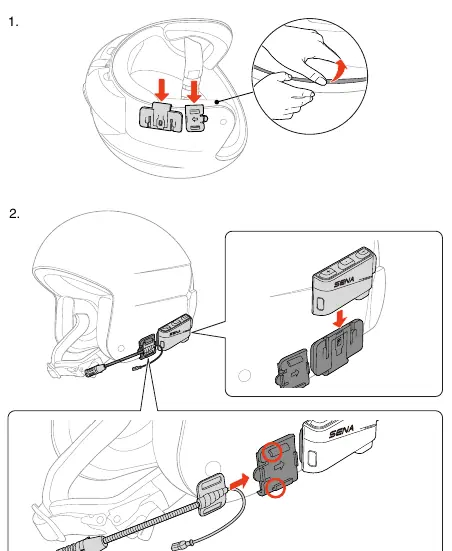
- Clip Mount: Attach the clip mount to the helmet shell.
- Glued Surface Mounting Plate: Clean the surface and adhere the plate to the helmet.
- Strap Mounts: Use the short or long strap mounts to secure the unit to helmet straps.
Ensure the speakers are positioned correctly inside the helmet using the provided speaker pads and Velcro pads.
Basic Operation
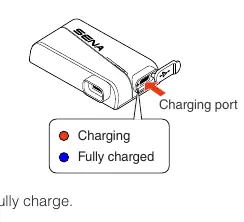
- Charging: Connect the USB-C cable. It takes 2 hours to fully charge. The device supports fast charging (3.5 hours of Mesh Intercom with a 20-minute charge).
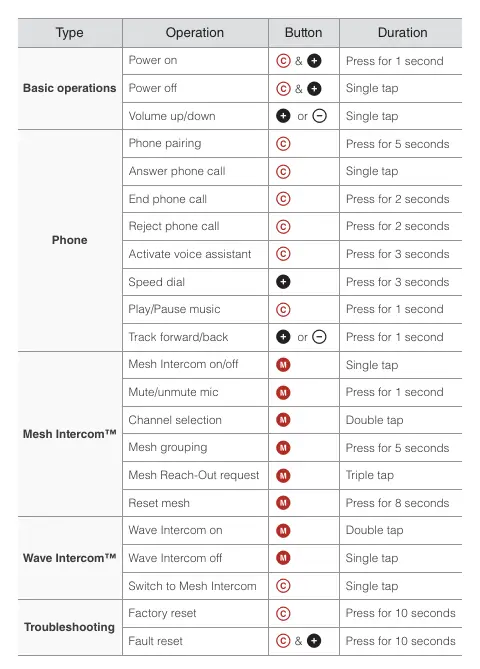
- Power On/Off: Press the Center button and (+) button simultaneously for 1 second to power on, or tap to power off.
- Volume: Tap the (+) or (-) button to adjust volume.
Using with a Smartphone
The device automatically enters phone pairing mode when turned on for the first time or after a factory reset. Use the Sena Outdoor app to assign speed dial presets and configure settings.
Mesh Intercom
The Summit X supports two modes:
- Open Mesh: Allows communication with virtually unlimited users on 6 available channels.
- Group Mesh: Creates a private conversation group for up to 24 participants.
Use the Mesh Intercom button to toggle modes, mute/unmute the mic, or initiate a Mesh Reach-Out request.
Wave Intercom
Wave Intercom uses cellular data for communication. Open the WAVE Intercom app, then double-tap the Mesh Intercom button to join. Single-tap the Mesh Intercom button to end the session.
Troubleshooting
- Factory Reset: Press the Center button for 10 seconds to restore default settings.
- Fault Reset: If the device is unresponsive, disconnect the charging cable and press the Center and (+) buttons simultaneously for 10 seconds.
Manufacturer information
SENA
Practical help
Common problems
Device is on but not responding
Perform a fault reset by pressing the Center and (+) buttons simultaneously for 10 seconds.
Mesh grouping failed
Ensure the process is completed within 30 seconds; otherwise, you will hear 'Grouping failed'.
Cannot toggle between Open and Group Mesh
If you have never participated in a group mesh, you cannot toggle; you will hear 'No group available'.
Before use
- Download the Sena Outdoor app.
- Download the WAVE Intercom app.
- Charge the device fully (2 hours).
- Select the appropriate mount (Clip, Glued, or Strap) for your helmet.
- Position speakers correctly using provided pads.
Specs in practice
- Mesh Intercom 3.0
- Latest technology for robust connection and extended talk time.
- Wave Intercom
- Communication feature using cellular data.
- Bluetooth 5.2
- Wireless connectivity standard for smartphone pairing.
Images and diagrams
- The device features 8 main components including buttons, status LEDs, and charging ports.
- Mounting diagrams show specific steps for Clip, Glued, and Strap installations.
- Quick Reference table on page 2 summarizes button combinations for all operations.
Model compatibility
- Mesh 2.0 mode is available for communication with legacy products.
- Wave Intercom requires an active cellular data connection via the app.
- Third-party USB chargers must be approved by FCC, CE, or IC.

Manual page author
David Miller
Documentation analyst
Organizes user manual content into clear summaries, with attention to model details, product context, and everyday usability.