Automotive / Motorcycle Communication
User Guide for Sena 10S Motorcycle Bluetooth Communication System
Quick guide for the Sena 10S motorcycle Bluetooth communication system. Learn how to install the unit, pair devices, use the intercom, manage music, and configure settings.
Table of contents
Manual images
Click an image to enlargeQuick guide from the manual
The Sena 10S is a Bluetooth 4.1 communication system designed for motorcycle helmets. It supports multi-way intercom, music sharing, and FM radio. Key operations are performed using the Jog Dial and Phone Button. Ensure the unit is fully charged before first use and that the firmware is updated via the Sena Device Manager.
Installation
The headset can be mounted using either the Clamp Unit or the Glued Surface Mounting Adapter.
Installing the Main Unit
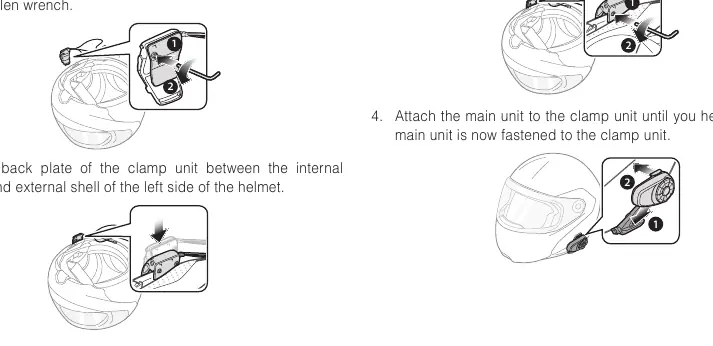
- Clamp Unit: Loosen the two screws on the back plate, insert the plate between the helmet's internal padding and external shell, then tighten the screws. Attach the main unit until it clicks.
- Glued Surface Mounting Adapter: Clean the helmet surface, peel off the adhesive cover, and attach the adapter. Allow 24 hours for maximum adhesion before attaching the clamp unit.
Installing Speakers and Microphones
- Speakers: Attach the hook and loop fasteners to the ear pockets inside the helmet, then attach the speakers. Use speaker pads if the helmet has deep ear pockets.
- Microphones: Attach the wired boom microphone or wired microphone to the inside of the helmet using the provided hook and loop fasteners. Ensure the microphone receiver is positioned near your mouth.
Getting Started
Powering On/Off: Press the Phone Button and the Jog Dial simultaneously.
Charging: Connect the USB cable to a computer or wall charger. The LED turns red while charging and blue when fully charged. Charging takes approximately 2.5 hours.
Volume Adjustment: Rotate the Jog Dial. Volume is maintained independently for each audio source.
Pairing
Mobile Phone: Press and hold the Phone Button for 5 seconds until you hear "Phone pairing". Search for "Sena 10S" on your phone and enter 0000 for the PIN.
Intercom: Press and hold the Jog Dial for 5 seconds until the LED flashes rapidly. Tap the Jog Dial on one of the headsets to establish the connection.
Intercom Features
The 10S supports up to 4-way intercom. You can start a conversation by tapping the Jog Dial (once for the 1st friend, twice for the 2nd, three times for the 3rd). To end a conversation, press and hold the Jog Dial for 1 second.
FM Radio
To turn on the FM radio, press the Phone Button for 1 second. You can seek stations by rotating the Jog Dial while pressing it. Stations can be saved as presets using the Jog Dial or by double-tapping the Phone Button to scan.
Configuration
To enter the configuration menu, press and hold the Jog Dial for 10 seconds. Use the Jog Dial to navigate through settings like Speed Dial, Audio Boost, VOX phone, and HD Intercom. Tap the Phone Button to enable a feature or the Jog Dial to disable it.
Troubleshooting
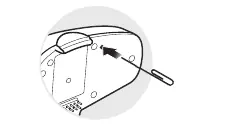
If the device is not working properly, you can perform a Fault Reset by inserting a paper clip into the pin-hole reset button. To restore factory settings, press and hold the Phone Button for 10 seconds until the LED is solid red, then press the Jog Dial to confirm.
Manufacturer information
SENA
Practical help
Common problems
Intercom failure
Ensure the intercom friend is within range and not currently in a conference intercom or mobile phone call.
Intercom disconnection
The unit will automatically attempt to reconnect every 8 seconds. Tap the Jog Dial to stop the reconnection attempt.
Pairing issues
Clear the pairing list by performing a factory reset or using the 'Delete all pairings' option in the configuration menu.
Before use
- Charge the unit fully (approx. 2.5 hours).
- Install the clamp unit or glued adapter securely.
- Position speakers in the helmet ear pockets.
- Position the microphone near your mouth.
- Download the Sena Smartphone App for easier configuration.
- Update firmware via Sena Device Manager.
Specs in practice
- Bluetooth 4.1
- Wireless connectivity standard supporting Headset, HFP, A2DP, and AVRCP profiles.
- Universal Intercom
- Allows pairing with non-Sena Bluetooth headsets that support the Hands-Free Profile (HFP).
- Advanced Noise Control
- Reduces background noise during intercom conversations.
Images and diagrams
- Clamp unit installation steps showing screw adjustment and helmet insertion.
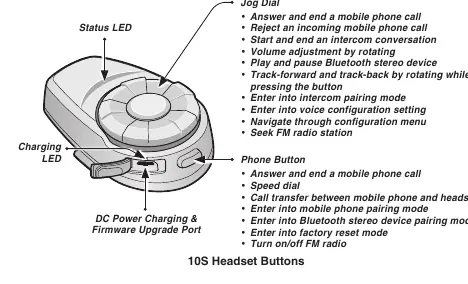
- Button layout identifying the Jog Dial, Phone Button, and charging port.
- Reset pin-hole location for fault reset.
Model compatibility
- Compatible with Sena 20S, SMH10, and SMH5 for intercom.
- Universal Intercom works with non-Sena headsets supporting HFP.
- Handlebar Remote (sold separately) is supported.

Manual page author
Emily Carter
User documentation editor
Prepares concise manual descriptions and highlights the most useful setup, operation, and maintenance information for readers.