Power / Power Inverters
User Manual for Alpha Digital 17Air 3-in-1 Foldable Wireless Charger
Quick guide for the Alpha Digital 17Air 3-in-1 foldable wireless charger. Learn how to set up, use, and troubleshoot your charging station for phones, iWatch, and earbuds.
Quick answers from the manual
Quick answer
- To use the 17Air charger, connect the provided 18W adapter and cable to the Type-C port. Unfold the stand, and place your phone, iWatch, and earbuds on their respective charging areas. p. 2, 3
Key actions
- Unfolding the charger p. 2
First start
- Connect the provided 18W adapter and cable to the charger and plug into a power supply. p. 3
Problems and fixes
Charging is slow
Use the provided 18W adapter and cable; close background apps.
p. 5Technical specifications
| Parameter | Value | Meaning | Pages |
|---|---|---|---|
| Input | 9V 2A | Power requirement | p. 4 |
| Phone Output | 15W/10W/7.5W/5W | Wireless charging power | p. 4 |
Where to find it in the PDF
- Product Introduction and Operation p. 2
- Setup and LED Indicators p. 3
- Specifications and Compatibility p. 4
Table of contents
Manual images
Click an image to enlargeQuick guide from the manual
To begin using your 3-in-1 wireless charger, connect the provided 18W adapter and cable to the charger and plug it into a power supply. Ensure your devices are placed on the designated charging areas for optimal performance. If charging is slow, verify you are using the included 18W adapter and that no apps are running in the background on your phone.
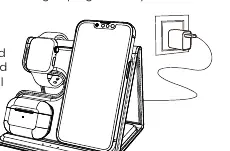
Product Introduction
This multi-functional wireless charging station is designed to charge your phone, iWatch, and earbuds simultaneously. It features a foldable design for portability and includes specific charging zones for each device type.
Operation Instructions
The charger is foldable for easy storage and transport. Follow these steps to set it up:
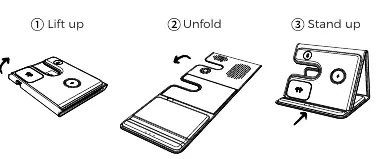
- Lift up: Raise the charging panel from its folded position.
- Unfold: Extend the panel fully.
- Stand up: Position the charger upright to access the charging areas.
LED Indicators
The charger features 3 LED indicators that change status based on the device's charging state:
- Power On: Green light on for 3 seconds.
- Standby: Light off.
- Charging: Green light on for 30 seconds, then turns off.
- Completed: Light off.
- FOD & Error: Green light flashes (for phones and earbuds).
Specifications
- Input: 9V 2A
- Phone Output: 15W/10W/7.5W/5W
- Earbuds Output: 3W
- iWatch Output: 2.5W
- Transmission Distance (Phone): ≤4mm
- Input Socket: Type-C
Compatibility
- Phone: Any phone with wireless charging functionality.
- iWatch: Apple Watch 9/8/7/6/5/4/3/2/SE 2/SE Ultra/Ultra 2.
- Earbuds: Earbuds with wireless charging functionality.
Troubleshooting
If you encounter issues, check the following:
- Charging is slow: Ensure you are using the 18W adapter and cable provided in the package. Close unnecessary apps on your phone.
- Charger heats up: It is normal for devices to generate heat during wireless charging. If the station becomes excessively hot, remove the devices and allow the charger to cool down.
- Indicator light is off: Unplug and re-plug the power adapter.
- Charging fails: Ensure your phone case is not thicker than 4mm and contains no metal, pop rings, credit cards, or magnetic attachments.
Safety Notice
- Do not disassemble the product or expose it to fire or water.
- Avoid using the charger in extremely hot, humid, or corrosive environments.
- Keep out of reach of children and pets.
- Avoid dropping the product from high places.
Support
For any support or comments concerning our products, please send an email to: [email protected] or call the toll-free number in the USA: 800-473-5156.
Manufacturer information
Sharper Image
Practical help
Common problems
Charging is slow
Ensure you are using the 18W adapter and cable provided in the package. Close background apps on your phone.
Charger heats up during use
It is normal for devices to generate heat. If it becomes excessively hot, remove devices and let the charger cool down.
Indicator light is off
Unplug and re-plug the power adapter into the power source.
Charging not working
Check that the phone case is not thicker than 4mm and contains no metal, magnets, or credit cards.
Before use
- Use the provided 18W adapter and charging cable.
- Ensure your devices support wireless charging.
- Remove phone cases thicker than 4mm.
- Remove metal, pop rings, credit cards, or magnetic attachments from your device.
- Align devices with the center of the designated charging area.
Specs in practice
- Transmission Distance
- The charger can charge through cases up to 4mm thick.
- Phone Output
- Supports fast charging up to 15W depending on the device.
Images and diagrams
- The charger has three distinct areas: one for the iWatch, one for the phone, and one for earbuds.
- The Type-C input port is located on the back of the device.
Model compatibility
- Compatible with Apple Watch 9/8/7/6/5/4/3/2/SE 2/SE Ultra/Ultra 2.
- Compatible with any phone or earbuds supporting wireless charging protocols.

Manual page author
David Miller
Documentation analyst
Organizes user manual content into clear summaries, with attention to model details, product context, and everyday usability.