Power / Wireless Chargers
User Manual for Sharper Image 150W Car Power Inverter
Quick guide for the Sharper Image 150W Car Power Inverter (Item No. 207709). Learn how to operate the device, understand LED indicators, safety precautions, and technical specifications.
Table of contents
Manual images
Click an image to enlargeQuick guide from the manual
This document provides essential operating instructions for the Sharper Image 150W Car Power Inverter (Item No. 207709). This device converts your car's 12V DC power into 110V AC power and provides USB charging ports for mobile devices. Always ensure your vehicle's power outlet is 12V DC before use.
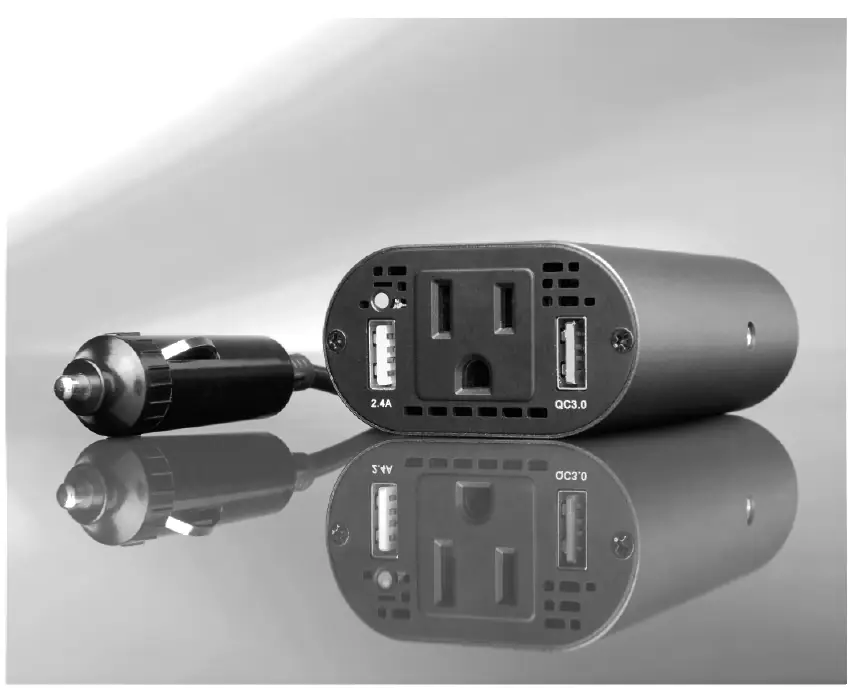
Product Overview
The inverter features a durable aluminum body with the following components:
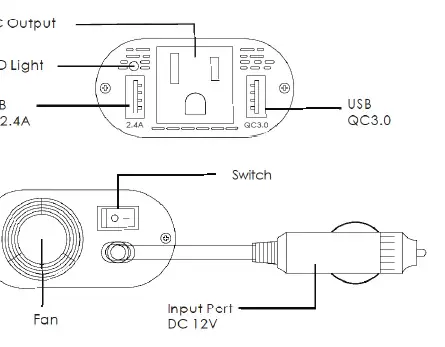
- AC outlet (110V)
- USB 5V 2.4A charging port
- USB Quick Charge 3.0 charging port
- LED indicator light
- On/Off switch
- Built-in cooling fan
- 12V DC input plug
Operation
- Plug the inverter into your car's cigarette lighter socket.
- Switch the device ON.
- The indicator light will briefly turn RED, then turn BLUE to indicate standby mode.
- Connect your electrical appliance or mobile device.
- Switch OFF and disconnect your device after use.
Note: The cooling fan activates automatically only when the device reaches 100°F (38°C).
LED Light Guide
- No light: No power supply or the inverter is damaged.
- Continuous BLUE light: Standby or in use.
- Continuous RED light: Automatic safety shutdown.
Safety Precautions
- Use only with 12V DC power outlets. Do not use with 24V systems.
- It is normal for the inverter to become warm during operation.
- Avoid placing the unit in direct sunlight or near heat-sensitive materials.
- For optimal performance, the connected appliance should consume less than 120W, though 150W is the maximum acceptable limit.
Technical Specifications
- Item No: 207709
- Output Power: 150W
- Input Voltage: DC 12V
- Output Voltage: AC 110V ± 10%
- Output Frequency: 60Hz ± 2Hz
- Output Wave Form: Modified Sine Wave
- Protections: Overload (180W ± 20W), Short-circuit, Overvoltage (16.0V ± 0.5V), Low-Voltage (10.0V), Overheating (65°C ± 5°C)
Customer Service
Sharper Image branded items purchased from SharperImage.com include a 1-year limited replacement warranty. For questions, contact Customer Service at 1 (877) 210-3449, available Monday through Friday, 9:00 a.m. to 6:00 p.m. ET.
Official resources from the manual
Manufacturer information
Sharper Image
Practical help
Common problems
No LED light
Check the vehicle power supply or ensure the inverter is not damaged.
Continuous RED light
The device has triggered an automatic safety shutdown (e.g., overload, overheating, or voltage issue).
Inverter is warm to the touch
This is normal during operation.
Before use
- Verify your vehicle outlet is 12V DC (not 24V).
- Ensure the appliance power consumption is below 120W for best performance.
- Check that the inverter is not placed in direct sunlight.
- Ensure the unit is kept away from heat-sensitive materials.
Specs in practice
- Output Power
- Maximum continuous power capacity is 150W.
- Output Wave Form
- Modified Sine Wave, suitable for most mobile devices and small electronics.
- Overheating Protection
- The device will shut down automatically if it reaches 65°C ± 5°C.
- Overvoltage Protection
- Shuts down if input voltage exceeds 16.0V ± 0.5V.
Images and diagrams
- The product diagram illustrates the layout of the AC output, USB 5V/2.4A port, USB QC3.0 port, LED indicator, cooling fan, and the 12V DC input plug.
Model compatibility
- Compatible with 12V DC car cigarette lighter sockets only.
- Not compatible with 24V DC systems.

Manual page author
Michael Turner
Technical manual editor
Reviews PDF manuals for structure, safety notes, and practical product details so readers can find the right information quickly.