Lighting / Outdoor Lighting
Installation Manual for Signature Hardware Fair Avenue Outdoor Post Lantern
A comprehensive installation guide for the Signature Hardware Fair Avenue Outdoor Post Lantern (SKU 953130). Includes safety warnings, wiring instructions, assembly steps, and maintenance tips.
Quick answers from the manual
Quick answer
- This manual provides installation and wiring instructions for the Fair Avenue Outdoor Post Lantern (SKU 953130). p. 1, 2, 3
Key actions
- Turn off power at the circuit breaker before starting installation. p. 2, 3
- Connect the black wire to the supply wire, white to neutral, and ground to ground. p. 3
First start
- Ensure power is off, unpack parts, connect wires, and secure the cage to the tube. p. 3
Maintenance and reset
- Wipe with a damp cloth. Do not use abrasive cleaners or cleaners containing alcohol. p. 2
Where to find it in the PDF
- Safety and Getting Started p. 1
- Maintenance and Tools p. 2
- Installation and Wiring p. 3
Table of contents
Important Information
Before beginning the installation of your Signature Hardware Fair Avenue Outdoor Post Lantern, please read all instructions carefully. If you are unfamiliar with installing electric fixtures, it is recommended to consult a professional. Signature Hardware accepts no liability for damage to property or personal injury during installation. Always observe local plumbing and building codes.
If you find any damage upon unpacking, contact the Customer Relations team via live chat at www.signaturehardware.com or by emailing [email protected].
Recommended Tools and Accessories
Ensure you have gathered all required materials before starting. The package includes:
- Wire Connectors (3pcs)
- Spare mounting screw (1pc)
- Pre-assembled screws (3pcs)
Installation
Follow these steps to install your outdoor post lantern:
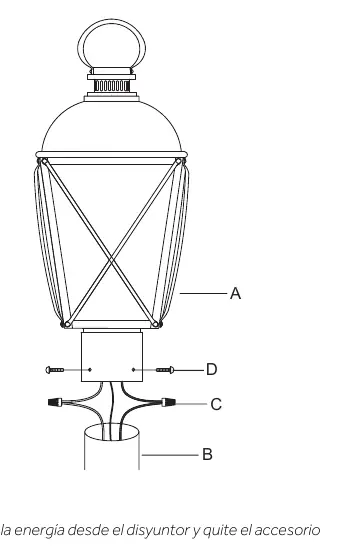
- Shut off power: Turn off the main power supply at the circuit breaker and remove the old fixture.
- Unpack: Carefully unpack the new fixture and lay out all parts in a clear area to avoid losing small components.
- Connect wires: Connect the black wire from the fixture to the supply wire. Connect the white wire from the fixture to the white (neutral) house wire. Ensure all wire nuts are secured; you may wrap connections with electrical tape. If your outlet has a ground wire (green or bare copper), connect the fixture's ground wire to it. Tuck the wire connections neatly into the junction box.
- Assemble: Attach the Cage (A) to the Tube (B) and secure it with the provided Screws (D).
Care and Maintenance
To keep your fixture in good condition:
- Wipe with a damp cloth for cleaning.
- Do not use abrasive cleaners or cleaners that contain alcohol.
- Always shut off the main power supply before cleaning the product or changing light bulbs.
- Handle glass shades and bulbs with care as they are fragile.
Official resources from the manual
Manufacturer information
Signature Hardware
Practical help
Common problems
Fixture not working after installation
Check that the circuit breaker is on and ensure all wire connections are secure and properly insulated.
Damaged parts upon arrival
Contact Signature Hardware Customer Relations via live chat at www.signaturehardware.com or email [email protected].
Before use
- Turn off the main power supply at the circuit breaker
- Inspect the product for shipping damage
- Gather all required tools for installation
- Ensure the junction box has a ground wire if applicable
Images and diagrams
- FIG 1 illustrates the assembly of the cage (A) to the tube (B) using screws (D).
Model compatibility
- Requires a standard junction box for installation.
- Compatible with standard house wiring (black/white/ground).

Manual page author
David Miller
Documentation analyst
Organizes user manual content into clear summaries, with attention to model details, product context, and everyday usability.