Lighting / Outdoor Lighting
Installation Guide for BELL Lighting Skyline Omni 72045/46/52/54 LED Floodlight
Comprehensive installation and configuration guide for the BELL Lighting Skyline Omni LED Floodlight. Includes wiring diagrams, wattage and CCT settings, and maintenance procedures.
Quick answers from the manual
Quick answer
- The BELL Lighting Skyline Omni is an adjustable LED floodlight. Installation must be performed by a qualified electrician. Settings for Power (200/250/300W), CCT (3000/4000/5000K), and Photocell (0-50lux) can be adjusted on the unit. p. 1, 2
Key actions
- Switch off mains supply before installation. p. 1
- Adjust Power, CCT, and Photocell settings. p. 2
Maintenance and reset
- Isolate power supply before maintenance. p. 2
Technical specifications
| Parameter | Value | Meaning | Pages |
|---|---|---|---|
| Weight | 9.6kg | Unit weight | p. 2 |
| Power | 200W / 250W / 300W | Selectable wattage | p. 2 |
Where to find it in the PDF
- Installation and Wiring p. 1
- Settings and Maintenance p. 2
Table of contents
Manual images
Click an image to enlargeImportant Information
This luminaire must be installed by a qualified electrician in accordance with current IEE wiring regulations (BS7671:2018) and local building control. Always switch off the mains supply before beginning any installation or maintenance work. All tests should be carried out in accordance with EN 50172:2004.
Installation
The installation process involves mounting the unit and connecting the wiring. Ensure the mounting surface is suitable for the weight of the luminaire (9.6kg).
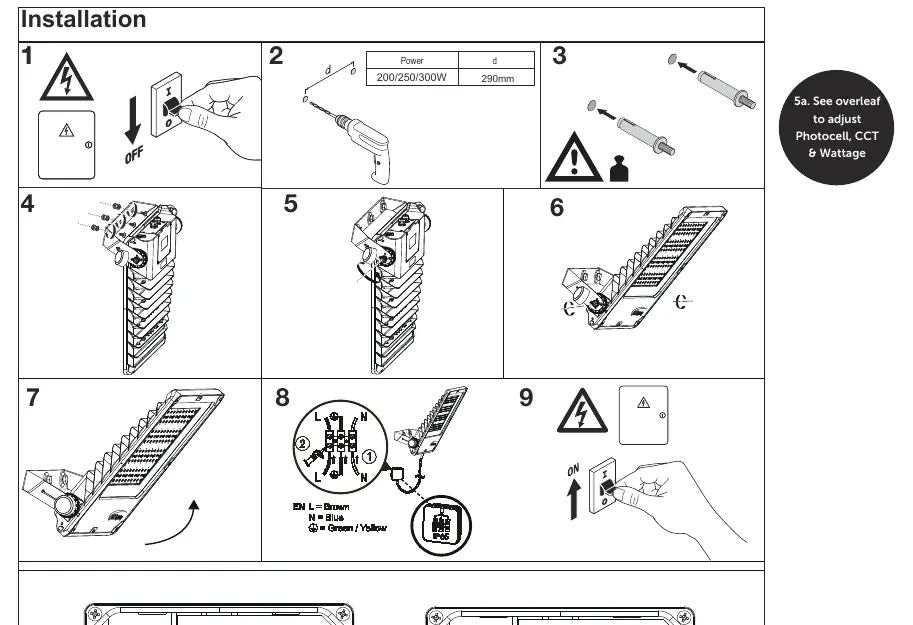
- Ensure the mains power is switched off.
- Drill mounting holes with a spacing of 290mm.
- Secure the luminaire to the surface.
- Follow the wiring diagram to connect the supply.
- Once installed, switch the mains power back on.
Wiring
The unit requires standard electrical connection:
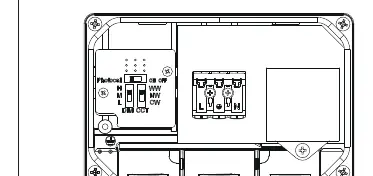
- L (Live): Brown
- N (Neutral): Blue
- Earth: Green/Yellow
Settings
The Skyline Omni features adjustable settings for the photocell, power output, and color temperature (CCT):
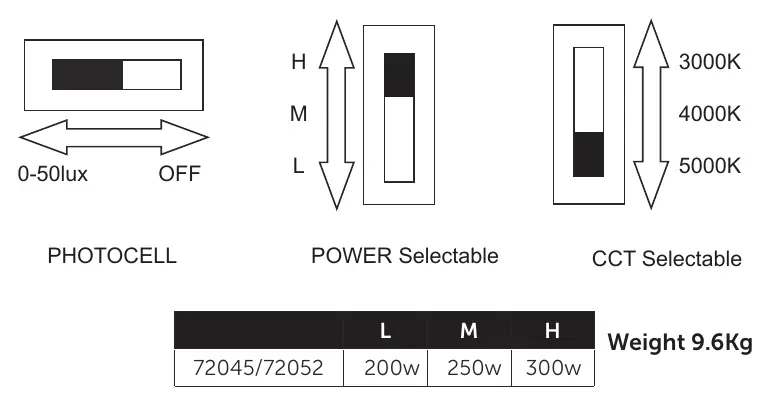
- Photocell: Adjustable between 0-50lux or OFF.
- Power Selectable: Switchable between 200W, 250W, and 300W (depending on model).
- CCT Selectable: Switchable between 3000K, 4000K, and 5000K.
Maintenance
Regular maintenance ensures the longevity of the luminaire. Always isolate the power supply before performing maintenance.
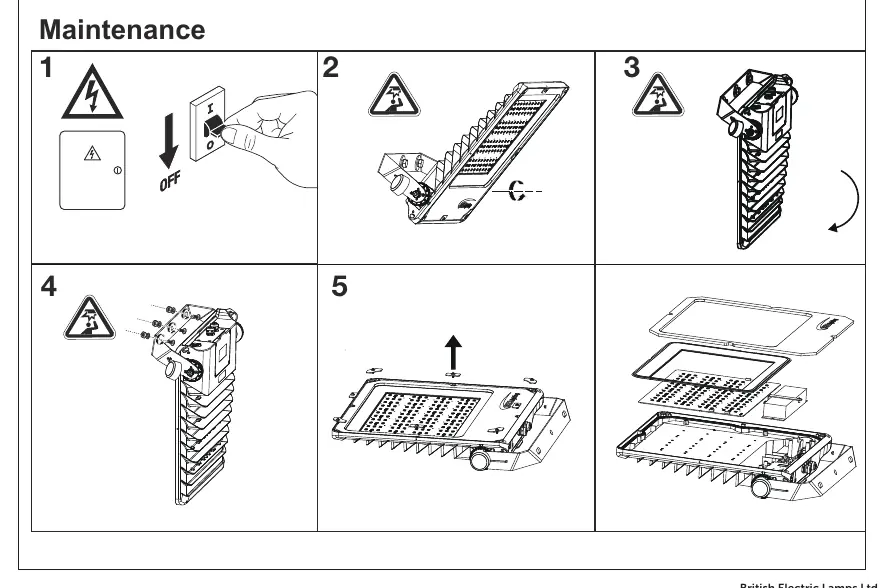
- Ensure the unit is clean and free from debris.
- Check all electrical connections periodically.
- If the unit requires servicing, ensure it is performed by a competent person.
Manufacturer information
BELL Lighting
Practical help
Common problems
Luminaire does not turn on
Check that the mains supply is switched on and that the wiring (L, N, Earth) is correctly connected according to the diagram.
Photocell not working as expected
Verify the photocell switch setting is not set to 'OFF' and adjust the lux sensitivity if necessary.
Before use
- Ensure mains power is isolated before starting installation.
- Verify the mounting surface can support the 9.6kg weight.
- Confirm the electrician is qualified and familiar with BS7671:2018 regulations.
- Check that the correct wattage and CCT settings are selected for your requirements.
Specs in practice
- Power Selectable
- Allows adjustment of the light output between 200W, 250W, and 300W.
- CCT Selectable
- Allows adjustment of the color temperature between 3000K (warm), 4000K (neutral), and 5000K (cool).
Images and diagrams
- The wiring diagram shows the L, N, and Earth connections clearly labeled.
- The settings diagram illustrates the switches for Photocell, Power, and CCT selection.

Manual page author
David Miller
Documentation analyst
Organizes user manual content into clear summaries, with attention to model details, product context, and everyday usability.