Electronics / Video Lighting
User Manual for SmallRig RC 220B Pro COB LED Video Light
Quick guide for the SmallRig RC 220B Pro COB LED Video Light. Learn how to install, power, operate, and configure your light, including CCT and FX modes, app control, and DMX settings.
Quick answers from the manual
Quick answer
- The SmallRig RC 220B Pro is a 220W COB LED video light. It supports AC power, V-mount, and NPF batteries. It features CCT and FX modes, app control via SmallGoGo, and DMX support. p. 1, 3, 5, 6
Key actions
- Install/Remove Reflector p. 4
- Reset Wireless Connection p. 7
First start
- Remove protective cover, connect power, and turn on. p. 4, 5
Show 4 more answers Show less
Problems and fixes
Device failure
Consult purchase channels for professional maintenance.
p. 2Maintenance and reset
- BLE Reset: Hold Reset button for 3 seconds. p. 7
Technical specifications
| Parameter | Value | Meaning | Pages |
|---|---|---|---|
| Power | 220W | Maximum power consumption. | p. 10 |
| CCT Range | 2700K - 6500K | Adjustable color temperature. | p. 9 |
Where to find it in the PDF
- Product Overview p. 3
- Installation p. 4
- Specifications p. 9, 10
Table of contents
Manual images
Click an image to enlargeQuick Guide
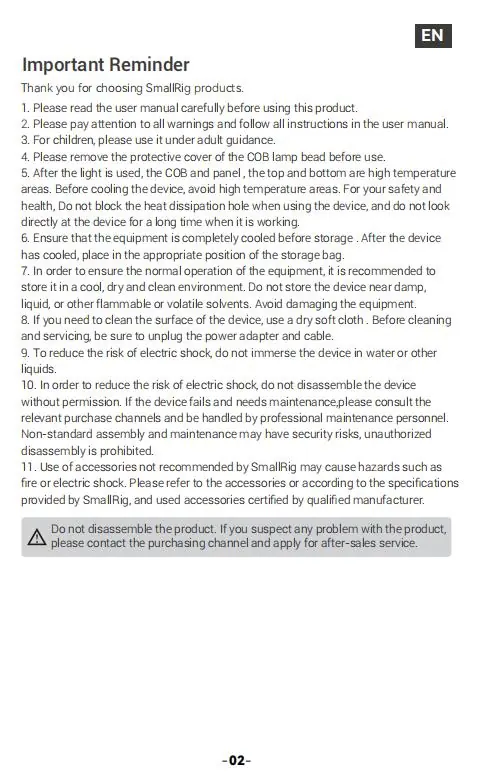
The SmallRig RC 220B Pro is a professional COB LED video light. Before using the device, ensure you remove the protective cover from the COB lamp bead. Always allow the device to cool down before storing it in the provided carrying bag. Do not block the heat dissipation holes during operation.
In the Box
- LED Video Light
- AC Adapter
- Power Cable
- 55° Hyper Reflector
- Carrying Bag
- Operating Instruction
Product Overview
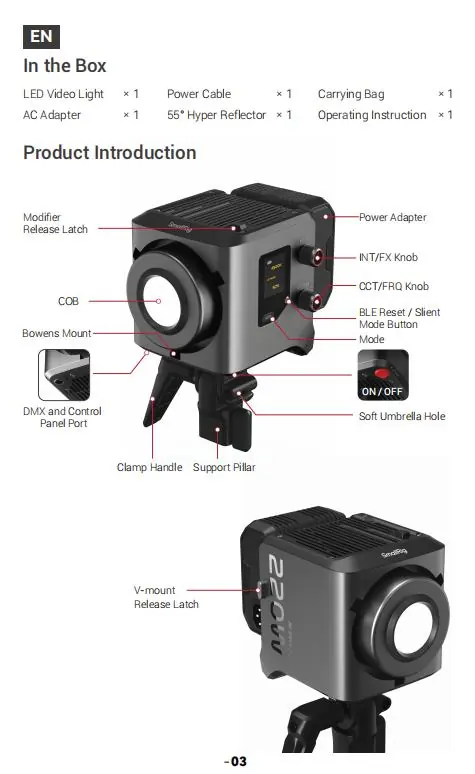
The light features a Bowens mount for modifiers, a modifier release latch, and a support pillar. Controls include an INT/FX knob for brightness and effects, a CCT/FRQ knob for color temperature and frequency, a Mode button, and a BLE Reset/Silent Mode button.
Installation
Protective Cover: Push the release latch in the direction of the arrow and rotate the cover to remove it. Rotate in the opposite direction to install.
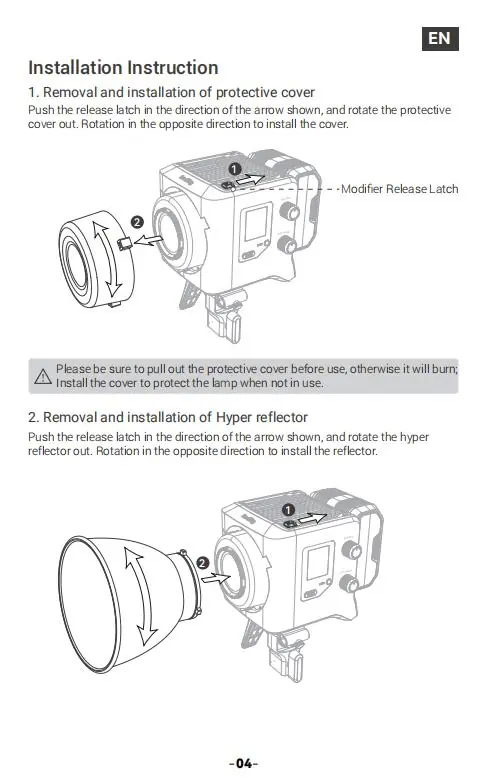
Hyper Reflector: Push the release latch and rotate the reflector to remove or install it.
Power Supply
AC Power: Connect the AC adapter to the light.
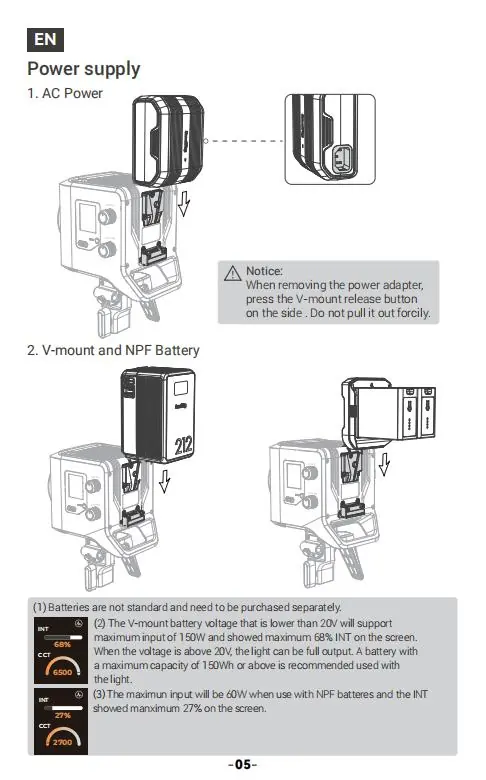
Battery Power: The light supports V-mount and NPF batteries (purchased separately). Note that V-mount batteries under 20V support a maximum input of 150W (68% intensity). NPF batteries limit the maximum input to 60W (27% intensity).
Product Operation
CCT Mode: Rotate the INT/FX knob to adjust brightness (0-100%). Rotate the CCT/FRQ knob to adjust color temperature (2700K-6500K).
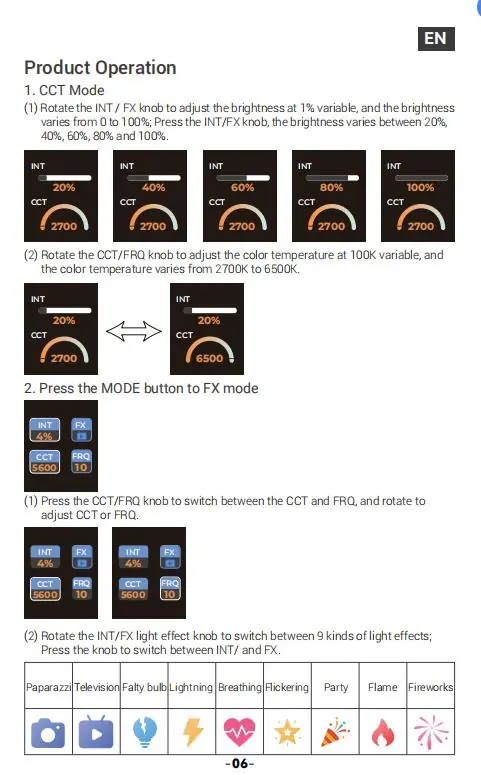
FX Mode: Press the MODE button to enter FX mode. Use the CCT/FRQ knob to switch between CCT and Frequency (FRQ). Rotate the INT/FX knob to switch between 9 light effects: Paparazzi, Television, Faulty bulb, Lightning, Breathing, Flickering, Party, Flame, and Fireworks.
Connectivity and Control
App Control: Download the SmallGoGo app to control the light wirelessly via mobile phone or tablet.
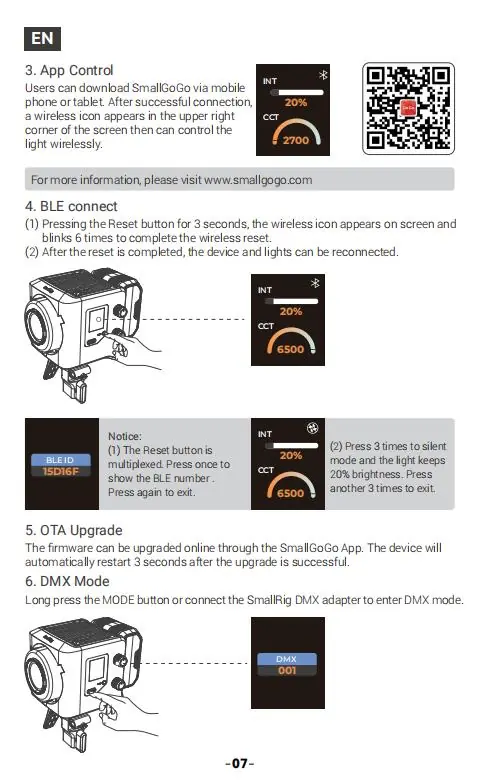
BLE Connect: Press the Reset button for 3 seconds to reset the wireless connection. The wireless icon will blink 6 times.
DMX Mode: Long press the MODE button or connect the SmallRig DMX adapter to enter DMX mode. Note that a separate DMX controller is required.
Specifications
- Power Consumption: 220W (MAX)
- CCT Range: 2700K - 6500K
- TLCI: 98
- Cooling Mode: Active Cooling
- Weight: 1650g
- Wireless Distance: 100m
Manufacturer information
SmallRig
Practical help
Common problems
Light does not turn on
Check the power cable connection or ensure the battery is properly seated and charged.
Overheating
Ensure the heat dissipation holes are not blocked and the device is used in a well-ventilated area.
Wireless connection failure
Perform a BLE reset by holding the Reset button for 3 seconds until the icon blinks.
Before use
- Remove the protective cover from the COB lamp bead.
- Ensure the device is completely cooled before storage.
- Use only accessories recommended by SmallRig.
- Do not immerse the device in water or liquids.
Show more Show less
Specs in practice
- Power Consumption
- Maximum power draw of 220W.
Images and diagrams
- Modifier Release Latch: Used to secure or release the reflector and protective cover.
- INT/FX Knob: Primary control for brightness and light effect selection.
- CCT/FRQ Knob: Adjusts color temperature and frequency settings.
Model compatibility
- V-mount batteries <20V limit input to 150W (68% brightness).
- NPF batteries limit input to 60W (27% brightness).
- DMX functionality requires a separate SmallRig DMX adapter.

Manual page author
Michael Turner
Technical manual editor