Lighting / Fixtures
User Manual for Aladdin ALL-IN ONE Bi-Color / RGB LED Panel
Comprehensive user guide for the Aladdin ALL-IN ONE Bi-Color / RGB LED panel. Includes setup instructions, power requirements, safety warnings, app connectivity, and technical specifications.
Quick answers from the manual
Quick answer
- The Aladdin ALL-IN ONE is a 70W LED panel. It is powered via AC adapter or D-Tap (12V-15V DC). Controls are located on the back of the panel, and it can be managed via a smartphone app. p. 3, 4, 7
Key actions
- Powering the panel p. 3
- Mounting the panel p. 3
First start
- Unpack the panel, connect the power source (AC or D-Tap), and use the controls on the back to adjust mode, dimming, and color temperature. p. 3
Show 3 more answers Show less
Maintenance and reset
- Ensure the panel has cooled down before storing it in a pouch or case. p. 5
Technical specifications
| Parameter | Value | Meaning | Pages |
|---|---|---|---|
| Power consumption | 70W | Total power draw of the unit | p. 7 |
| Dimmer input | 12V to 15V DC | Required input voltage for the dimmer | p. 7 |
| Dimensions | 300mm x 300mm x 18mm | Physical size of the panel | p. 7 |
Where to find it in the PDF
- Start-up Guide p. 3
- App Download p. 4
- Safety Warnings p. 5
- Technical Specifications p. 7
Table of contents
Manual images
Click an image to enlargeQuick Start Guide
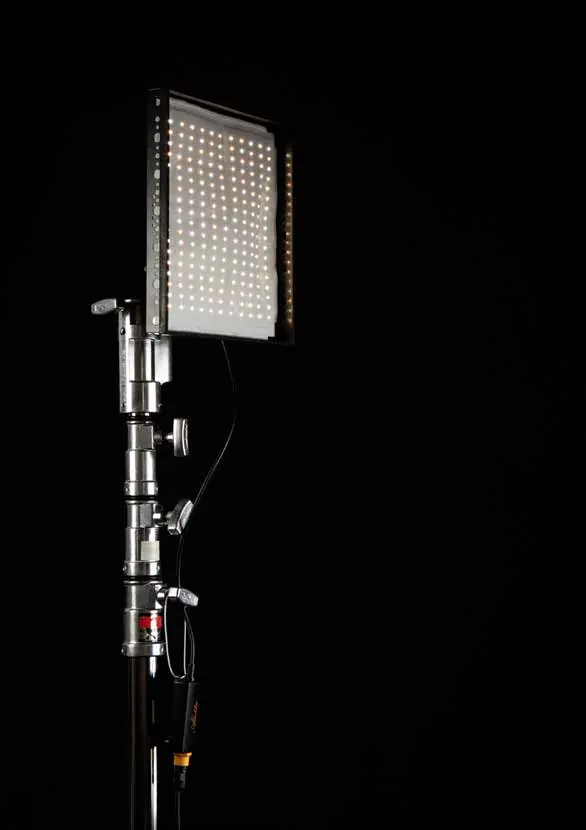
Unpack your panel and accessories. The panel features a built-in dimmer unit on the back. Connect your AC adapter or D-Tap cable to the input box of the panel. If the cable is too short, use the included extension cable. Once connected to a power outlet, the unit is ready for use. If you have purchased the optional DMX Attachment (ALL-DMXAT) or Wired Dimmer (ALL-WDIM), connect them between the panel (or extension cable) and the power source.
Controls and Operation
The control unit on the back of the panel allows for the following adjustments:
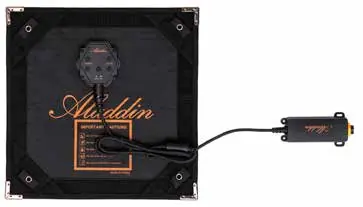
- Switch between RGB and Bi-Color control: Toggle modes as needed.
- Dimming control: Adjust brightness from 1% to 100%.
- Color temperature control: Fine-tune the light output.
The panel includes metal corners and a metal ring for mounting, which can be attached to magnets, as well as Velcro straps for versatile positioning.
Power Requirements
The panel requires batteries capable of handling a power draw of 70 watts. To calculate the required current, use the formula: Power Draw (W) / Battery Voltage (V) = Min. Working Current (A). For example, using a 14.8V battery requires at least 4.7A of working current.
App Connectivity
The ALL-IN panel can be controlled via a smartphone app available for Android and iOS. The app allows you to store custom color filters, dial in specific RGB/Bi-Color values, and control hues and saturation. Download the app using the QR codes provided in the manual.

Safety and Maintenance
- Do not use near flammable materials or heaters.
- Avoid exposing the unit to direct sunlight for extended periods.
- Do not use the dimmer or extension wires to hang or mount the panel.
- Do not bend or fold the panel more than 90 degrees.
- Do not tape directly on the LEDs.
- Ensure the panel has cooled down before storing it in a pouch or case.
- Operate only within the temperature range of -10°C to +40°C.
- If the panel runs at 100% power for a long period, it will heat up; ensure it is in your eyesight and use the X-BEND holder or frame to facilitate heat reduction.
Technical Specifications
The panel features a 50W Bi-Color / 20W RGB LED light source with a CRI of Ra 98 and TLCI of 98. It supports a color temperature range of 2200K - 12000K and a beam angle of 140°. The input voltage for the dimmer is 12V to 15V DC, and the power unit accepts 100V to 240VAC.
Practical help
Common problems
Panel overheating during long use
Ensure the panel is used with the X-BEND holder or frame to allow proper airflow for heat reduction.
Battery not powering the light
Verify that the battery can handle a 70W power draw and provides at least 4.7A of working current if using a 14.8V battery.
Technical issues during operation
Stop using the product immediately and contact your dealer or reseller.
Before use
- Unpack the panel and accessories.
- Verify the power source (AC adapter or D-Tap) is compatible.
- Check that the battery can handle a 70W power draw.
- Ensure the X-BEND holder or frame is available for mounting and heat reduction.
- Download the smartphone app for advanced control.
Show more Show less
Specs in practice
- Power Consumption
- 70W total draw; ensure your power source/battery can support this.
- Dimmer Input
- Requires 12V to 15V DC.
- Temperature Range
- Operate only between -10°C and +40°C.
Images and diagrams
- 1: Switch between RGB and Bi-Color control
- 2: Dimming control
- 3: Color temperature control
- 4: Metal corner (for magnets)
- 6: Metal ring for mounting
Model compatibility
- Optional DMX Attachment (ALL-DMXAT) available.
- Optional Wired Dimmer (ALL-WDIM) available.
- Optional 1X1-FR-KIT (Frame) available.
- Optional 1X1-BALL (Diffuser) available.

Manual page author
Emily Carter
User documentation editor