Electronics / Cameras
Sony E PZ 10-20mm F4 G Interchangeable Lens Operating Instructions
Comprehensive operating instructions for the Sony E PZ 10-20mm F4 G (SELP1020G) lens, covering installation, zooming, focusing, and maintenance.
Table of contents
Manual images
Jump to the sectionProduct Overview
The Sony E PZ 10-20mm F4 G is a high-performance E-mount lens designed for Sony APS-C mirrorless cameras. This power zoom lens offers a versatile wide-angle range, making it ideal for both photography and videography. Its compact design and advanced optical construction ensure high image quality while maintaining portability.
Attaching and Detaching the Lens
To attach the lens, first remove the rear lens cap and the camera body cap. Align the white index on the lens barrel with the white index on the camera mount. Insert the lens and rotate it clockwise until it clicks into place. To detach, hold down the lens release button on the camera and rotate the lens counterclockwise. Always handle the lens by its mounting body rather than the operation controls.
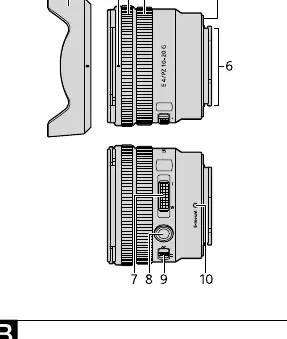
Lens Hood and Protection
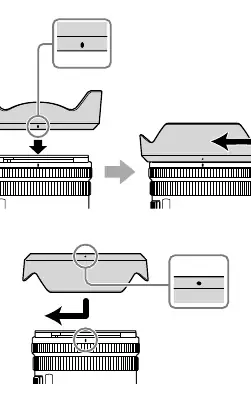
Using the included lens hood is recommended to reduce flare and maintain maximum image quality. Align the red line on the hood with the red line on the lens, then rotate clockwise until it clicks. For storage, the hood can be attached in reverse. Always keep lens caps on when the lens is not in use to protect the glass elements.
Zooming and Focusing
This lens features both a zooming ring and a power zoom lever. The lever is particularly useful for smooth, quiet zooming during movie recording. For focusing, the lens includes a focus mode switch to toggle between AF (Auto Focus) and MF (Manual Focus). Additionally, a focus hold button is provided, which can be customized on compatible camera bodies to lock focus or perform other assigned functions.
Notes on Use and Maintenance
Avoid exposing the lens to direct sunlight or bright light sources, as this can cause internal damage due to light focusing. If the lens is shaken, you may hear a slight rattling sound from internal components; this is normal and does not indicate a malfunction. When carrying the camera, always support both the camera body and the lens. To clean the lens, use a soft, dry cloth. Do not touch the electrical contacts on the lens mount.
Manufacturer information
Sony Group Corporation
Practical help
Common problems
Shadows appearing at the bottom of images
The lens hood may be blocking the flash. Remove the lens hood when using the flash.
Vignetting (dark corners)
Close the aperture by 1 to 2 stops to reduce corner darkening.
Rattling sound when shaking the lens
This is normal and does not indicate a malfunction; it is caused by internal components.
Before use
- Ensure the camera is turned off before attaching the lens.
- Remove both the rear lens cap and the camera body cap.
- Align the white mounting index on the lens with the camera.
- Rotate the lens clockwise until it locks securely.
- Attach the lens hood for optimal image quality.
- Check that the focus mode switch is set to the desired AF or MF position.
- Verify that the lens contacts are clean and untouched.
Specs in practice
- Focal length (10-20mm)
- The range of zoom, providing a wide-angle perspective.
- Minimum focus (0.20m AF)
- The closest distance the lens can focus on a subject in auto-focus mode.
- Maximum aperture (f/22)
- The smallest opening of the lens diaphragm, used for deep depth of field.
- Filter diameter (62mm)
- The size of screw-on filters compatible with this lens.
Images and diagrams
- A: Identifies lens parts including the zoom lever, focus ring, and focus hold button.
- B-1: Illustrates the correct alignment of the white index for mounting the lens.
- B-2: Shows the lens release button procedure for safe detachment.
- C: Demonstrates the correct rotation and locking mechanism for the lens hood.
- D/E: Shows the operation of the zoom lever and the AF/MF switch.
Model compatibility
- Designed exclusively for Sony E-mount cameras.
- Cannot be used on A-mount cameras.
- Some camera models may not support the focus hold button or focus mode switch functionality.
- Using with third-party products may affect performance.

Manual page author
Michael Turner
Technical manual editor
Reviews PDF manuals for structure, safety notes, and practical product details so readers can find the right information quickly.