Electronics / Cameras
SONY FE 100mm F2.8 Macro GM OSS Instruction Manual
Comprehensive operating instructions for the Sony FE 100mm F2.8 Macro GM OSS lens, covering installation, focusing modes, aperture control, and macro photography settings.
Table of contents
Product Overview
The Sony FE 100mm F2.8 Macro GM OSS is a high-performance E-mount lens designed for Sony α camera systems. It is compatible with 35mm format image sensors and can be used on APS-C cameras. This lens features advanced optical design for macro photography, including a focus-range limiter and a dedicated aperture ring for precise control.
Safety Precautions
Always handle the lens with care. Never point the lens directly at the sun or strong light sources, as focused light can cause internal damage, smoke, or fire. While the lens is designed with dust and moisture resistance, it is not waterproof; avoid exposure to rain or water droplets. When carrying the camera with the lens attached, always hold both the camera and the lens firmly.
Attaching and Detaching
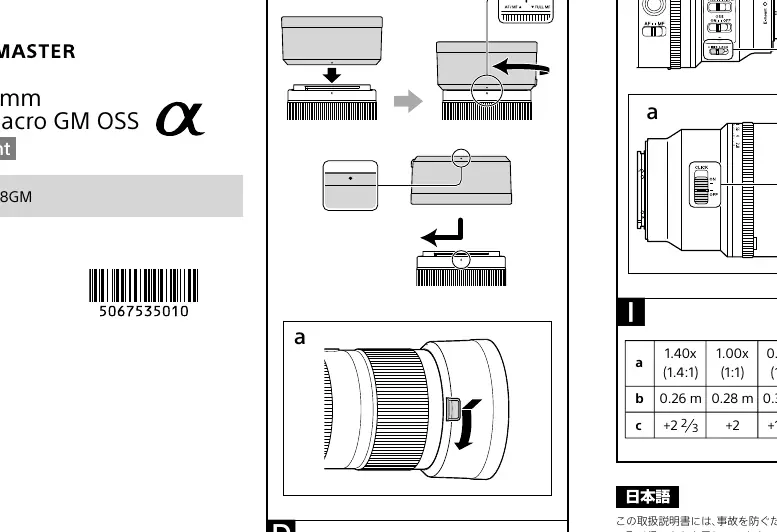
To attach the lens, remove the rear lens cap and the camera body cap. Align the white index on the lens barrel with the white index on the camera mount, then rotate the lens clockwise until it locks. To remove, hold down the lens release button on the camera and rotate the lens counterclockwise.
Focusing and Modes
The lens offers flexible focusing options. You can switch between AF and MF using the focus mode switch on the lens. The Full-time Direct Manual Focus (DMF) switch allows for quick manual adjustments. Additionally, the FULL MF mode enables manual focusing regardless of the camera's AF settings. The focus-range limiter helps reduce AF time by restricting the focusing distance to specific ranges.
Aperture Control
The aperture ring allows for manual exposure control. Aligning the ring to 'A' enables auto iris mode. You can lock the ring at 'A' or within the f/2.8 to f/22 range using the IRIS LOCK switch. For movie recording, it is recommended to set the aperture click switch to 'OFF' to minimize operational noise.
Macro Photography and Maintenance
Macro photography requires stability; use a tripod to prevent camera shake as magnification increases. When using external exposure meters or manual flash, refer to the provided exposure compensation table to adjust settings correctly. Keep the lens clean and store it with the lens hood attached in reverse position when not in use.
Manufacturer information
Sony Group Corporation
Practical help
Common problems
Shadow appears at the bottom of the image when using flash.
Adjust the focal length or shooting distance, or remove the lens hood.
Corners of the screen appear darker (vignetting).
Close the aperture by 1 to 2 stops.
AF is slow or struggles to focus.
Use the focus-range limiter to restrict the AF range to the subject's distance.
Operational noise recorded during video.
Set the aperture click switch to 'OFF' to reduce ring noise.
Before use
- Remove front and rear lens caps.
- Ensure the lens is securely locked into the camera mount.
- Check that the focus mode switch is set to the desired AF or MF mode.
- Verify the focus-range limiter is set correctly for your subject.
- Ensure the IRIS LOCK switch is in the desired position.
- Attach the lens hood to reduce flare.
- Check camera settings for compatibility with the lens.
Specs in practice
- Focal length (100mm)
- The primary focal length of the lens, providing a 150mm equivalent on APS-C sensors.
- Minimum focus (0.26m)
- The closest distance from the image sensor to the subject for sharp focus.
- Maximum magnification (1.4x)
- The ratio of the subject's size on the sensor compared to its actual size.
- Minimum aperture (f/22)
- The smallest opening of the lens diaphragm, providing the deepest depth of field.
- Filter diameter (67mm)
- The size of the screw-in filter required for the front of the lens.
Images and diagrams
- The lens barrel features a distance scale and magnification scale for macro work.
- The aperture ring includes an 'A' position for automatic iris control.
- The focus-range limiter switch allows selection between FULL, 0.5m-infinity, and 0.7m-0.26m ranges.
- The IRIS LOCK switch prevents accidental movement of the aperture ring.
- The aperture click switch toggles the tactile 'click' sound of the aperture ring.
Model compatibility
- Designed for Sony E-mount cameras; not compatible with A-mount cameras.
- Compatible with 35mm format image sensors.
- Some camera models may not support the focus hold button or focus mode switch.
- Check the Sony support website for specific teleconverter compatibility.

Manual page author
Michael Turner
Technical manual editor
Reviews PDF manuals for structure, safety notes, and practical product details so readers can find the right information quickly.