Toys / RC Components
User Manual for Spektrum DX Pro+ 12-Channel Radio System
Comprehensive user guide for the Spektrum DX Pro+ 12-Channel 2.4GHz DSMR Radio System. This manual covers initial setup, battery installation, receiver binding, advanced programming functions, firmware updates, and troubleshooting.
Table of contents
Manual images
Click an image to enlargeQuick Guide: Getting Started
The Spektrum DX Pro+ is a 12-channel 2.4GHz radio system designed for RC vehicles. To get started, install the batteries, bind the transmitter to your receiver, and ensure the correct model memory is selected. Always ensure the transmitter is turned on before the vehicle, and turn off the vehicle before the transmitter.

Controls and Display
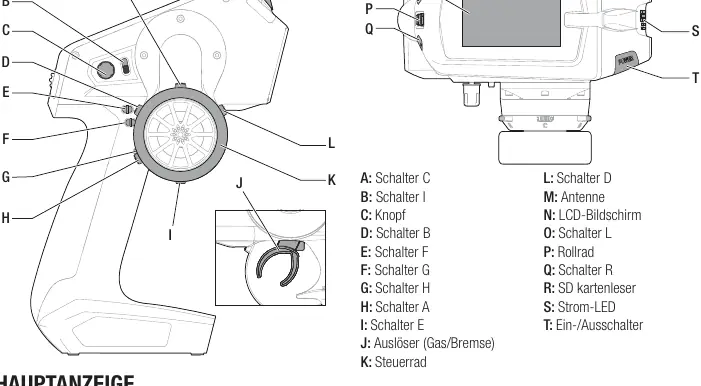
The transmitter features a scroll wheel for navigation and various switches (A-T) for custom functions. The main screen displays critical information including battery voltage, model name, and trim positions. To return to the main screen at any time, press and hold the scroll wheel for at least 6 seconds.
Batteries and SD Card
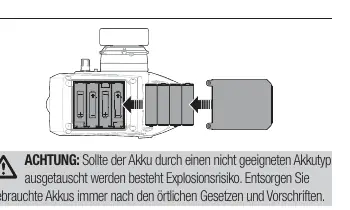
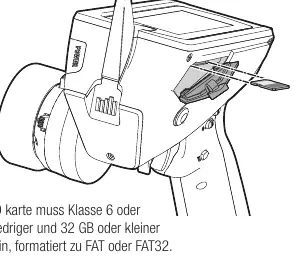
The transmitter uses 4 AA batteries. Remove the battery cover on the bottom to install them. The SD card slot allows for importing/exporting model files, updating RaceWare software, and installing sound files. Use a Class 6 or lower SD card (up to 32GB) formatted to FAT or FAT32.
Binding the Receiver
Binding links the receiver to the transmitter's unique GUID. 1. Put the receiver in bind mode. 2. Turn on the transmitter. 3. Select the desired model memory. 4. Select 'Bind' from the menu. 5. Once the LEDs stop flashing and remain solid, the binding is complete. Always remove the bind plug after binding.
Programming Functions
The Function List provides access to advanced settings including: Servo Setup (Travel, Subtrim, Reverse, Speed), Mixing (4WS, Dual Steering, Dual Throttle, Dual Brake, MOA), AVC (Active Vehicle Control), ABS (Automatic Braking System), and Launch Control. Use the scroll wheel to navigate and select these options.
Firmware Updates
Firmware can be updated via the SD card. Download the update from the Spektrum website, save it to the SD card, insert it into the transmitter, and select the update option in the system menu. Do not turn off the transmitter during the update process.
Physical Adjustments
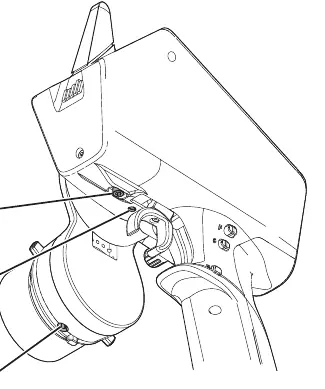
The DX Pro+ allows for physical customization, including adjustable trigger and steering tension, multiple trigger positions, and optional grip sizes. Use the provided hex keys to adjust steering and throttle tension screws.
Troubleshooting
If the system fails to connect, ensure the transmitter and receiver are 2.4-3.6m apart and not near large metal objects. If the receiver enters failsafe mode, check antenna placement. For unresponsive receivers, check battery voltage and cable connections.
Manufacturer information
Spektrum
Practical help
Common problems
System fails to connect
Ensure transmitter and receiver are 2.4-3.6m apart, check model memory selection, and re-bind.
Receiver enters Failsafe mode
Check antenna placement and ensure it is properly installed.
Receiver unresponsive during operation
Check battery voltage and inspect all cables/connectors for damage.
Receiver loses binding
Re-bind the transmitter and receiver.
Before use
- Ensure all batteries are fully charged.
- Verify all servos, linkages, and electrical cables are securely connected.
- Ensure the correct model memory is selected on the transmitter.
- Verify the receiver is bound to the transmitter.
- Check for any loose screws or components.
Specs in practice
- Operating Voltage
- 4-8.4V (supports 4 AA batteries or optional Li-Ion pack).
Images and diagrams
- Controls: Overview of switches A-T, scroll wheel, and antenna.
- Main Screen: Shows battery voltage, model name, and trim positions.
- Battery Installation: Shows correct polarity for 4 AA batteries.
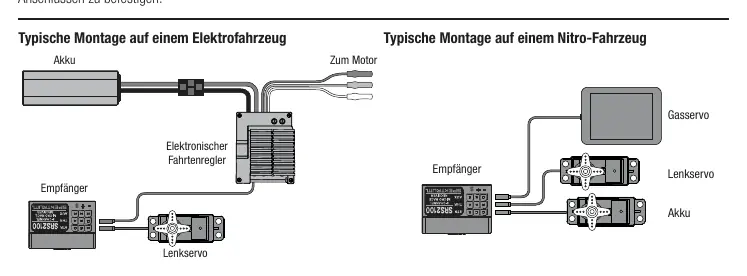
- Receiver Mounting: Shows typical setup for electric and nitro vehicles.
Model compatibility
- Compatible with Spektrum DSMR 5.5, DSMR, DSMR+, and SLT receivers.
- SR2100 receiver is optimized for racing and does not support telemetry.
- Aux channels may be limited when using 5.5ms frame rate.

Manual page author
Michael Turner
Technical manual editor
Reviews PDF manuals for structure, safety notes, and practical product details so readers can find the right information quickly.