Toys / RC Models & Drones
User Manual for Spektrum iX14 14-Channel Aircraft Transmitter
Comprehensive user manual for the Spektrum iX14 14-Channel DSMX Aircraft Transmitter. Includes instructions for charging, Android-based navigation, model setup, binding, and gimbal adjustments.
Table of contents
Manual images
Click an image to enlargeQuick Start and Safety
The Spektrum iX14 is a sophisticated hobby-grade transmitter. Before operating, ensure all batteries are charged, check all servo connections, and always engage the throttle cut before approaching the model. Do not operate near spectators or in adverse weather conditions. This device is not a toy and is not intended for children under 14.
Transmitter Overview
The iX14 features a 14-channel layout with a large color LCD touchscreen. Key controls include:
- Power Button: Located on the top right.
- Gimbals: Adjustable for tension and mode.
- Switches: Multiple assignable switches (A-I) and levers.
- Ports: Includes a USB-C charge port, audio jack, and micro memory card port.
Charging the Battery
The transmitter uses a 10500mAh 3.7V 1S Li-Ion battery. For optimal results, use a USB power supply with at least 2-3A output.
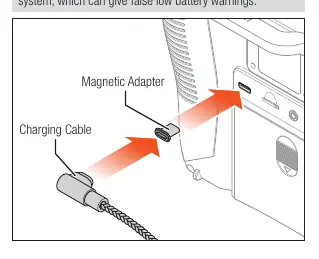
- Connect a 2-3A USB power supply to an AC outlet.
- Connect the included magnetic USB charging cable to the power supply.
- Insert the magnetic micro USB adapter into the USB port on the back of the transmitter.
- Connect the charging cable to the adapter. The LED will flash blue while charging.
- Charging is complete when the battery icon on the screen shows full.
Caution: Never leave a charging battery unattended. Do not charge the battery outside of the transmitter.
Powering On and Navigation
The iX14 runs on the Android operating system. To power on, press and hold the power button until the blue LED flashes. Startup takes approximately one minute, after which the Spektrum AirWare application launches automatically.
Navigation Tips:
- Use standard Android gestures (tap, swipe, drag).
- Swipe down from the top or left from the right edge to access Android navigation icons (Back, Home, Overview).
- Use the Notification Screen (swipe down twice) for quick access to Wi-Fi, Bluetooth, and Brightness settings.
- Use Sleep Mode for short breaks (1-2 days) to avoid battery discharge.
Model Setup and Binding
To create a new model, tap the pen icon on the dashboard to access Model Utilities, then select 'Add a New Model'. You can configure settings like model type (Airplane, Helicopter, Sailplane, Multirotor) and customize the model name and image.
Binding is the process of linking the transmitter to an aircraft receiver. Access the Bind menu from the Model Setup menu or directly via the BIND button on the Dashboard screen. The iX14 is compatible with genuine DSM2 and DSMX Spektrum receivers (Note: EU version does not support DSM2).
Gimbal Adjustments
The iX14 allows for quick adjustments to the gimbals without removing the back cover. Adjustment points are located around the face of each gimbal, covered by small rubber plugs.
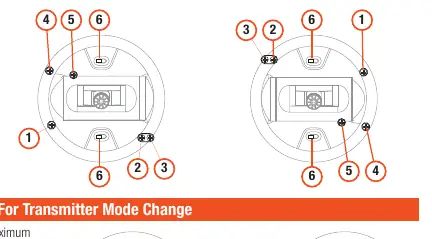
- Adjustments include: Mode change, throttle ratchet, throttle tension, and stick tension.
- Procedure: Remove the rubber plug, then use the appropriate screw to adjust.
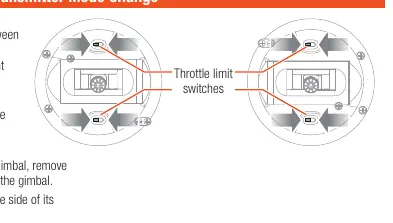
- Throttle Limit: To change modes (e.g., 1 to 2), you may need to adjust the throttle limit switches by removing the plastic switch covers above and below the gimbal and sliding the switch to the opposite position.
Notice: Always perform a stick tension test while turning screws. Do not over-loosen, as screws may fall out.
Manufacturer information
Spektrum
Practical help
Common problems
Transmitter not charging or charging very slowly
Ensure you are using a USB power supply capable of at least 2-3A output. Lower output supplies may not charge the unit while it is powered on.
Battery drains quickly
Use Sleep Mode for short breaks (1-2 days). If not using the transmitter for more than 2 days, power it off completely to prevent continuous battery discharge.
Gimbal tension feels wrong
Adjust the tension screws located under the rubber plugs on the gimbal face. Do not over-loosen, or the screws may fall out.
Before use
- Ensure the transmitter battery is fully charged.
- Check all servos and their connections.
- Engage throttle cut before approaching the model.
- Verify the transmitter antenna is not pointed directly at the model.
- Ensure the environment is free of spectators and hazards.
Specs in practice
- Model Memory
- Storage capacity for 250 different model configurations.
Images and diagrams
- Page 3: Detailed layout of all switches, trims, and ports.
- Page 4: Illustration of the magnetic USB charging connection.
- Page 9: Location of gimbal adjustment screws and throttle limit switches.
Model compatibility
- Compatible with genuine DSM2 and DSMX Spektrum receivers.
- EU version of the iX14 does not support DSM2 receiver products.

Manual page author
Michael Turner
Technical manual editor
Reviews PDF manuals for structure, safety notes, and practical product details so readers can find the right information quickly.