Power / Batteries & Chargers
User Manual for Sunslice Gravity 27 Pro Power Bank
Comprehensive user guide for the Sunslice Gravity 27 Pro power bank. Learn how to charge devices, use the adjustable DC output, solar charging, and safety precautions.
Table of contents
Manual images
Click an image to enlargeQuick Guide
The Sunslice Gravity 27 Pro is a high-capacity power bank designed for off-grid energy. It features multiple output ports, including USB-C PD (100W), USB-A, and an adjustable DC output. It supports solar charging via MPPT and pass-through charging. Always carry the device in your cabin luggage when flying, as its 99.9 Wh capacity is compliant with airline regulations.
Product Overview
The device features an LCD screen that displays battery percentage, port status, and DC voltage level. Key interface elements include:
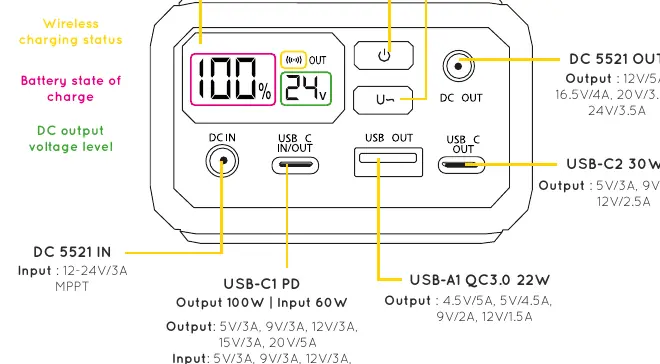
- POWER Button: Activates charging and shows status on the LCD screen.
- Voltage Button: Activates and adjusts the DC output voltage.
- USB-C1 PD: Input (60W) and Output (100W).
- USB-C2: Output (30W).
- USB-A1 QC3.0: Output (22W).
- DC 5521: Input (12-24V MPPT) and Output (Adjustable voltage).
- Wireless Charging Pad: 10W output.
Charging the Power Bank
You can recharge the Gravity 27 Pro using two methods:
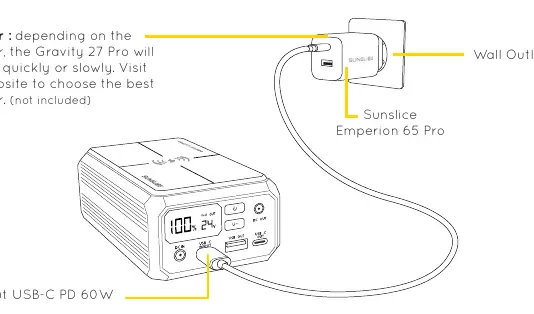
- USB-C PD: Use a PD-capable wall adapter (up to 60W recommended) and the included USB-C to USB-C cable.
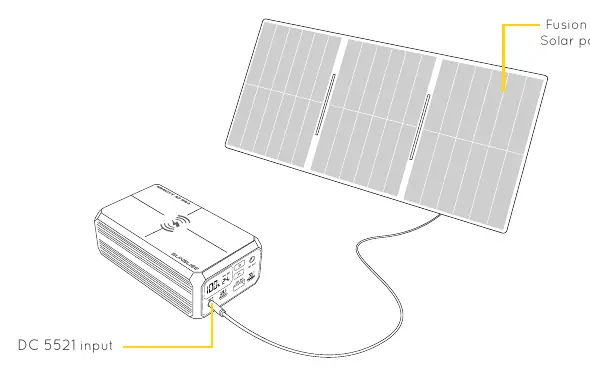
- Solar Charging: Connect a compatible solar panel (12-24V DC) to the DC 5521 input. For best results, use the Fusion 60, Fusion 100, or Fusion Flex 24 & 48 panels. Place the unit in direct sunlight and avoid shadows.
Charging Your Devices
The power bank can charge up to 5 devices simultaneously. Ensure you use cables rated for your device's voltage and current requirements.
- Laptops/Tablets: Connect to the USB-C1 (100W) port or use the DC 5521 output with an adapted cable.
- Smartphones/Accessories: Use the USB-C1, USB-C2, USB-A ports, or the wireless charging pad.
Adjustable Voltage Output
To use the DC output for specific devices:
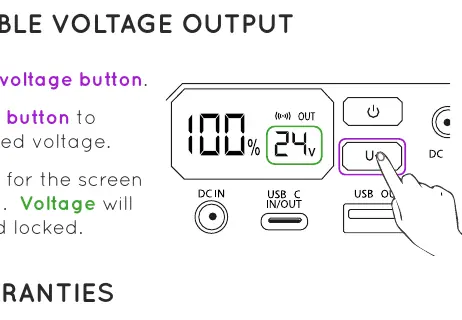
- Long press the Voltage Button.
- Short press the button to select the desired voltage.
- Wait 5 seconds for the screen to stop blinking; the voltage will be selected and locked.
Pass-Through Charging
The Gravity 27 Pro supports pass-through charging, allowing you to charge your devices while the power bank itself is being charged (e.g., via solar or USB-C input). Note that charging speed may reduce slightly during this process.
Safety and Maintenance
- Storage: Recharge the unit at least once every 3 months and store it at approximately 80% charge to prevent battery damage.
- Handling: Do not puncture, throw, drop, bend, or modify the unit. Keep away from water, fire, and excessive heat.
- Connections: Do not use excessive force when connecting or disconnecting cables. Keep ports free from dust and lint.
- Abnormalities: Stop using the device immediately if it generates an unusual smell, heats up excessively, or shows signs of distortion.
Practical help
Common problems
Unusual smell or heating
Stop using the device immediately and contact support.
Before use
- Charge the unit fully before first use.
- Ensure you have the correct cable for your device.
- Check if your device supports PD charging.
- Verify the DC output voltage matches your device requirements.
- Keep the device away from water and extreme heat.
Images and diagrams
- The LCD screen displays battery percentage, port status, and DC voltage level.
- The DC 5521 port supports both input (solar) and output (adjustable voltage).
Model compatibility
- Compatible with laptops, tablets, drones, cameras, and smartphones.
- Solar panels must provide 12-24V DC input.

Manual page author
Michael Turner
Technical manual editor
Reviews PDF manuals for structure, safety notes, and practical product details so readers can find the right information quickly.