Power / Batteries & Chargers
User Manual for Sunslice Gravity 756 Portable Power Station
Quick guide for the Sunslice Gravity 756 portable power station. Learn how to operate the AC/DC outputs, charge the unit via wall adapter or solar panels, understand LCD fault indicators, and follow safety precautions.
Table of contents
Manual images
Click an image to enlargeQuick Guide
The Sunslice Gravity 756 is a high-capacity portable power station designed for both indoor and outdoor use. Before first use, ensure the device is charged. The unit features multiple output types, including AC, DC, USB-A, and USB-C. It is not waterproof, so avoid exposure to rain or water. If the device is not used for a long time, charge it to over 60% capacity and recharge every 6 months.
Product Overview
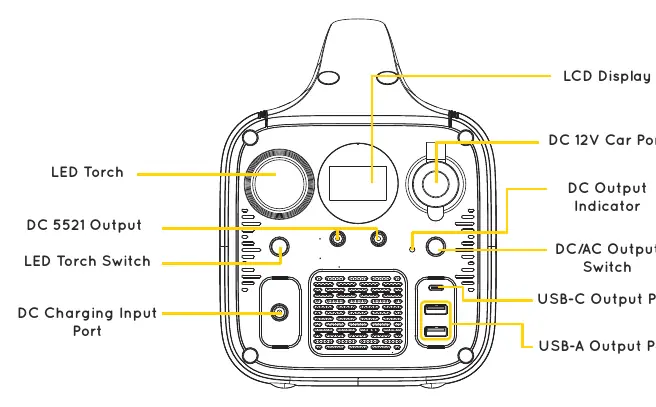
The front panel includes the LCD display, LED torch, DC 5521 output, DC charging input, USB-A and USB-C ports, and the AC/DC output switches. The rear panel contains the AC output outlets and the air outlet. The unit weighs 8.6 kg.
Specifications
- Capacity: 756Wh / 204,300 mAh (3.7V)
- AC Output: 2x 1000W (220V), 1600W Peak, Pure Sine Wave 50Hz
- DC Output: 2x USB-A QC3.0 (18W), 1x USB-C PD (45W), 2x DC 5521 (12V/3A), 1x Cigarette Lighter (12V/8A)
- AC Input: 1x DC6530 (116W)
- Solar Input: 1x DC6530 (27-42V/5A, 210W)
- Working Temperature: 0 to 40°C
- Storage Temperature: -20 to 40°C
Charging the Gravity 756
There are two ways to charge the unit:
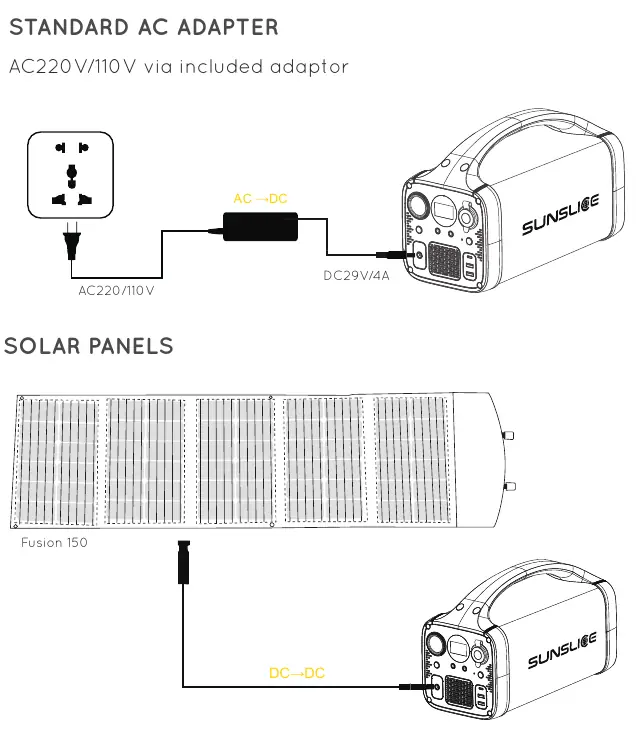
- Standard AC Adapter: Connect the included AC adapter to a wall outlet (220V/110V) and the DC charging input port.
- Solar Panels: Connect compatible solar panels (such as the Sunslice Fusion 150W) to the DC charging input port.
Using Outputs
LED Torch: Press the switch for 0.5s to turn on, 0.5s again for stronger brightness, and 0.5s again to turn off.
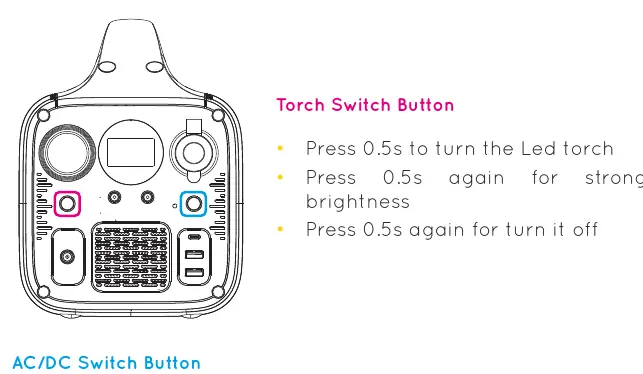
DC Output: Press the AC/DC switch for 0.5s. The DC output indicator will light up. Press 0.5s again to turn off.
AC Output: Press the AC/DC switch for 3s. The OUT icon on the LCD display will light up. Press 3s again to turn off.
LCD Screen and Fault Indicators
The LCD screen displays charging status and fault warnings. If the screen flashes, check the following fault conditions:
- DC Output Over Current: DC indicator flashes twice. Restart the unit.
- USB Over Current: DC indicator flashes 3 times. Restart the unit.
- AC Overload: OUT icon flashes twice. Restart the unit.
- AC Over-temperature: OUT icon flashes 5 times. Automatic recovery.
- Low AC Output Voltage: OUT icon flashes 6 times. Restart the unit.
- AC Short Circuit: OUT icon flashes 8 times. Restart the unit.
- Input Over-voltage: IN icon flashes twice. Automatic recovery.
- Battery Temperature Faults: Warning icon flashes 2-5 times depending on charge/discharge temperature. Automatic recovery.
- Overload Total Power: Warning icon flashes 9 times. Restart the unit.
Safety Precautions
- Do not use or store near fire or heat sources above 80°C.
- Do not puncture, throw, drop, or modify the device.
- Keep battery ports free from dust and lint.
- Stop using immediately if the device generates unusual smells, heating, or distortion.
- Keep away from children.
- Not allowed on airplanes.
Practical help
Common problems
DC output indicator flashes twice
DC 12V output over current. Restart the unit.
OUT icon flashes twice
AC overload. Restart the unit.
IN Icon flashes twice
Input over voltage. Automatic recovery.
Warning icon flashes 9 times
Over load total power. Restart the unit.
Before use
- Ensure the device is charged before first use.
- Check that all cable connections are secure.
- Verify the ambient temperature is between 0-40°C.
- Ensure the device is kept away from water and rain.
- If storing for a long time, charge to over 60% capacity.
Specs in practice
- Working Temperature
- 0 to 40°C
Images and diagrams
- The front panel contains the LCD display, LED torch, and all input/output ports.
- The rear panel features the AC output outlets and air outlet.
Model compatibility
- Not allowed on airplanes.
- Not waterproof; use the optional flight case for protection.
- Compatible with laptops, smartphones, tablets, cameras, drones, and small appliances.

Manual page author
David Miller
Documentation analyst
Organizes user manual content into clear summaries, with attention to model details, product context, and everyday usability.