Power / Batteries & Chargers
User Manual for Sunslice LinkPower Flightcase Pro
Comprehensive user guide for the Sunslice LinkPower Flightcase Pro. Learn how to install your generator, connect solar panels, manage cables, and maintain the waterproof case for optimal field performance.
Table of contents
Manual images
Click an image to enlargeQuick Guide from the Manual
The Sunslice LinkPower Flightcase Pro is a rugged, waterproof transport case designed to house and protect power equipment, specifically the Gravity 512 generator and Starlink Mini. Important: The case itself does not store power; it acts as a housing and connection hub for your external generator and solar panels.
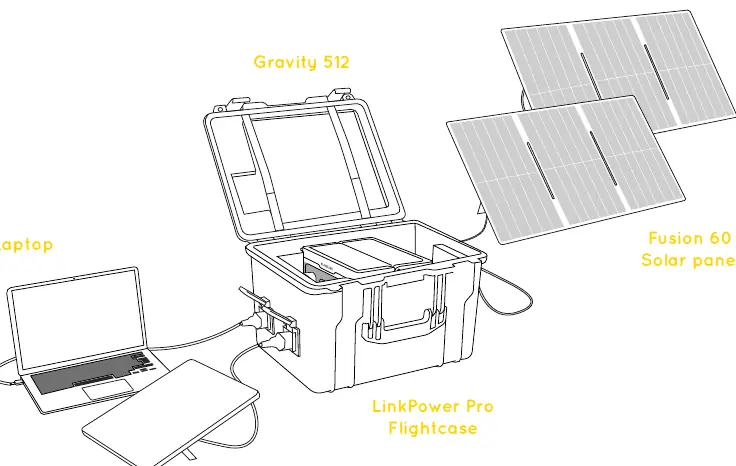
Product Overview
The case features a shock-absorbing foam interior and an IP54-rated shell. Key external features include:
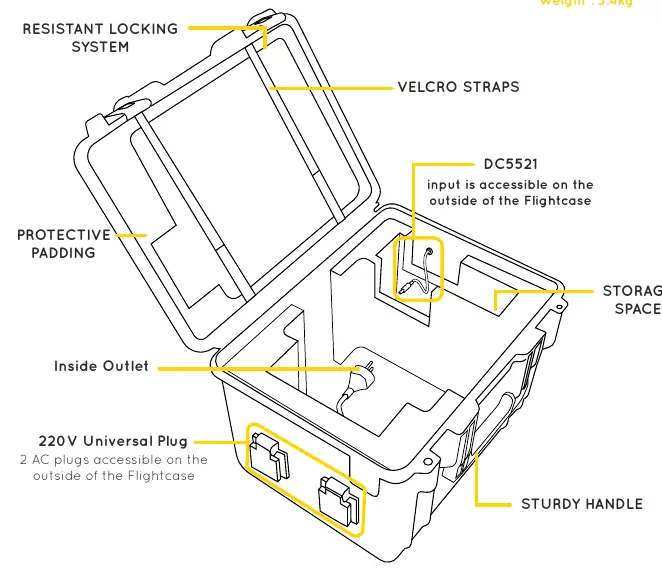
- External DC Input: DC5521 port for solar panel connection.
- External AC Output: Two 220V universal plugs for powering devices.
- Reinforced Handle: For secure transport.
- Resistant Locking System: Keeps the case securely closed.
Installation and Setup
To set up your power station:
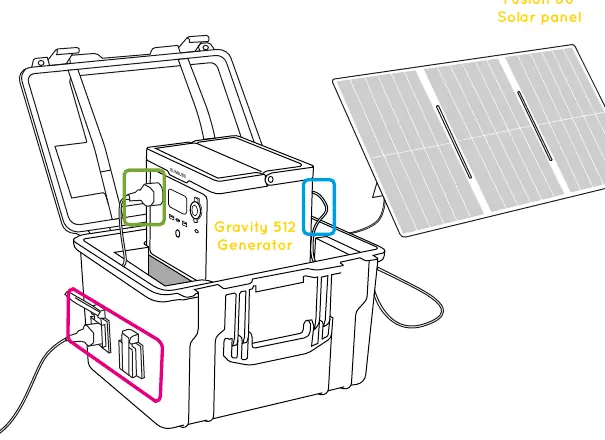
- Place the Gravity 512 generator inside the designated foam compartment.
- Connect the internal DC5521 cable to the generator's DC port.
- Connect your solar panel directly to the external DC5521 input on the case.
- Connect your devices (e.g., Starlink Mini, laptop) to the external AC outlets.
Usage Guidelines
For optimal performance and safety:
- Ventilation: For better ventilation and longer battery life, keep the lid resting against the case during use.
- Waterproofing: Only close the lid completely when waterproof protection is required (e.g., during transport or in rain).
- Safety: Do not block or cover the generator’s ventilation openings while in use.
Maintenance and Precautions
- Regular Checks: Periodically inspect the foam padding, connectors, and locks to ensure they are in good condition.
- Cleaning: Ensure all connectors, ports, and plugs are completely dry before connecting or disconnecting power.
- Restrictions: Do not apply pressure or impact to external DC ports. Do not modify the electrical system.
- Environment: Keep away from open flames, excessive heat, and corrosive environments.
For support, contact the manufacturer via email at [email protected] or visit their website at www.sunslice-solar.com.
Official resources from the manual
Practical help
Common problems
Case overheating during use
Keep the lid resting against the case rather than fully closed to allow for proper ventilation of the internal generator.
Generator not charging via solar
Ensure the internal DC5521 cable is securely connected to the generator's DC port and the solar panel is connected to the external DC input.
Water ingress
Ensure the lid is closed completely and the locking system is engaged to maintain the IP54 waterproof rating.
Before use
- Verify the Gravity 512 generator is correctly installed inside the foam interior.
- Ensure all cables are connected according to the recommended wiring sequence.
- Check that the lid position is appropriate for the current environment (resting for ventilation vs. closed for protection).
- Inspect the foam padding and locks for any signs of damage.
- Ensure all external ports are clean and dry.
Specs in practice
- 220V Universal Plug
- External AC output ports allowing you to power devices without opening the case.
Images and diagrams
- The case provides external access to power ports, allowing you to charge and power devices while the case remains closed.
- Internal wiring connects the generator to the external ports, streamlining power management.
Model compatibility
- Designed specifically for the Sunslice Gravity 512 generator.
- Compatible with Fusion 60 solar panels.
- Engineered to fit the Starlink Mini securely.

Manual page author
Michael Turner
Technical manual editor
Reviews PDF manuals for structure, safety notes, and practical product details so readers can find the right information quickly.