Power / Portable Power Stations
User Manual for Sunslice Gravity 144 Power Station
Comprehensive user guide for the Sunslice Gravity 144 (PS100) portable power station. Includes setup instructions, charging methods, output specifications, safety precautions, and troubleshooting tips.
Table of contents
Manual images
Click an image to enlargeQuick Guide from the Manual
The Sunslice Gravity 144 is a portable power station designed for indoor and outdoor use. Before first use, ensure the battery is charged. The device can be charged via the included AC adapter, solar panel (12V-24V), or car charging cable. Always verify that your connected devices do not exceed the 100W AC output limit.
Safety Precautions
- Use only the provided AC adapter for charging.
- Do not expose the product to water, rain, or high temperatures (above 45°C).
- Do not attempt to disassemble the unit.
- Keep the device away from fire and heat sources.
- If storing for a long time, charge the battery to over 60% capacity and recharge every 6 months.
Packing List
- 1x Portable Power Station
- 1x User Manual
- 1x AC/DC Adapter
- 1x Car Charging Cable (Optional)
Product Overview
The front panel contains the following controls and ports:
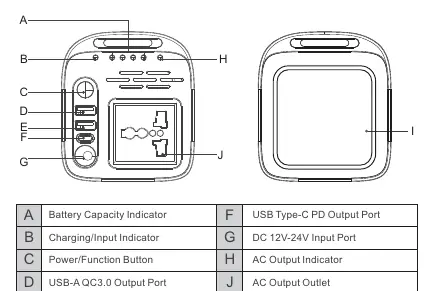
- Battery Capacity Indicator: Shows remaining charge.
- Charging/Input Indicator: Indicates charging status.
- Power/Function Button: Used to turn on the unit, toggle AC output, and control the LED lamp.
- USB-A QC3.0 Output Ports: For charging phones, tablets, and other USB devices.
- USB Type-C PD Output Port: High-speed charging for compatible devices.
- AC Output Outlet: For powering small household appliances (100W max).
- LED Lamp: Built-in light with high/low/SOS modes.
Operation and Charging
Charging the Unit
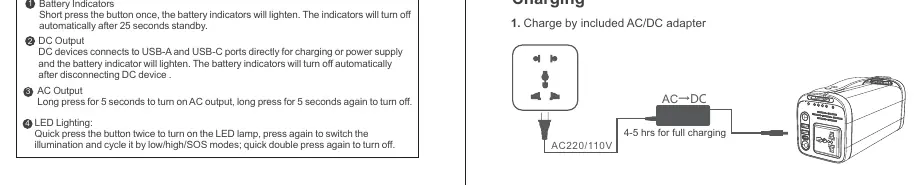
AC Charging: Connect the included AC adapter to a wall outlet and the DC input port on the power station. Full charging takes approximately 4-5 hours.
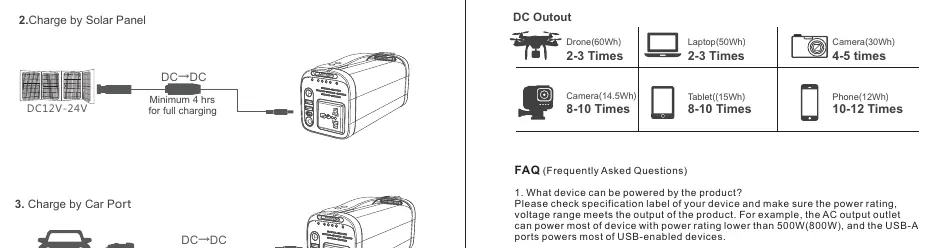
Solar Charging: Connect a 12V-24V solar panel to the DC input port. Charging time depends on solar conditions.
Car Charging: Connect the car charging cable to the vehicle's 12V outlet and the power station's DC input port. Full charging takes approximately 4-5 hours.
Using Outputs
- Powering On: Press the Power/Function button once to check battery levels.
- AC Output: Long press the button for 5 seconds to turn on AC output. Long press again to turn it off.
- DC Output: Connect devices to USB-A or USB-C ports. Power is supplied automatically.
- LED Lighting: Quick press the button twice to turn on the LED lamp. Press again to cycle through modes (high/low/SOS). Double press again to turn off.
Technical Specifications
- Model: PS100
- Battery Capacity: 144Wh (3.6V 40000mAh)
- AC Output: 100W (Pure Sine Wave), 100V/110V or 220V/230V
- DC Output: 2x USB-A QC3.0 (18W Max), 1x USB-C PD (45W Max)
- Operating Temperature: 0°C to 40°C
- Net Weight: 1.62 kg
FAQ
- What devices can be powered? The AC output supports devices up to 100W. USB ports support most USB-enabled devices.
- Can it be charged and discharged simultaneously? Yes, the product can be charged by solar or AC adapter while powering devices.
- Is the battery replaceable? No, the internal battery is not replaceable by the end user.
Practical help
Common problems
AC output indicator is red
This indicates a fault. Check that the connected device power rating does not exceed 100W.
Device not charging
Ensure the AC adapter is securely connected and the input voltage is within 100V-240V.
Battery indicators do not light up
Press the Power/Function button once to wake the system. If still off, the battery may be fully depleted.
Before use
- Verify the AC adapter input voltage matches your local power supply.
- Check the battery level by pressing the Power/Function button.
- Ensure the device is placed in a dry, well-ventilated area.
- Confirm that connected devices do not exceed the 100W AC output limit.
Specs in practice
- Pure Sine Wave
- Provides clean, stable power suitable for sensitive electronics like laptops and medical devices.
Images and diagrams
- The front panel layout includes the power button, charging indicators, and various output ports (USB-A, USB-C, AC).
- Charging diagrams illustrate the connection points for AC wall adapters, solar panels, and car chargers.
Model compatibility
- AC output is limited to 100W.
- Solar charging requires a 12V-24V input.
- USB-C PD port supports laptops, tablets, and smartphones.

Manual page author
David Miller
Documentation analyst
Organizes user manual content into clear summaries, with attention to model details, product context, and everyday usability.