Electronics / Camera Lenses
User Manual for Tamron 18-300mm F/3.5-6.3 Di III-A VC VXD Lens
Quick guide for the Tamron 18-300mm F/3.5-6.3 Di III-A VC VXD lens (Model B061). Learn how to attach the lens, operate the zoom lock, use vibration compensation, and follow essential safety precautions.
Table of contents
Manual images
Click an image to enlargeQuick Guide from the Manual
This manual provides essential operating instructions for the Tamron 18-300mm F/3.5-6.3 Di III-A VC VXD lens (Model B061). Key features include a zoom lock mechanism, vibration compensation (VC) for handheld shooting, and a specialized lens hood. Always ensure the camera is powered off before attaching or detaching the lens.
Parts Identification
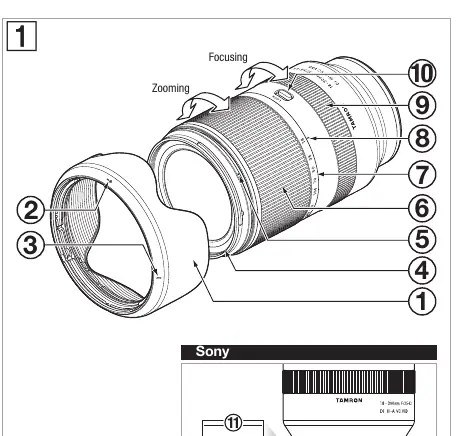
- 1: Lens hood
- 2: Hood alignment mark
- 3: Hood lock mark
- 4: Filter ring
- 5: Hood release mark
- 6: Zoom ring
- 7: Focal length scale
- 8: Focal length mark
- 9: Focus ring
- 10: Zoom lock switch
- 11: Lens attachment mark
- 12: Lens-camera interface contacts
Attaching and Detaching the Lens
Remove the rear lens cap. Align the lens attachment mark (11) with the corresponding mount mark on your camera. Rotate the lens clockwise until it clicks into place. To detach, press the lens release button on the camera while rotating the lens in the opposite direction.
Zoom Lock Mechanism
The zoom lock prevents the lens from extending under its own weight when carried. To lock: set the focal length to 18mm using the zoom ring (6), then push the zoom lock switch (10) towards the zoom ring. To unlock, push the switch back towards the camera body.
Vibration Compensation (VC)
Enable VC via your camera settings. The lens automatically switches to the appropriate VC mode for video recording. VC is effective in low-light conditions or when a tripod cannot be used. Disable VC when using a tripod to prevent potential malfunctions.
Lens Hood
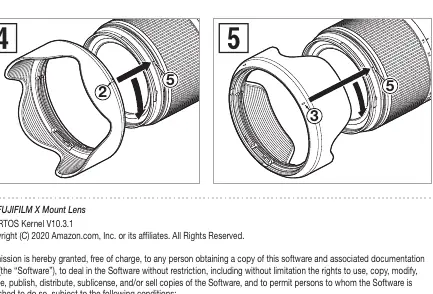
The lens hood (1) blocks stray light. To attach, align the hood alignment mark (2) with the hood release mark (5) on the lens, then rotate the hood until the hood lock mark (3) aligns with the release mark. It can be stored in reverse position.
Safety Precautions
- Do not look at the sun or strong light sources through the lens.
- Do not disassemble, repair, or modify the lens.
- Keep the lens out of reach of children.
- Do not leave the lens in direct sunlight or hot places like inside a car.
- Always attach the lens cap when not in use.
Manufacturer information
Tamron Corporation
Practical help
Common problems
Lens rattles when off the camera
This is normal and not a malfunction; it is related to the internal mechanism.
Image appears blurry immediately after half-pressing the shutter
This is a characteristic of the VC mechanism and not a malfunction.
Autofocus is difficult to work
Depending on the subject, autofocus may struggle. Switch to manual focus using the focus ring if necessary.
Before use
- Ensure the camera is turned off.
- Remove the rear lens cap.
- Align the lens attachment mark with the camera mount.
- Rotate the lens clockwise until it clicks.
- Check that the zoom lock is disengaged before shooting.
Specs in practice
- Focal Length
- 18-300mm (versatile zoom range).
- Maximum Aperture
- F/3.5-6.3.
- Minimum Focus Distance
- 0.15m (wide) / 0.99m (tele).
Images and diagrams
- Zoom Lock: Align focal length to 18mm, then push the switch towards the zoom ring to lock.
- Lens Hood: Align the hood alignment mark with the release mark, then rotate until the lock mark aligns.
Model compatibility
- Compatible with Sony E (APS-C) mount cameras.
- Compatible with FUJIFILM X (APS-C) mount cameras.

Manual page author
Emily Carter
User documentation editor
Prepares concise manual descriptions and highlights the most useful setup, operation, and maintenance information for readers.