Electronics / Camera Lenses
User Manual for Tamron SP 150-600mm F/5-6.3 Di VC USD Lens
Quick guide for the Tamron SP 150-600mm F/5-6.3 lens (Model A011). Learn how to mount the lens, use the VC mechanism, operate the focus limiter, adjust the tripod mount, and use the zoom lock switch.
Table of contents
Manual images
Click an image to enlargeQuick guide from the manual
This lens is designed for high-performance photography. Key operations include mounting the lens by aligning the attachment marks, using the AF/MF switch for focusing, and utilizing the VC (Vibration Compensation) mechanism for hand-held shots. Always ensure the zoom lock switch is disengaged before zooming and engaged at 150mm for transport.
Nomenclature
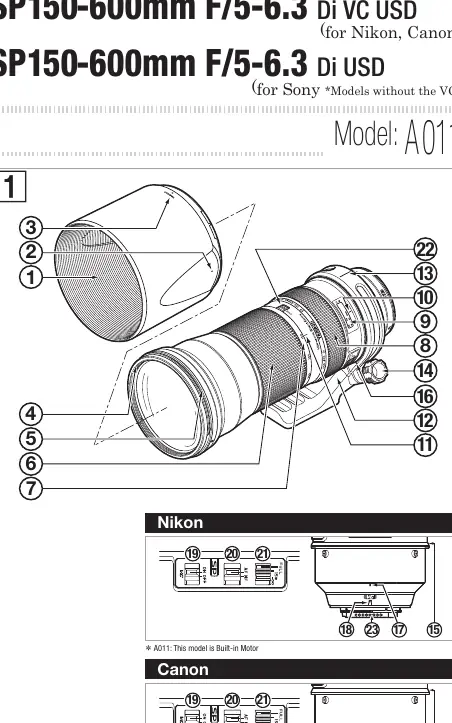
The lens features a zoom ring, focusing ring, distance scale, and various switches including AF/MF, VC, and a focus limiter. The tripod mount is detachable and adjustable for different shooting orientations.
Attaching and Removing the Lens
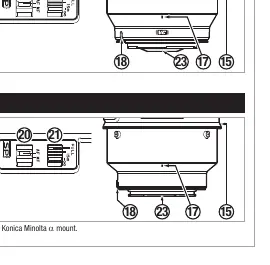
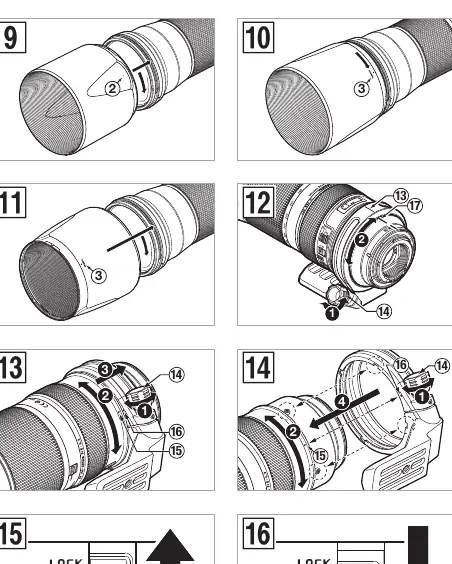
To mount, remove the rear cap, align the lens attachment mark with the camera mount, and rotate clockwise until it clicks (for Nikon, rotate counter-clockwise). To detach, press the camera's lens release button, rotate the lens in the opposite direction, and lift it off.
Focusing
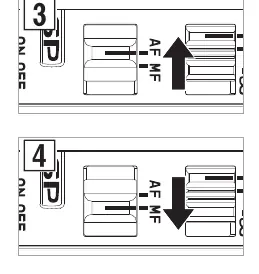
Switch the AF/MF button on the lens to AF for autofocus or MF for manual focus. The lens supports full-time manual focus, allowing fine-tuning while in AF mode by turning the focus ring while the shutter button is pressed halfway.
VC Mechanism
Available on Nikon and Canon models, the Vibration Compensation (VC) mechanism reduces image blur. Turn the VC switch ON to activate. Note that it takes about 1 second to stabilize after pressing the shutter button halfway. Turn the VC switch OFF when using a tripod or during long exposures.
Zooming
Rotate the zooming ring to adjust the focal length. Ensure the zoom lock switch is disengaged before attempting to zoom.
Lens Hood
Attach the provided bayonet-type hood by aligning the marks and rotating clockwise. The hood helps eliminate stray light. It can be reversed and stowed on the lens when not in use.
Focus Limiter
Use the focus limiter switch to accelerate autofocus speed. Set to FULL for the maximum close-up to infinity range, or 15m-∞ for normal photography outside the close-up range.
Tripod Mount
The tripod mount can be rotated to change the camera's orientation. Loosen the fixing screw to rotate, and tighten it to secure. To remove, align the release marks on the lens and tripod mount.
Zoom Lock Switch
Prevents the lens barrel from extending under its own weight. Activate by setting the lens to 150mm and pushing the switch up. Disengage by pulling the switch forward before zooming.
Maintenance and Precautions
Avoid touching the glass elements. Use a lens cloth or blower to remove dust. Store in a cool, dry place with a drying agent to prevent mildew. Do not touch the lens-camera interface contacts.
Manufacturer information
Tamron Corporation
Practical help
Common problems
Image blur in viewfinder after pressing shutter halfway
This is normal; it takes about 1 second for the VC mechanism to stabilize the image.
VC makes a clicking sound
This is the locking mechanism activating, not a malfunction.
Zoom lock switch will not engage
Ensure the lens is set to the 150mm position before pushing the switch up.
Autofocus accuracy issues
Due to digital SLR configuration, the focal point may be slightly forward or behind; this is inherent to the system.
Before use
- Remove the rear lens cap
- Align the lens attachment mark with the camera mount
- Rotate the lens until it click-locks
- Set the AF/MF switch to the desired mode
- Ensure the zoom lock switch is disengaged before shooting
Specs in practice
- Focal Length
- 150-600mm zoom range
- Minimum Focusing Distance
- 2.7 meters (106.3 inches)
Images and diagrams
- Diagram 1: Overview of lens parts and nomenclature
- Diagram 3-4: AF/MF switch operation
- Diagram 5-6: VC switch operation
- Diagram 7-8: Focus limiter settings
- Diagram 15-16: Zoom lock switch operation
Model compatibility
- VC mechanism is for Nikon and Canon models only
- Sony models use Di USD without VC
- Compatible with Konica Minolta alpha mount

Manual page author
Michael Turner
Technical manual editor
Reviews PDF manuals for structure, safety notes, and practical product details so readers can find the right information quickly.