Electronics / Camera Lenses
User Manual for Tamron 150-500mm F/5-6.7 Di III VC VXD Lens
Comprehensive user guide for the Tamron 150-500mm F/5-6.7 Di III VC VXD lens. Includes instructions on lens mounting, focus modes, vibration compensation (VC), focus limiter settings, tripod mount usage, and safety precautions.
Table of contents
Quick Guide from the Manual
This manual provides essential operating instructions for the Tamron 150-500mm F/5-6.7 Di III VC VXD lens. Key features include Vibration Compensation (VC), focus limiting, and a flexible zoom lock mechanism. Always ensure the camera is powered off before mounting or removing the lens.
Lens Parts and Controls
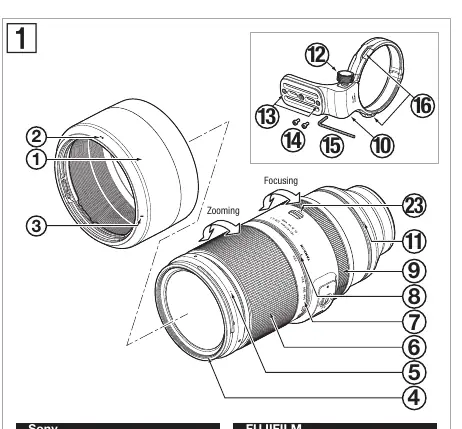
The lens features several controls, including the zoom ring, focus ring, AF/MF switch (Sony) or MF SPEED switch (Fujifilm), VC switch, VC mode switch, focus limiter switch, and a tripod mount. Refer to the diagram on page 1 for the exact location of these components.
Mounting and Removing the Lens
To mount the lens, align the lens mounting mark on the lens with the corresponding mark on the camera body. Rotate the lens clockwise until it clicks into place. To remove, press the lens release button on the camera and rotate the lens in the opposite direction.
Focus Mode Switching
Sony E-mount: Use the AF/MF switch on the lens to toggle between Auto Focus (AF) and Manual Focus (MF). Ensure both the lens and camera are set to the desired mode.
Fujifilm X-mount: Select "MANUAL FOCUS" on the camera body. Use the MF SPEED switch on the lens to choose the focus response speed: MODE 1 (standard response) or MODE 2 (slower, precise response).
Vibration Compensation (VC)
The VC system reduces image blur. Use the VC switch to turn it ON or OFF. The VC mode switch allows you to select between three modes:
- MODE 1: Standard vibration compensation.
- MODE 2: Dedicated panning mode.
- MODE 3: Framing priority mode, useful for tracking fast-moving subjects.
Note: Turn VC OFF when using a tripod.
Focus Limiter
The focus limiter switch helps speed up autofocus by restricting the focusing range. Settings vary by mount:
- Sony E-mount: Options include ∞-3m, ∞-15m, and FULL.
- Fujifilm X-mount: Options include MOD-10m, 10m-∞, and FULL.
Zooming and Flex Zoom
Rotate the zoom ring to adjust the focal length. The Flex Zoom mechanism allows you to lock the zoom ring at any position by moving the ring toward the subject. To unlock, move the ring toward the camera.
Tripod Mount
The lens includes a tripod mount compatible with Arca-Swiss style platforms. To attach, align the mount with the lens groove and tighten the locking screw. Ensure the safety lock screw is installed if using an Arca-Swiss compatible platform to prevent the lens from falling.
Safety Precautions
- Do not look at the sun or strong light sources through the lens.
- Keep the lens out of reach of children.
- Do not disassemble or modify the lens.
- Avoid storing the lens in high-temperature areas or direct sunlight.
- Always attach the lens cap when not in use.
Manufacturer information
Tamron Corporation
Practical help
Common problems
Lens does not focus
Ensure the AF/MF switch on the lens is set to AF and the camera is also set to AF mode.
VC (Vibration Compensation) is not effective
Ensure the VC switch is set to ON. Turn VC OFF when using a tripod.
Zoom ring is locked
Ensure the Flex Zoom or Zoom Lock mechanism is disengaged by moving the ring toward the camera.
Before use
- Remove the front and rear lens caps.
- Align the lens mounting mark with the camera mount.
- Ensure the camera is powered off before attaching or removing the lens.
- Check that the tripod mount is securely tightened before use.
- Verify the focus limiter switch is set to the desired range.
Images and diagrams
- Diagram 1 identifies all external controls, including the zoom ring, focus ring, and various switches.
- Diagrams 7-9 illustrate the focus limiter settings for Sony E-mount.
- Diagrams 7'-9' illustrate the focus limiter settings for Fujifilm X-mount.
- Diagrams 3 and 4 show how to engage and disengage the zoom lock.
Model compatibility
- Compatible with Sony E-mount and Fujifilm X-mount (APS-C) cameras.
- The tripod mount is compatible with Arca-Swiss style platforms.

Manual page author
David Miller
Documentation analyst
Organizes user manual content into clear summaries, with attention to model details, product context, and everyday usability.