Electronics / Camera Lenses
User Manual for Rokinon 135mm F1.8 Auto Focus Lens
Get the most out of your Rokinon 135mm F1.8 Auto Focus lens with this quick guide. Learn how to use the Astro-Focus mode, configure the custom switch, calibrate infinity focus, and maintain your lens for optimal performance.
Table of contents
Quick guide from the manual
The Rokinon 135mm F1.8 lens features advanced functions including an Astro-Focus mode for astrophotography and a customizable switch. If you experience focus issues, you can calibrate the infinity focus by focusing on an object at infinity, then pressing and holding the focus hold button for 3 seconds until the camera screen darkens and brightens.
Lens Overview
The lens barrel includes several key controls:
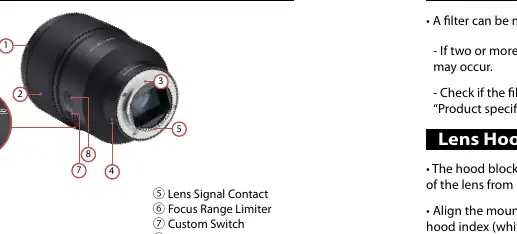
- Focus Ring: Used for manual focus or aperture adjustment depending on the custom switch setting.
- Custom Switch: Toggles between Mode 1 (focus adjustment) and Mode 2 (aperture adjustment).
- Focus Range Limiter: Restricts the AF range (Full, 0.69m-2m, or 1.5m-infinity) to speed up autofocus.
- Focus Hold Button: Locks focus in AF mode or performs assigned custom functions.
- LED Index: Indicates status, particularly for Astro-Focus mode.
Installation
To attach the lens:
- Remove the front and rear lens caps.
- Align the LED index on the lens with the index on the camera mount.
- Rotate the lens clockwise until you hear a click.
To detach the lens, press the camera's lens-detaching button and rotate the lens counterclockwise until it stops.
Astro-Focus Mode
This mode is designed for astrophotography. To enter it:
- When camera is on: Press and hold the focus hold button while mounting the lens.
- When camera is off: Mount the lens, press the focus hold button, and turn on the camera.
Once active, the camera switches to Manual Focus (MF). The LED index will blink red, move to the infinity position, and then light up green. If you adjust the focus ring, the LED turns red; press the focus hold button briefly to return to the infinity position.
Maintenance and Safety
- Cleaning: Use a lens blower or brush to remove dust. Wipe with a clean, soft cloth. Do not use organic solvents like thinner, alcohol, or benzene.
- Storage: Store in a dry, ventilated place. Avoid direct sunlight and drastic temperature changes to prevent moisture condensation and mold.
- Safety: Do not look at the sun through the lens. Keep out of reach of children.
Manufacturer information
Rokinon
Practical help
Common problems
Vignetting occurs
Ensure the lens hood is mounted correctly and not obstructing the view. Avoid using two or more filters simultaneously.
Focus cannot be set to infinity accurately
Perform the calibration method: Focus on an object at infinity, then press and hold the focus hold button for approximately 3 seconds.
Astro-Focus mode is canceled
This happens if the camera is turned off or enters sleep mode. You must re-engage the mode as described in the manual.
Before use
- Remove front and rear lens caps.
- Align the LED index on the lens with the camera mount index.
- Rotate the lens clockwise until it clicks.
- Check that the filter size (82mm) is compatible.
- Ensure the camera is turned off before attaching or detaching the lens.
Specs in practice
- Aperture Range
- F1.8 to F22, controlling the amount of light and depth of field.
- Minimum Focusing Distance
- 0.69m (2.26ft) from the image sensor to the object.
Images and diagrams
- The lens barrel features a Focus Ring, Custom Switch, Focus Range Limiter, and Focus Hold Button.
- The LED Index provides visual feedback for the Astro-Focus mode status.
Model compatibility
- Designed for Sony E mount cameras.
- Some features (Focus hold button, custom switch, Astro-Focus) may not work on all camera models.
- Supported functions may vary according to the specific camera model.

Manual page author
Emily Carter
User documentation editor
Prepares concise manual descriptions and highlights the most useful setup, operation, and maintenance information for readers.