Electronics / Audio Processors
User Manual for Beko Dishwasher A6 Series
Quick guide for Beko A6 Series dishwasher. Learn how to operate programs, adjust water softening settings, and understand consumption values.
Quick answers from the manual
Quick answer
- This manual provides operating instructions for the Beko A6 Series dishwasher, including program selection, auxiliary functions, and the procedure for adjusting the water softening system. p. 1, 3, 4
Key actions
- Adjusting water hardness p. 3, 4
Problems and fixes
Salt indicator light stays on
If water hardness is below 7°dH, salt is not needed; the indicator will remain lit.
p. 4Technical specifications
| Parameter | Value | Meaning | Pages |
|---|---|---|---|
| Loading Capacity | 14 | Maximum number of place settings | p. 2 |
Where to find it in the PDF
- Control Panel and Operation p. 1
- Programme Data Table p. 2
- Water Softening Adjustment p. 3, 4
Table of contents
Manual images
Click an image to enlargeQuick Guide to Operation
The Beko A6 Series dishwasher is controlled via a main program selection knob and a set of function keys. Before operating, ensure you have read the separate Safety Instructions document.
Control Panel Overview
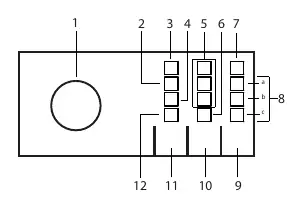
- On-Off / Program Selection knob: Used to turn the machine on and select the desired washing program.
- Start / Hold / Cancel key: Used to initiate, pause, or cancel a program.
- Indicators: The panel features indicators for Rinse aid, Low salt, Delay, SelfDry, and program status (Washing, Drying, Program Ended).
- Auxiliary Functions: Keys are provided for Delay, Half Load, and Tablet detergent functions. Note that auxiliary functions may alter the total program duration.
Programme Data and Consumption
The dishwasher offers various programs tailored to different soil levels and dish types. The Eco program is the reference program for EU eco-design directive compliance.
- Eco: Most efficient for combined power and water consumption.
- Auto: Automatically determines soil degree and adjusts water/temperature.
- Intensive: For heavily soiled dishes, pots, and pans.
- GlassCare: Gentle cleaning for delicate glassware.
- Quick&Shine: Daily washing for normally soiled dishes.
- Mini: For lightly soiled, pre-cleaned dishes.
Adjusting the Water Softening System
Proper adjustment of the water softening system is crucial for optimal washing, rinsing, and drying performance.
How to Determine Water Hardness
- Unpack the provided test strip.
- Run the tap for approximately 1 minute.
- Dip the test strip into the water for 1 second.
- Remove the strip, shake it, and wait 1 minute.
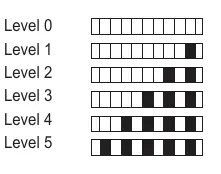
- Compare the result with the levels provided in the manual to determine your water hardness level.
Setting the Water Hardness
- With the Program Selection Knob in the "Off" position, press and hold the Start / Pause / Cancel key.
- Rotate the Program Selection Knob one step clockwise while keeping the key pressed for 3 seconds to enter regeneration setting mode.
- The current level will be illuminated for 5 seconds.
- Turn the Program Selection Knob to the position corresponding to your water hardness level (refer to the Water Hardness Level Setting Table).
- Press the Start / Pause / Cancel key to save the setting.
- Return the knob to the "Off" position.
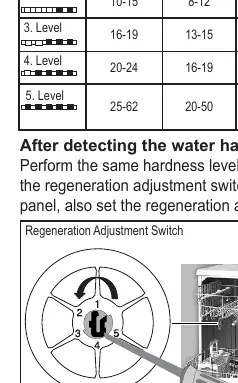
- Important: You must also manually set the Regeneration Adjustment Switch located inside the machine to match the level set on the control panel.
Practical help
Common problems
Salt indicator light stays on
If your water hardness is below 7°dH, salt is not required. The indicator will remain lit, but you do not need to add salt.
Need to change water hardness setting
You must update both the electronic setting via the control panel and the physical Regeneration Adjustment Switch inside the machine.
Before use
- Read the Safety Instructions section.
- Determine your local water hardness using the provided test strip.
- Adjust the electronic water softening level via the control panel.
- Adjust the physical Regeneration Adjustment Switch to match the electronic setting.
Specs in practice
- Loading Capacity
- The dishwasher is designed to hold 14 place settings.
Images and diagrams
- The control panel diagram identifies the program knob and indicators for salt, rinse aid, and program stages.
- The regeneration adjustment switch diagram shows how to manually set the hardness level inside the machine.
Model compatibility
- If water hardness is above 50°dH or if using well water, it is recommended to use additional filter and water purification devices.

Manual page author
Emily Carter
User documentation editor
Prepares concise manual descriptions and highlights the most useful setup, operation, and maintenance information for readers.