Automotive / Car Audio
User Manual for Taramps DS 1200X4 Amplifier
Quick guide for the Taramps DS 1200X4 amplifier. Learn about installation, wiring, crossover settings, and technical specifications for this 4-channel car audio amplifier.
Table of contents
Manual images
Click an image to enlargeQuick guide from the manual
The Taramps DS 1200X4 is a high-performance car audio amplifier. Installation must be performed by a qualified professional. Ensure the vehicle battery is 12V and disconnect the negative terminal before starting any connections. The amplifier requires at least 1 inch of space around the heatsink for proper cooling. Always install a 70A fuse or circuit breaker as close to the battery as possible.
Functions and inputs
The amplifier features controls for each channel pair:
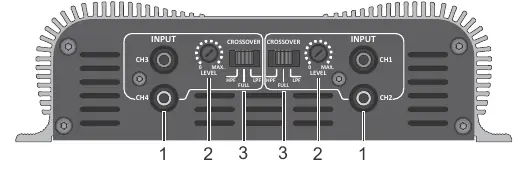
- Input: Connect to the RCA outputs of your Head Unit using high-quality shielded cables.
- Level: Adjusts the input sensitivity to match the output signal levels of your Head Unit.
- Crossover: Selects the operating mode:
- FULL: Amplifies the entire audio range (9Hz to 27KHz).
- HPF (High Pass): Amplifies signals above 90Hz (ideal for mid-bass, mid-range, or tweeters).
- LPF (Low Pass): Amplifies signals below 90Hz (ideal for subwoofers).
Output and power supply
The output and power connectors are located on the side of the unit:
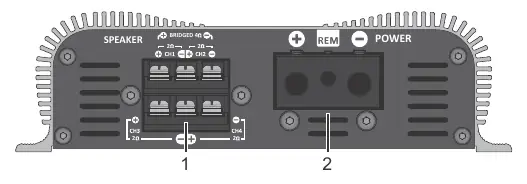
- Output: Connect speakers while respecting polarity and minimum impedance (2 ohms per channel for stereo, 4 ohms for bridged connections).
- Power: Connect the positive (+) terminal to the battery using a minimum 16mm² (5 AWG) wire. Connect the negative (-) terminal to the battery using the same gauge wire.
- Remote: Connect to the Head Unit's remote output using a 0.75mm² wire.
Protection System: The amplifier will shut down if it detects a short-circuit or impedance lower than the supported limit.
Installation and wiring
Proper wiring is critical for performance and safety:
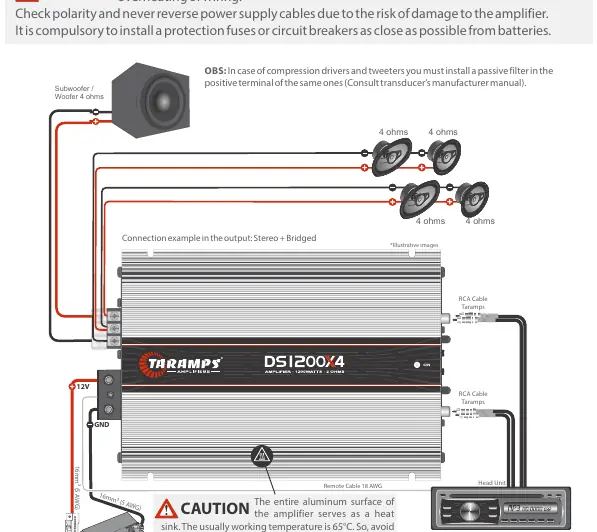
- Power/Ground Cable: 5 AWG (16mm²).
- Output Cables: 13 AWG.
- Remote Cable: 18 AWG.
- Protection Fuse: 70A.
Avoid running wires over sharp edges; use rubber grommets. If your Head Unit lacks 4 RCA outputs, use Y-type adapters. For compression drivers and tweeters, install a passive filter on the positive terminal.
Technical features
Key specifications for the DS 1200X4:
- Number of Channels: 4
- Output Power: 1200W RMS (4 x 300W RMS @ 2 Ohms)
- Frequency Response: 9Hz to 27KHz
- Input Impedance: 18K Ohms
- Supply Voltage: 9VDC to 16VDC
- Dimensions: 182 x 52 x 281mm
Practical help
Common problems
Amplifier shuts down during operation
Check for short-circuits or speaker impedance lower than the supported 2 ohms (stereo) or 4 ohms (bridged).
Power loss or overheating
Verify that wire gauges meet the 5 AWG requirement. Using thinner wires causes power loss and overheating.
Noise interference in audio
Ensure you are using high-quality shielded RCA cables for the input connections.
Before use
- Disconnect the vehicle battery negative terminal before starting installation.
- Verify the vehicle battery is 12V.
- Install a 70A fuse or circuit breaker near the battery.
- Ensure at least 1 inch of clearance around the heatsink.
- Check that speaker impedance matches the amplifier's requirements (2 ohms stereo / 4 ohms bridged).
Images and diagrams
- Input/Crossover Panel: Shows RCA inputs, level sensitivity knobs, and crossover switches.
- Power/Output Connector: Illustrates speaker terminals, power (+/-) inputs, and remote terminal.
- Wiring Diagram: Shows the complete connection path from battery to amplifier and speakers.
Model compatibility
- Requires 12V battery system.
- Not suitable for use in areas where children are present.
- Requires passive filters when using compression drivers or tweeters.

Manual page author
Emily Carter
User documentation editor
Prepares concise manual descriptions and highlights the most useful setup, operation, and maintenance information for readers.