Automotive / Car Audio
User Manual for Taramps THS 4004 Amplifier
Quick guide for the Taramps THS 4004 4-channel amplifier. Learn about installation, wiring connections, Bluetooth setup, optical input configuration, and technical specifications.
Table of contents
Manual images
Click an image to enlargeQuick guide from the manual
The Taramps THS 4004 is a 4-channel Class D receiver designed for various environments. Installation must be performed by a qualified professional. Ensure the device is placed in a firm, ventilated area away from heat, humidity, and direct sunlight. The device features an automatic bivolt power supply (90-240V).
Product description
The THS 4004 is a compact, powerful receiver capable of integrating different audio environments. It supports multiple audio sources including Bluetooth, USB, Micro SD, AUX, and Optical inputs. It also features a microphone input with an attenuation function and a 'Gongo' (ding-dong) alert system.
Installation and connections
The rear panel contains the power input, speaker outputs, and audio inputs. Follow these guidelines for proper setup:
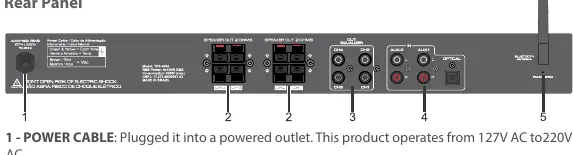
- Power: Connect to a power outlet (90-240V AC).
- Speakers: The unit has 4 individual power outputs. Observe polarity and ensure a minimum impedance of 2 Ohms per channel.
- Wiring: Use cables with a gauge of at least 1.5mm² for distances up to 40 meters. For longer distances, refer to the gauge table in the full manual.
- Antennas: Position the FM wire antenna for best reception and ensure the Bluetooth antenna is attached.
Audio sources and inputs
The device supports several input methods:
- USB/Micro SD: Supports MP3 files up to 64GB. Ensure the drive is free of viruses to prevent slow reading or failures.
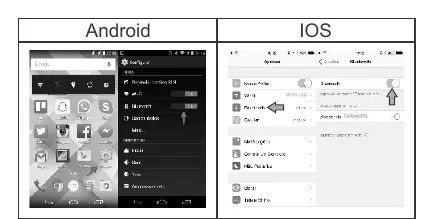
- Bluetooth: Search for 'TARAMPS' on your device to pair. The range is approximately 50 meters.
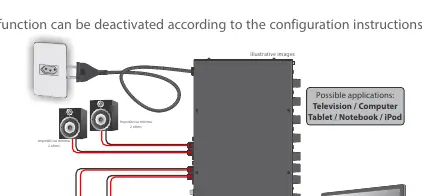
- Optical Input: Requires the TV or source to be set to PCM output. The device features an 'Auto Turn On' function that activates when an optical signal is detected.
- Microphone: Use the P10 input. Avoid wrapping microphone cables and keep the mic away from speakers to prevent feedback.
Front panel controls
The front panel allows for source selection, volume control, and configuration:
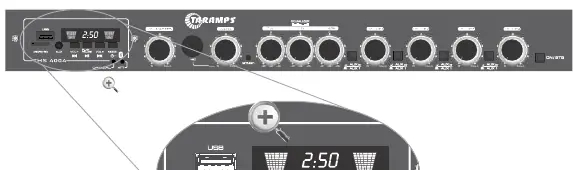
- Mode/ON/OFF: Short touch to cycle through sources (USB, SD, AUX, Bluetooth, FM). Long touch to turn the player on/off.
- Volume: Master volume control and individual channel volume controls (CH1-CH4).
- Equalization: 3-band equalizer (Low, Mid, High) to adjust sound frequencies.
- Gongo: Activation key for the ding-dong alert.
Configuration mode
To enter configuration mode, ensure the device is in Standby, then touch and hold the ON/STB key for more than 5 seconds. The blue LEDs indicate the status of the Optical Auto Turn On and Microphone Attenuation functions. Use the ON/STB or Gongo keys to toggle these settings.
Protection system
The amplifier includes protection against output overload and short circuits. If triggered, the ATT LED will light up, and audio will be interrupted for approximately 2 seconds. If this occurs frequently, review your installation and speaker impedance.
Practical help
Common problems
Unwanted noise
Check that cables and connections are in good condition and use high-quality cables.
Slow music reading or general failures
Ensure the USB/Micro SD card is free of viruses and contains only MP3 format files.
Optical signal not working
Ensure the TV or audio source is configured to output standard PCM audio.
Microphone feedback
Do not pass the microphone in front of the loudspeakers and do not wrap the microphone cables.
Before use
- Ensure installation is performed by a qualified professional.
- Verify the power source is between 90V and 240V.
- Check that speaker impedance is at least 2 Ohms.
- Ensure ventilation holes on the top and rear are not blocked.
- Format USB/SD card music files to MP3.
Specs in practice
- Nominal Impedance
- 2 Ohms per channel.
- Power Supply
- Automatic bivolt (90-240V AC).
- Frequency Response
- 10 Hz to 50 KHz (-3 dB).
Images and diagrams
- Front Panel: Displays inputs, volume knobs, and mode selection buttons.
- Rear Panel: Shows power input, speaker terminals, and audio inputs.
- Wiring Diagram: Illustrates how to connect speakers in parallel/series to match impedance.
Model compatibility
- Supports USB/Micro SD up to 64GB (MP3 format only).
- Compatible with Taramps Connect Control long-range remote.
- Optical input requires PCM output from the source device.

Manual page author
Michael Turner
Technical manual editor
Reviews PDF manuals for structure, safety notes, and practical product details so readers can find the right information quickly.