Automotive / Car Audio
User Manual for Taramps THS 6000 Multi Channel Receiver
Comprehensive user guide for the Taramps THS 6000 Multi Channel Receiver. This manual covers installation, speaker configuration, Bluetooth setup, input modes, and technical specifications to ensure optimal performance.
Table of contents
Manual images
Click an image to enlargeQuick guide from the manual
The Taramps THS 6000 is a high-performance multi-channel receiver. Important: Installation must be performed by a qualified professional. The device is automatic bivolt (90V-240V AC). Ensure proper ventilation, avoid direct sunlight, and use correct cable gauges based on the distance between the receiver and speakers to prevent signal loss or noise.
Product description
The THS 6000 is designed to integrate various audio environments. It features multiple inputs including USB, Micro SD, AUX, Bluetooth, FM radio, Microphone input, and Optical input. It provides 4 channels of 100W RMS each, with flexible configuration options for frequency filtering and channel routing.
Front panel controls
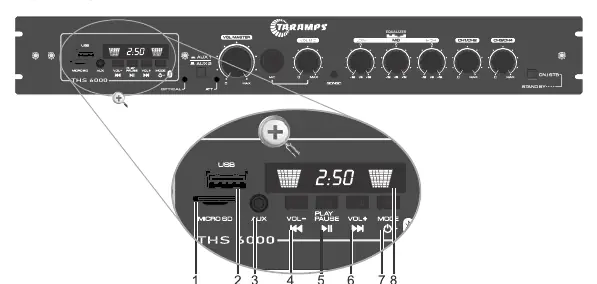
- 1-2: Micro SD and USB inputs.
- 3: P2 Auxiliary input.
- 4-6: Track/Volume controls and Play/Pause.
- 7: Mode/ON/OFF selector.
- 8: IR sensor for remote control.
- 9-10: Optical/Aux input indicators and selectors.
- 11: ATT (Audio attenuation) indicator.
- 12: Master volume control.
- 13-15: Microphone input, volume, and Gongo (ding-dong) activation.
- 16: 3-band Equalizer (Low, Mid, High).
- 17: Channel volume controls (CH1/CH2, CH3/CH4).
- 18: ON/STB button.
Rear panel connections
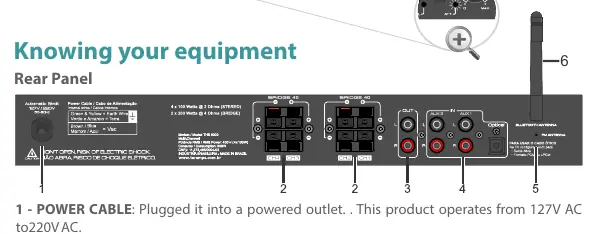
- Power Cable: Connects to 127V or 220V AC outlets.
- Speaker Outputs: Supports normal connection (2 Ohms) or Bridged connection (4 Ohms).
- Line Out: Sends unamplified audio to other equipment.
- Inputs: AUX 1, AUX 2, and Optical input.
- Antennas: FM and Bluetooth antenna connections.
Configuration and settings
The device features specific switches for sound customization:
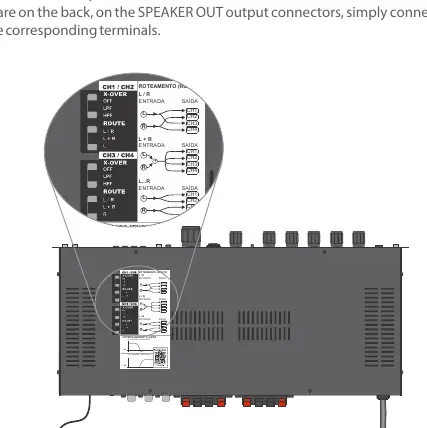
- X-OVER (Frequency Filters): Allows setting filters to OFF, LPF (Low Pass for subwoofers), or HPF (High Pass for mid/high speakers).
- ROUTE (Routing): Determines how the L/R channels are routed to the outputs (L/R, L+R, or L/R specific channels).
- Function Configuration Mode: Hold the ON/STB key for 5 seconds to enter configuration mode to toggle the Auto Turn On function or attenuation settings.
Bluetooth and audio sources
To use Bluetooth, select the function on the device and search for "TARAMPS" on your smartphone or tablet. For Optical input, ensure the connected TV or device is set to output PCM audio, otherwise, the receiver may not produce sound.
Protection system
If the protection system is triggered (indicated by the ATT LED), the audio output will be interrupted for approximately 2 seconds. If this happens frequently, check your speaker wiring for short circuits or impedance issues.
Technical features
- Power: 400W RMS (4 x 100W).
- Impedance: 2 Ohms per channel / 4 Ohms bridged.
- Frequency Response: 15 Hz to 50 KHz.
- Power Supply: 90V ~ 140V AC or 190V ~ 240V AC.
- Dimensions: 398 x 59 x 194 mm.
Practical help
Common problems
Protection system triggers (ATT LED turns on)
Check for short circuits in speaker wiring or ensure speaker impedance is not below the minimum (2 Ohms normal, 4 Ohms bridged).
No sound from Optical input
Ensure the TV or audio source is configured to output standard PCM audio.
Unwanted noise in audio
Check the quality of cables and connections. Ensure cables are of the correct gauge for the distance used.
Before use
- Ensure installation is performed by a qualified professional.
- Verify power supply is between 90V and 240V AC.
- Check speaker impedance (2 Ohms normal, 4 Ohms bridged).
- Use appropriate cable gauges based on distance (e.g., 1mm² for up to 20m, 4mm² for up to 100m).
- Ensure ventilation holes on the top and rear are not blocked.
Specs in practice
- Frequency Response
- 15 Hz to 50 KHz, covering the full audible spectrum.
- Power Supply
- Automatic bivolt (90-240V AC), compatible with most standard power outlets.
Images and diagrams
- Front panel: Contains volume, equalizer, input selection, and playback controls.
- Rear panel: Contains speaker terminals, power input, and auxiliary/optical inputs.
- X-OVER/ROUTE switches: Located on the bottom, used to configure frequency filters and channel routing.
Model compatibility
- Supports MP3 format on USB/SD (max 64GB).
- Compatible with Bluetooth devices (Class II, 10m range).
- Optical input requires PCM output from the source device.

Manual page author
David Miller
Documentation analyst
Organizes user manual content into clear summaries, with attention to model details, product context, and everyday usability.