Automotive / Car Audio
User Manual for Taramps Smart Charger 100A
Quick guide for the Taramps Smart Charger 100A. Learn about installation, wiring, operating modes, LED indicators, and technical specifications.
Table of contents
Manual images
Click an image to enlargeQuick guide from the manual
The Taramps Smart Charger 100A is a high-performance power supply and battery charger. Installation must be performed by a qualified professional. Key requirements include using a 150A circuit breaker near the power supply and 16mm² (5 AWG) cables for battery connections. The device features automatic bivolt detection (127V/220V) and multiple operating modes, including Smart Mode and Fixed Voltage modes.
Important recommendations
- Installation: Install in a firm, well-ventilated area. Do not install on the sides of speaker boxes due to vibration.
- Safety: Never reverse polarity. Do not open the unit; there are no user-serviceable parts inside.
- Environment: Avoid direct sunlight.
- Cabling: Do not use extension cords with gauges smaller than recommended (127V: 4mm²; 220V: 2.5mm²).
Electrical network connections
Ensure the electrical installation is adequate for the power supply's current draw. Always turn off the equipment before making any connections. A 150A circuit breaker is mandatory near the power supply. Use 16mm² (5 AWG) cables for battery connections.
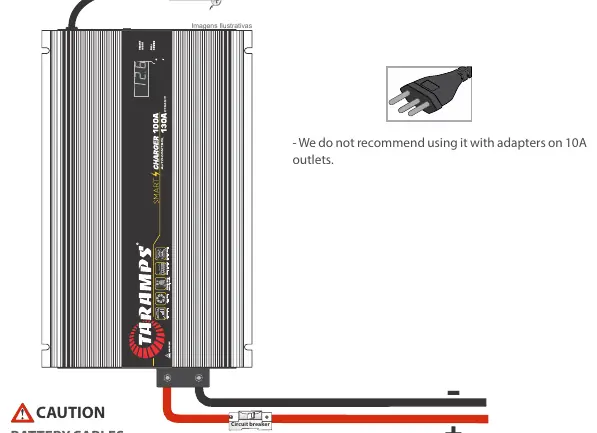
Output & power connector
The unit features a Smart Cooler system that adjusts speed based on temperature. The Smart Key (ON/OFF) button controls power and mode selection. A quick press turns the unit on. With the unit on, a quick press changes the output voltage (12.6V, 13.8V, 14.4V). A long press (2 seconds) turns the unit off.
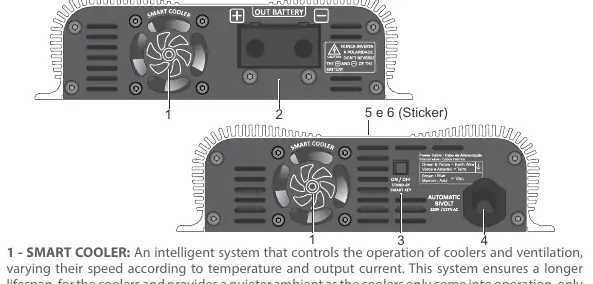
LED indicators & protection system
The illuminated logo displays the current status:
- Flashing 4x: Fixed 14.4V mode.
- Flashing 3x: Fixed 13.8V mode.
- Flashing 2x: Fixed 12.6V mode.
- Flashing rapidly: Smart Mode (automatic management).
- Flashing 6x/sec: Short circuit detected.
- Flashing 1s on/1s off: Over-temperature protection.
Operation modes
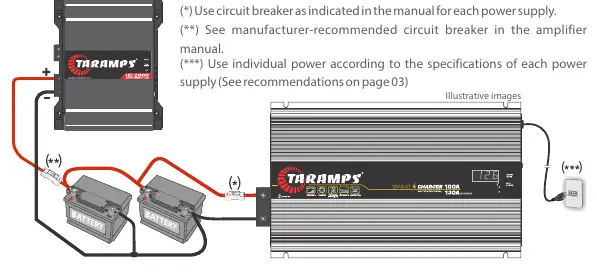
- Smart Mode: Automatically manages output voltage and current. Ideal for intelligent battery recharging.
- Fixed Voltage Mode: Allows setting a specific voltage (12.6V, 13.8V, or 14.4V) by disabling smart functions.
- Dynamic Mode: Automatically activated when the audio system is on, providing up to 130A for music signals.
Technical features
- Voltage Supply: Bivolt Automatic (127V / 220V).
- Rated Max. Output Current: 100A (130A Dynamic).
- Max. Input Power: 3000VA or 2000W.
- Dimensions: 182 x 52 x 319mm.
- Weight: 2.30Kg.
Practical help
Common problems
Short circuit detected
The device will flash 6x per second and automatically re-check the output every 5 seconds.
Over-temperature protection
The device shuts off the output and waits for the internal temperature to drop. Ensure ventilation is not obstructed.
Voltage drop or poor performance
Check if the electrical installation is adequate and if cable gauges meet the minimum requirements (16mm² for battery).
Reverse polarity
Never reverse polarity. Ensure correct connections before powering on.
Before use
- Ensure installation is performed by a qualified professional.
- Verify the electrical network voltage is compatible (automatic bivolt).
- Install a 150A circuit breaker near the power supply.
- Use 16mm² (5 AWG) cables for battery connections.
- Ensure the installation site is firm and well-ventilated.
- Check that fans and ventilation openings are not obstructed.
Specs in practice
- Rated Max. Output Current
- 100A continuous, with 130A available in Dynamic mode.
- Voltage Supply
- Automatic Bivolt (127V / 220V AC).
- Max. Input Power
- 3000VA or 2000W.
Images and diagrams
- Wiring diagram shows the connection between the power supply, circuit breaker, battery, and amplifier.
- Smart Key controls power and mode selection.
- LED indicators on the logo provide status and protection alerts.
Model compatibility
- Suitable for 12V battery banks between 60Ah and 1500Ah nominal capacity.
- Not recommended for use with adapters on 10A outlets.

Manual page author
Emily Carter
User documentation editor
Prepares concise manual descriptions and highlights the most useful setup, operation, and maintenance information for readers.