Music / Guitar Effects
User Manual for TC Electronic Flashback Triple Delay Pedal
Comprehensive user guide for the TC Electronic Flashback Triple Delay pedal. Includes detailed control descriptions, setup instructions, MIDI configuration, and technical specifications.
Table of contents
Quick Guide
The TC Electronic Flashback Triple Delay is a versatile delay pedal featuring three independent delay engines. This guide covers the operation of the controls, signal routing, and setup requirements to get you started.
Controls Overview
The pedal features 16 primary controls and connections:
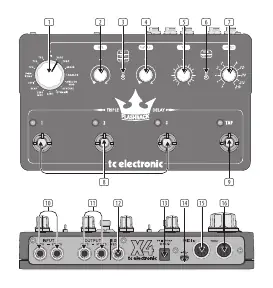
- 1. Delay Type: Selects between various delay types, including classic tape delays and the TC 2290 sound. Slots TP1-TP4 are reserved for TonePrints.
- 2. Time: Adjusts the delay time for the currently selected engine.
- 3. Delay 1/2/3: Selects which of the three delay engines is active for editing.
- 4. Repeats: Controls the number of delay repeats for the selected engine.
- 5. Mix: Adjusts the balance between the delay effect and the dry signal.
- 6. Serial/Parallel: Determines the signal path. Serial mode routes Delay 1 into Delay 2, then into Delay 3. Parallel mode outputs each engine separately.
- 7. Subdiv: Sets the rhythmic subdivision (e.g., dotted quarter, eighth notes) for the delay repetitions.
- 8. Delay Engine/Preset (1/2/3): Footswitches to activate or deactivate each delay engine.
- 9. Tap: Footswitch to set the delay time rhythmically.
Setup and Connections
Ensure your pedal is correctly connected for your desired signal chain:
- Input (10): Connect one 1/4" TS cable for mono or two cables for stereo operation.
- Output (11): Connect one 1/4" TS cable for mono or two cables for stereo operation.
- Power Input (13): Connect a 9 V DC power supply (center negative) providing at least 300 mA.
- Expression Pedal (12): Connect an optional expression pedal (25 kΩ linear pot recommended) to control delay time, repeats, or mix.
MIDI and Advanced Features
- USB (14): Use a standard Mini-B USB cable to connect to a computer for TonePrints and firmware updates.
- MIDI In (15): Connect to a computer or DAW to control the pedal's delay tempo via MIDI Clock.
- MIDI Thru (16): Forwards incoming MIDI signals to other MIDI-equipped devices in your chain.
Specifications
- Bypass Mode: True Bypass (Buffered Bypass optional).
- Signal Circuitry: Analog dry-through.
- Input/Output Impedance: 1 MΩ input / 100 Ω output.
- Dimensions: 235 x 145 x 57 mm.
- Operating Temperature: Up to 45°C.
Manufacturer information
TC Electronic
Practical help
Common problems
No sound output
Check that the power supply is connected (9V, 300mA+), ensure input/output cables are securely connected, and verify that at least one Delay Engine is activated (LED lit).
Expression pedal not working
Ensure you are using a 25 kΩ linear potentiometer expression pedal. Other types may not function correctly.
MIDI tempo not syncing
Ensure the MIDI IN port is connected to a device generating a valid MIDI Clock signal.
Before use
- Verify you have a 9V DC power supply (center negative) capable of providing at least 300 mA.
- Use 1/4" TS cables for your instrument and amplifier connections.
- If using an expression pedal, confirm it is a 25 kΩ linear pot model.
- Have a Mini-B USB cable ready if you intend to load TonePrints or update firmware.
Specs in practice
- Analog dry-through
- Your original instrument signal remains purely analog and unaffected by the digital processing.
- Serial/Parallel
- Serial mode chains the delays together (1->2->3), while Parallel mode runs them side-by-side.
Images and diagrams
- The top panel features the main control knobs (Delay Type, Time, Repeats, Mix, Subdiv) and the three footswitches for individual delay engines.
- The rear panel contains all I/O, including power, USB, MIDI, and expression pedal inputs.
Model compatibility
- Requires 9V DC power supply (300mA or more).
- Expression pedal must be 25 kΩ linear pot.
- USB Mini-B required for TonePrints and firmware updates.

Manual page author
Emily Carter
User documentation editor
Prepares concise manual descriptions and highlights the most useful setup, operation, and maintenance information for readers.