Music / Guitar Effects
User Guide for TC Electronic Sub 'N' Up Octaver
Quick start guide for the TC Electronic Sub 'N' Up Octaver pedal. Includes control descriptions, power requirements, and operating mode information.
Table of contents
Quick Start Guide
The TC Electronic Sub 'N' Up Octaver is a versatile octave pedal designed for guitarists. This guide provides an overview of the controls and basic setup requirements to get you started.
Controls Overview
The pedal features several knobs and a footswitch to shape your sound:
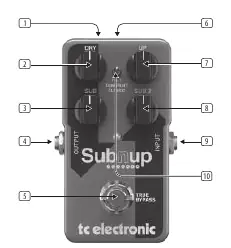
- USB: Connects to your computer for firmware updates and TonePrint editing.
- Dry: Sets the output level for the dry (unprocessed) signal.
- Sub: Adds a harmony voice one octave below the dry signal.
- Output: Connects to your amplifier or the next pedal in your chain.
- Footswitch: Turns the effect on and off.
- Power Input: Connect a 9 V / >100 mA power supply.
- Up: Adds a harmony voice one octave above the dry signal.
- Sub 2: Adds a harmony voice two octaves below the dry signal.
- Input: Connect your instrument here.
- Mode: Choose between Polyphonic, TonePrint, and Classic modes.
Operating Modes
The pedal offers three distinct modes selectable via the Mode switch:
- Polyphonic: Advanced tracking for complex chords.
- TonePrint: Allows you to load custom artist presets via the USB connection.
- Classic: A traditional monophonic octave effect.
Regulatory Information
This equipment complies with Part 15 of the FCC Rules. It is designed to provide reasonable protection against harmful interference in a residential installation. If interference occurs, try reorienting the receiving antenna or increasing the separation between the equipment and the receiver.
Manufacturer information
TC Electronic
Practical help
Common problems
No sound output
Ensure the power supply is connected (9V / >100mA) and that your instrument and amplifier cables are securely plugged into the Input and Output jacks.
Effect not engaging
Check that the footswitch is functioning and the pedal is powered correctly.
Before use
- Ensure you have a 9V DC power supply with at least 100mA capacity.
- Connect your instrument to the Input jack.
- Connect your amplifier or next pedal to the Output jack.
- Select the desired mode (Polyphonic, TonePrint, or Classic) using the Mode switch.
Images and diagrams
- The pedal features a central footswitch for toggling the effect.
- Input and Output jacks are located on the sides of the unit.
- The USB port is located on the top edge for firmware updates and TonePrint editing.
Model compatibility
- Requires a 9V DC power supply with at least 100mA.
- TonePrint editing requires a computer connection via USB.

Manual page author
David Miller
Documentation analyst
Organizes user manual content into clear summaries, with attention to model details, product context, and everyday usability.