Music / Guitar Effects
User Manual for TC Electronic THUNDERSTORM FLANGER
Quick start guide for the TC Electronic THUNDERSTORM FLANGER. Learn how to connect your guitar, adjust effects like Rate, Depth, Manual, and Feedback, and replace the battery.
Table of contents
Quick guide from the manual
The TC Electronic THUNDERSTORM FLANGER is a vintage-style flanger pedal featuring an all-analog bucket-brigade circuit. This guide provides essential information on connecting the device, adjusting the sound, and maintaining the unit.
Controls
- Input/Output jacks: Connect your guitar to the INPUT jack and your amplifier to the OUTPUT jack using 1/4 inch cables.
- 9 V DC: Connect a 9 V power supply (not included).
- Footswitch: Toggles the effect on and off. The LED lights up when the pedal is engaged. The pedal operates in true bypass when disengaged.
- Rate: Adjusts the speed of the flanger effect.
- Depth: Adjusts the intensity of the flanger effect.
- Manual: Emphasizes higher frequencies as the knob is turned clockwise.
- Feedback: Controls the amount of signal fed back through the effect, exaggerating the filtering and resonance.
Connections
To set up the pedal, connect a 1/4 inch instrument cable from your guitar to the INPUT jack. Connect a second 1/4 inch cable from the OUTPUT jack to your amplifier input. Ensure you are using a 9 V DC power supply (center negative) or a fresh 9 V battery.
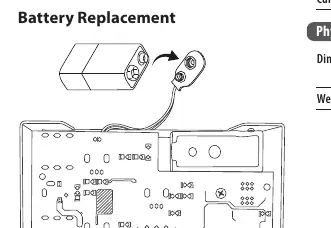
Battery Replacement
To replace the battery, locate the battery compartment on the bottom of the unit. Ensure the battery is installed with the correct polarity (+ and -). Always remove the battery if the product is to be left unused for a long time.
Specifications
- Connectors: 1/4 inch TS, unbalanced (Input and Output).
- Impedance: Input >350 kΩ, Output 1 kΩ.
- Power input: Standard 9 V DC, center negative, >100 mA.
- Battery option: Internal 9 V battery connector.
- Current consumption:
- Dimensions: 58 x 74 x 132 mm.
- Weight: 0.5 kg.
Safety Information
Do not expose batteries to excessive heat such as sunshine or fire. Keep small batteries away from children. If swallowed, seek medical attention immediately. Dispose of batteries according to environmental regulations.
Manufacturer information
TC Electronic
Practical help
Common problems
No sound output
Check that the input and output cables are securely connected and that the 9V power supply is active or the battery is fresh.
LED does not light up
Verify the power source. Ensure the 9V battery is installed correctly or the external power adapter is plugged in and functioning.
Before use
- Ensure you have a 9V power supply or a fresh 9V battery.
- Use 1/4 inch TS instrument cables for all audio connections.
- Verify the pedal is in 'true bypass' mode when disengaged.
- Check that the battery contacts are clean before installation.
Images and diagrams
- The control panel features four knobs (Rate, Depth, Manual, Feedback) and a footswitch.
- The battery compartment is located on the bottom of the pedal.
Model compatibility
- Requires a standard 9V DC center negative power supply (>100 mA).
- Compatible with standard 1/4 inch TS instrument cables.

Manual page author
Michael Turner
Technical manual editor
Reviews PDF manuals for structure, safety notes, and practical product details so readers can find the right information quickly.